
Most of us agree that Gen5 SSDs are still pointless, even years after they first arrived on the scene. The blazing-fast read/write speeds they promise are a huge jump over those of Gen4 drives, but mean very little for most of us. However, these unnecessary speeds aren't the only issue with Gen5 SSDs. Even if you can make a case for utilizing 14,000 GB/s speeds, other factors like price, operating temperatures, and compatibility are still hurdles in the widespread adoption of PCIe 5.0 SSDs.
4 reasons PCIe 5.0 still doesn't matter for most people
If you've been wondering whether your GPU uses PCIe 5.0 or you want an SSD that supports it, here's why it doesn't matter.
4 The price per GB still doesn't work
They still cost twice as much as Gen4 drives
The cost per GB of NVMe SSDs compared to spinning drives and even SATA SSDs is favorable, but when you compare Gen4 with Gen5 SSDs, the premium isn't justified. You can get a 1TB Gen4 NVMe for around $60, whereas a 1TB Gen5 drive will cost at least double that, if not much more, for the latest models. For most users who simply need a fast NVMe SSD for gaming and regular PC activities, Gen5 SSDs still don't make financial sense.
The added cost gets you higher read/write speeds, but that doesn't really move the needle in terms of the boot time, game loading times, or system responsiveness. Even when you move up in capacity, 2TB drives are still around 50% pricier if you go Gen5 vs. Gen4. We still have a ways to go in terms of Gen5 affordability, so if you're building a PC right now, you can still safely buy a Gen4 drive.
WD_Black SN8100 1TB
The WD Black SN8100 is one of WD's latest Gen5 drives, promising record-high transfer speeds. It costs much more than the best Gen4 drives, but provides future-proof storage.

5 SSD specs I look for that actually matter
If you're not checking the spec table for these 5 things before purchasing an SSD, you're doing it wrong.
3 They can't keep their cool
Who needs an overheating SSD?
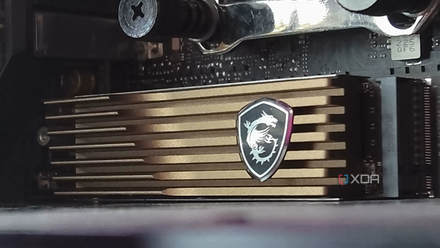
Gen5 SSDs have always run hotter than their Gen4 counterparts. The operating temps might have come down with more recent models, but you still need proper cooling for Gen5 drives, whereas most Gen4 SSDs are seen chilling without any help. Using a Gen5 SSD without a heatsink is almost impossible, since they tend to run hot even when idle.
Due to the way Gen5 SSDs are engineered, there's a lot of signal amplification that goes on underneath. Combined with signal degradation prevention and high-speed lane signalling, this contributes to the higher temps we see on most Gen5 drives. Thermal throttling is a very real problem on Gen5 SSDs, and considering there aren't many real benefits to the high transfer speeds, it's simply easier to pick a Gen4 drive instead.
Do I need a heatsink for PCIe 5.0 SSDs?
PCIe 5.0 SSDs require a heatsink for optimal performance, but whether you need to buy a heatsink alongside a PCIe 5.0 drive is something else.
2 Many of them are too bulky
They need to be
Due to the risk of thermal throttling, Gen5 SSDs need advanced cooling solutions when compared with Gen4 drives. Sometimes, that simply means a bundled heatsink, but many Gen5 drives need bulky active coolers with massive heatsinks and mini fans, just to keep the thing running normally. This makes these drives slightly more complicated when surrounded by a beefy air cooler and graphics card.
Although you can find ways to get around the issue, why go through the hassle? The benefits aren't worth it unless you're transferring large files or running professional workloads regularly. You're simply buying into the promise of top-tier transfer speeds and creating more problems for yourself. There aren't even esthetic advantages to installing bulky Gen5 SSDs versus sleek Gen4 drives. Without further reduction in operating temps and cooler sizes, Gen5 SSDs will remain clunky alternatives.

If you're not using active cooling for your PCIe 5.0 SSD, you'll definitely need to for PCIe 6.0
You think Gen5 SSDs run hot? Wait for Gen6 drives
1 They're not compatible with most PCs
You're probably looking at a hefty upgrade
Motherboards with PCIe 5.0 M.2 ports have been around for a few years now, but many people are happily running older PCs with PCIe 4.0 support. Those of you using a Ryzen 5000 CPU are probably using a B550 motherboard with support for only PCIe 4.0 M.2 slots. And users with 12th Gen Core CPUs are likely using a DDR4 and PCIe 4.0 motherboard as well.
In such cases, you'll need a full platform upgrade necessitating not just a new motherboard, but a new CPU and memory kit as well. Since I'm one of those who're still satisfied with their AM4/DDR4 gaming PCs, I don't see a point in making the jump to AM5 just for the privilege of installing a Gen5 SSD. PCIe 5.0 SSDs are even rarer on laptops, with only a few flagship devices even supporting a Gen5 slot.
How to know if an M.2 SSD is compatible with your motherboard
Buying a compatible M.2 SSD for your brand new PC can confuse even the most experienced PC builders
Gen5 SSDs still need more time
We've seen Gen5 SSDs bring a lot of technological wizardry to high-speed storage, but they still need some tweaks to appeal to the masses. The price is right at the top of the list, followed by operating temperatures. The adoption of compatible hardware is happening as we speak, so users will be ready to drop in a Gen5 SSD when they improve in other areas. Even DirectStorage hasn't picked up pace as much as some would have hoped, further delaying the mass adoption of Gen5 drives.