
When you first build your home network, it's relatively simple to keep track of which devices are connected and what they're doing. But as your network grows, maybe as you build a home lab or increase the number of smart devices in your home, that task gets trickier. If you're really invested in your home network, it's not enough to track those devices; you also want to know where any bandwidth hogs are or any sections of the network that are underperforming so you can fix the issues.
That means it's time to install network monitoring software. This software will allow you to analyze network traffic and identify problems as they arise. You might be worried about the cost, as professional tools are often expensive to license. You might be pleasantly surprised to find many of the best network monitoring tools are free to use for home use, and they're also open source, so you can modify them if your particular needs (and the license terms) are in agreement.

Five essential things to keep in mind when building your home network
Save yourself some time, effort and trouble by considering these things when building out your home network
10 Grafana
Visualize streams of data in pretty dashboards that are simple to setup
Grafana isn't strictly a network monitoring tool; it's more of an open source data visualization platform that you feed with data from other services. But the sheer depth of the data sources it supports, from PostgreSQL, MySQL, ElasticSearch, Prometheus, Graphite, and others, gives you both the macro view and the micro view of what's really going on in your network, and in every piece of equipment that's connected to it.
As you can see, it's not limited to devices on your home network, as you can bring in data from cloud providers, to show your entire home lab infrastructure in one place. That makes it easy to see trends, including the behavior of individual programs, any errors, and also the context around when those errors occur. It's one of the best tools for making sense of very complex data sets, and it can do this in real-time or with historical data or even compare the two to evaluate the effects of any configuration changes.
Grafana
9 Zabbix
Monitor your hardware and software with automated notifications for issues
👁 sample network map in zabbix
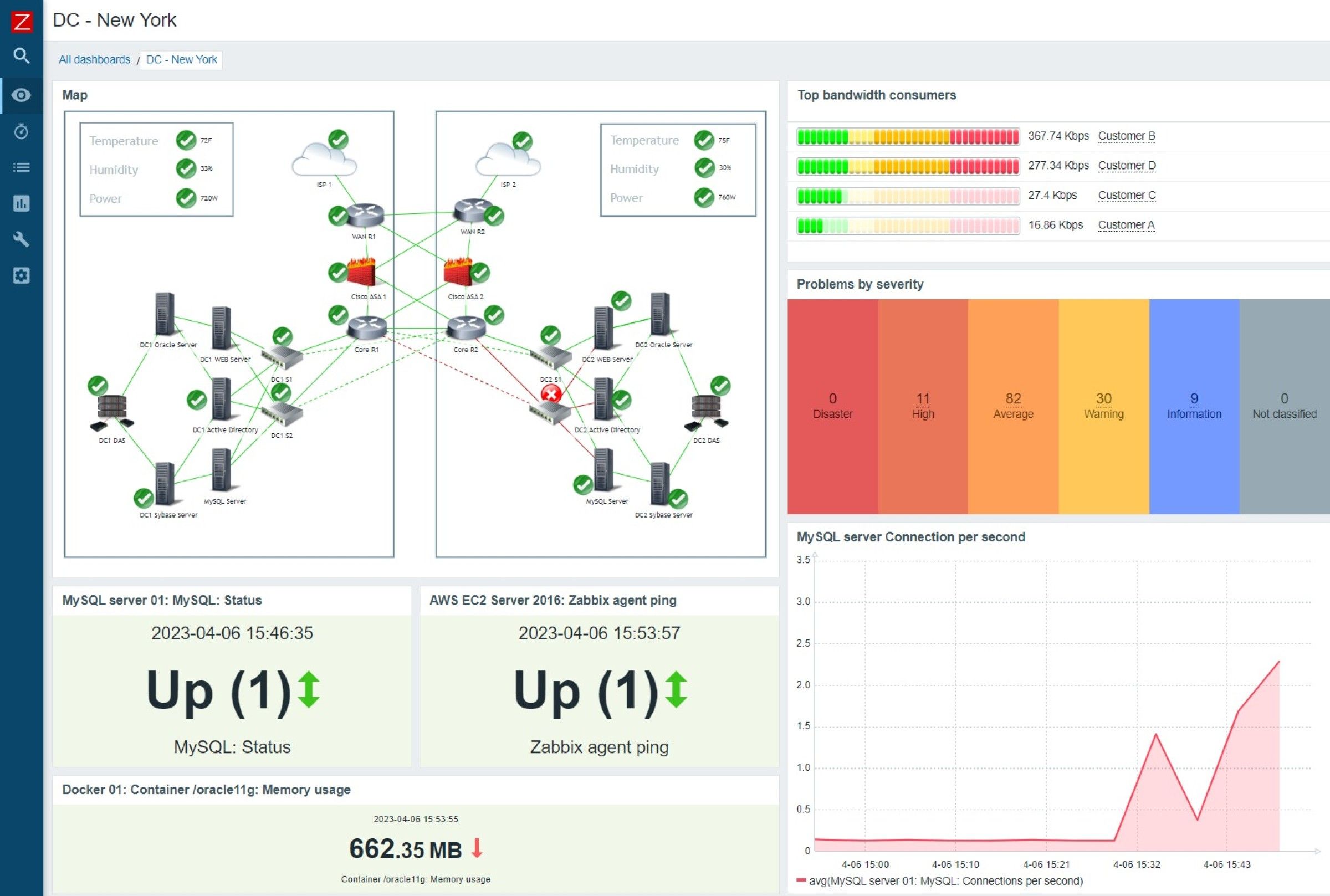
When you're first starting out with a home lab, the temptation to look through every log file manually is huge. After all, you want to learn, and the best way is by doing it. But it's not really the best practice once you've got your infrastructure set up, as most of those log file entries will be normal operations, and you want to know about any issues instead.
That's where full-scale network and system monitors like Zabbix come in. You add your infrastructure to the web-based console by deploying agents to watch your devices, virtual machines, programs, and other running tasks, all feeding data back to the console. Things that you might use Task Manager to watch, like CPU cycles, RAM utilization, disk space, and the like. Then, you set up alerts, and the Zabbix system lets you know if anything out of the ordinary happens. These can be via email for less time-sensitive tasks or SMS if they're alarms that you need to fix right there and then. The best part is that all the packages are free to use, as like many of the services on this list, Zabbix earns through supplying technical support and their cloud-based offering.
Zabbix
8 PRTG
Real-time monitoring for your whole stack
PRTG is one of the best small business network monitoring tools, but there's no reason you shouldn't use it for your home network as well. You get real-time IT network monitoring for everything on your network, with easy setup thanks to automatic discovery of the appropriate sensor types for your devices. That makes it easy to get started monitoring uptime, bandwidth, and other handy metrics to keep your home network humming along. It's worth mentioning that you get up to 100 sensors for free, which is roughly 10 devices. That's enough to get you started, and once you know a bit more about network monitoring, decide if you want to change to a more hands-on but less expensive option, or to continue while paying for licenses as your network grows.
Paessler PRTG Network Monitor
7 Pi.Alert
Turn a Raspberry Pi into your network watchdog
Want to spin up a really quick but incredibly powerful IDS, or intrusion detection system, for your home network? Pi.Alert is what you want to look at, as it provides 24/7 network scanning to detect any odd behavior and alerts you to potential issues early enough to do something about them.

Turn your Raspberry Pi into an intrusion detection system with Pi.Alert
Repurpose your Raspberry Pi into a watchdog that can warn you the moment it detects unauthorized devices in your network
It's an extra level of protection for your home network, and you can run other things on the Pi at the same time, like PiHole for adblocking across your whole home network. Pi.Alert will let you know if devices drop off the network or if unknown ones join it. The only thing here is that smartphones with private IP addresses will trigger an alert when they change their IP periodically, but if that's the only device that is joining, it should be straightforward to rule them out. It'll also let you know if other systems try to gain access to your home network, which might be more important if you've left ports open for home lab use.
Pi.Alert
6 Cacti
Monitoring and graphing all in one package
Cacti is an incredibly versatile tool for network monitoring, but it's more involved to set up and maintain. That's maybe okay for a home lab environment, as you won't be monitoring a huge number of devices or hosts. You can set it up to monitor bandwidth, voltages, various wireless metrics, device uptime, and almost anything else for your home network and store that data for nice graphs. It's also good at monitoring QoS settings to ensure they're actually working as intended, or how fast NAS hard drives are filling up, or which parts of your network are the peak loads occurring on.
You will need to know some more advanced networking principles to get it running, or at least the time to learn them. It needs Linux to run, the Apache web service, PHP, MySQL, RRDTool, and net_snmp if you're using SNMP to poll your network switches and other hardware, all of which take time and manual tweaking to get running smoothly. But it's free to use, so the only cost is the time it takes to get running.
Cacti
5 Nagios Core
A powerful monitoring tool that can be upgraded to the paid service if needed
Nagios Core is a good solution for basic network monitoring, which is free to use until you need more devices than your home network will likely support. While it might feel dated compared to some of these other tools, it's been around for a long time and pros keep going back to it. It supports plugins and self-scripted automation, and as you can imagine, for a tool as widely used, it has a huge community support of plugins to use.
It also runs well on modest hardware, which makes it ideal for home labbers using ex-enterprise hardware. If you find you need more functionality, you can upgrade to Nagios IX without having to redo your configuration files, which is nice. Also, several other well-known tools, like Icinga 2, are forks of Nagios Core, so they support the same plugins while bringing more modern functionality.
Nagios Core
4 Icinga 2
Free, flexible, and with a deep feature set
Icinga 2 was originally a fork of Nagios, but constant development has made it even more powerful. The learning curve to start is said to be steep, but what you get out of it is an infinitely extensible and scalable monitoring tool that is easy to automate. The community support is strong, and the real-time dashboards give you an instant overview that you can drill down into for troubleshooting purposes. If it's used by IT departments supporting thousands of devices, it's going to do the job on your home network and teach you some valuable skills in the process.
Icinga 2
3 Prometheus
Powerful data monitoring tool that's better when combined with Grafana
Prometheus is part data scraper, part database, and all business. While it has its own graphing functionality, Grafana has native support for connecting with Prometheus, and that's the preferred pairing of many IT departments. It was originally built in-house at SoundCloud in 2012, but has since split and joined the Cloud Native Computing Foundation, so it's not going away any time soon. What's cool here is that it has automated service discovery, so that new instances are detected when set up without the need for manual configuration. It's also seamless with Kubernetes for monitoring your containerized environments as you build up your home lab.
Prometheus
2 NetXMS
Enterprise-grade monitoring that you can use at home👁 netxms management dashboard
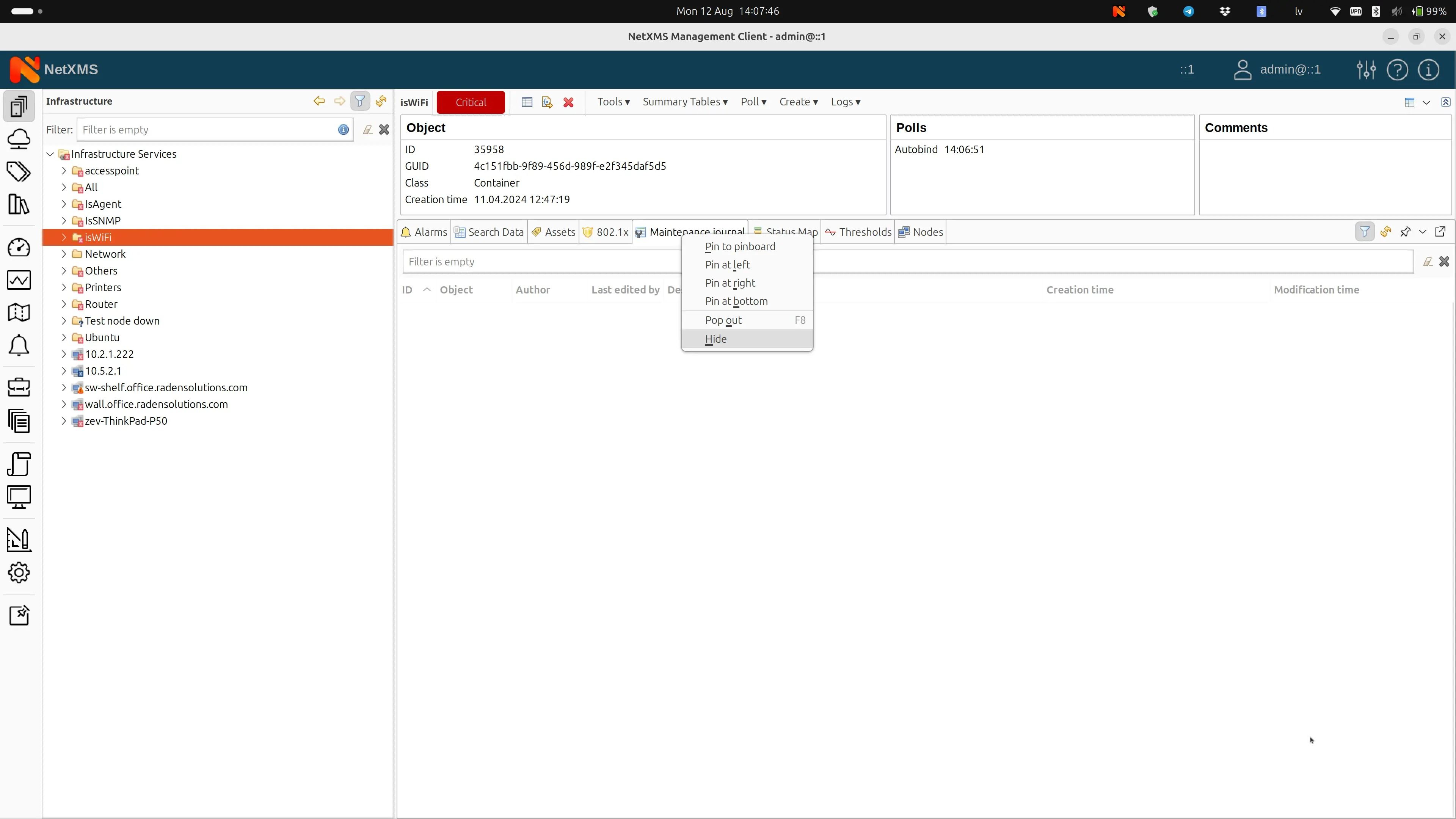
NetXMS is a powerful, multiplatform monitoring solution with multitenant capabilities, so you can build your own cloud-based monitoring system. That might sound a bit like overkill for your home network, but that's never stopped our own Ayush from his Proxmox adventures, and you can build datacenter-ready skills without leaving your living room. You can monitor network links, devices, power equipment, assorted sensors, and application performance to get a real understanding of what's going on in your home network. See which applications grind your servers to a halt, or which individual network links could do with a bandwidth upgrade. And unlike some of these tools, it works on a huge range of operating systems or databases, so you can monitor all your resources from one place.
NextXMS
1 Ntopng
For lightweight network performance monitoring
Ntopng is a lightweight, real-time network monitoring solution that primarily visualizes network traffic. But it's so much more, as it can graph performance on multiple interfaces at once to find network bottlenecks, which network protocols are taking up your bandwidth, and how data is flowing around your home network. Identify DDoS attacks, incoming port scanning, and other security issues as they happen, so you can keep you network secure. It's also extensible with the ability to feed its data to other tools like Zabbix for a more comprehensive monitoring dashboard.
Ntopng
Monitor your home network for free with some of the best free open source tools available
Whether you're monitoring a few devices so your IoT smart home doesn't get out of control or a whole home lab with multiple servers, virtual machines, and a cluster of containers, open-source software can help you manage what's going on. It can help with load balancing, network traffic issues, security concerns, and more. For the hobbyist, they're mostly free to use, with a few that have paid plans once you outgrow a certain level of monitoring.