
One of the big perks of PC gaming is that you can swap out components to make your computer better without having to replace the entire parts list. But whether you've upgraded to the latest and greatest CPU or want the best graphics card to run games at high frame rates and resolutions, you quickly end up with a stack of old PC parts that you're not quite sure what to do with.
While you could sell them, especially any GPUs that tend to do better on the secondary market, why not turn them into a DIY project instead. The thing is, reusing an old PC is much easier as you've got a fully working device. Figuring out what to do with an old CPU or GPU is slightly harder, as you might not want to bother getting the rest of the parts for a functioning PC. We've put together a few out-of-the-ordinary ideas to get you started, along with a couple of tried-and-tested favorites to reuse those old CPUs and GPUs and give them a new lease on life.

If you have old PC parts lying around, here’s what you should do with them
Your stash of PC hardware can be given new life in a wide variety of uses
5 Media server
Cut ties with streaming subscriptions and serve your own content to wherever you are
One of our favorite uses for old hardware is setting up a personal media server. This can be as simple as a low-spec PC with only a CPU, but adding a graphics card to accelerate transcoding makes it even better. Moving your database of TV shows and movies off your main PC gives it resources back for other tasks, and you can add other services to the media server if you decide that self-hosting is something you want to pursue further.
With a little extra outlay, that CPU and GPU turn into a way to reduce your streaming subscription costs and also keep family videos and photos safe.
While Plex might be the most recognizable name for home media server software, there are plenty of other options, including our current favorite, Jellyfin. It offers many plugins to improve your viewing experience and isn't much more difficult to get running than Plex. The other important thing to know is that it runs on very modest hardware, so your old CPU and GPU are likely more than enough.With a little extra outlay, that CPU and GPU turn into a way to reduce your streaming subscription costs and also keep family videos and photos safe.

Want to set up a home media server? Here’s everything you need to get started.
Ever wanted to set up a home media server to reduce your cloud reliance? Here's what you'll need to know.
4 Make a keychain
Let your techie flag fly with a CPU keychain, but watch out for sharp corners
Sometimes, the old CPU in your parts box was replaced because it was faulty, or perhaps it was an ancient relic, and it isn't really worth finding a new place to use it. In that case, get your craft on and turn it into something physically useful, like a new keychain. If you've got an old AMD CPU with pins, you won't want that in your pocket, but you can scrape off the pins with a screwdriver if you still want to make it into a key fob. Drill a hole in one corner of the PCB with a drill bit that's large enough for a keyring to pass through, and you've got yourself a quirky keychain that won't easily get lost.
You can do the same with a GPU, but the process is much more involved, as you need to remove the GPU core from the PCB. A heat gun, reflow station, or even a toaster oven set to 230 degrees Centigrade will melt the solder, and then it's simple to push the silicon and substrate off the PCB gently. Put a hole in one corner as before, and you've got a GPU in your pocket.

Got an old CPU? Give it a new lease of life to save it from being e-waste
Give that CPU a new task, crunching your data and holding your device backups.
3 Frame it
Old, interesting tech makes for great wall art
Sometimes, the best use for older hardware is to show it off. Whether it's to remember your first PC build or a memorable game that you were finally able to play from that upgrade, putting your GPU or CPU into a shadow box to hang on the wall is a fantastic way to reuse those components. That's what one Redditor's son did with their old GPU, sound card, CPU and RAM, and one cooling fan, and it makes a wonderful addition to their wall.
If you have more hardware, you can keep a living memorial to every graphics card you've ever owned, like this Redditor with dozens hanging on their wall. Even Microsoft has a wall of GPUs hanging up in the Direct3D team office, or more precisely, a full hallway. That post is from 2019, and they had 402 different GPUs from a staggering 35 years of PC hardware history. I wonder how many more they have hung up since then...

Need to jazz up your home office? Get yourself these 10 must-have upgrades.
Your home office is your mainstay for almost half of your day. These indispensable upgrades can help you take it to the next level.
2 Retro PC build
Some games don't play nice with modern hardware
If you've ever found the CD for an old game you loved in a drawer while cleaning and decided to see if it would run on your current gaming PC, you might have encountered a few issues. That's even if you have an optical drive installed, which many modern PCs no longer have. Maybe the game doesn't support the high resolution your new monitor does, or uses outdated copy protection that doesn't run on modern operating systems, or you might get a simple "This app can't run on your PC" message when you try to install it.
You could set up an emulator like EmulationStation and play them emulated on modern hardware, but emulation still isn't perfect, and it might not work with every title. But if your old CPU and GPU are old enough, you can install Windows XP, or Windows 7, or MSDOS, and play those games on period-accurate hardware without having to worry about quirks of emulation.
You might encounter some oddities when using an older operating system, and you probably won't want to keep it connected to the Internet for long, at least not without a hardware firewall protecting your network. However, it's a fantastic way to replay the games you grew up with while reusing hardware that would otherwise be scrapped.

Give your old PC parts a new lease on life by making a retro gaming machine
Emulation has low hardware standards and high potential, thanks to modern programs that can help create a gaming hub
1 Make your own die shots
Silicon is fascinating to photograph once you've skimmed off a thin layer
Spend enough time on any computing website, and you'll come across beautifully iridescent die shots of various CPUs, GPUs, and other chips. Many of these (and the annotated versions on CPU Wikipedia pages) come from one photographer, Fritzchens Fritz. There really is something magical in being able to see the blocks that make up the components that run our computers, and it's something that anyone can learn how to do.
.jpg)
Computer hardware is made of various toxic materials, and you'll be exposed to them while you are removing the silicon die and sanding it down for photography. Wear protective equipment at all times, like a ventilator to avoid fumes and dust, and gloves.
As you'll be destroying the silicon in the process, this isn't recommended with recent working hardware. At least, not until you get good at the process. To practice, you can delid that old CPU or pull off the GPU die, heat it to take off the actual chip from the PCB carefully, and then start carefully sanding the top layers of the die, as you can see in the video above.
Eventually, you'll get to the layers you want to see and get the rainbows of light coming from the individual transistors and other features interfering with the light in your room. Now it's time to break out the camera and get those beautiful die shots you've only seen in other people's pictures.
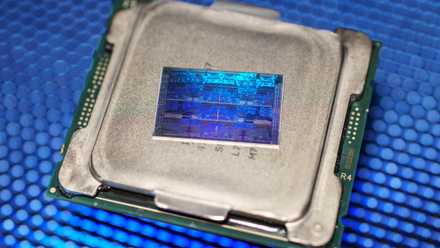
These 5 signs could mean your CPU is about to die
Your CPU be like: "I don't fail much, but when I do, I make sure you know what's up!"
Those old CPUs and GPUs can still be used for other purposes if you feel like getting crafty
Even if your old CPUs or GPUs are no longer functional computers, they can still be repurposed into DIY projects. From practicing silicon die photography to creating a living record of your computing journey, these old pieces of PCB and silicon can still amaze. And who hasn't watched a GPU or CPU launch presentation and thought, "I want one of those dies to keep in my pocket." I know I haven't.