
Building your own home media server makes a lot of sense in the age of everything-as-a-service. With the right software installed, you not only reduce subscription costs for entertainment, but also on cloud storage, when you set up a local storage repo for your precious photos and documents this way instead. While you can run your media server from almost anything, not every device is great at running Plex, which is our favorite media server software. And whatever device you build your media server with, you'll need some dependable hard drives to store your data on. With that said, here are my favorite devices, drives, and software to spin up a home media server in no time!
-
Synology DiskStation DS224+
Best Overall -
OWC Mercury Optical drive
Best for ripping discs

How to build your own Home Theater PC and why it’s better than a streaming stick
With a little bit of effort, you can have a versatile Home Theater PC to keep you entertained
Our picks for the best home media server in 2024
Synology DiskStation DS224+
The most cost-effective home media server
- Brand
- Synology
- CPU
- Intel Celeron J4125
- Memory
- 2 GB DDR4
- Drive Bays
- 2
- Ports
- 2x 1GbE, 2x USB-A 3.2 Gen 1, 1x eSATA
- Caching
- No
The Synology DiskStation DS224+ is one of the most cost-effective ways to spin up your own home media server. It has two drive bays, Plex support, an Intel Celeron processor for transcoding support and support for Synology's excellent DSM operating system and catalog of apps.
- Capable specs for the price
- Intel CPU for 4K transcoding support
- The best NAS operating system
- Only 1GbE networking
- No M.2 SSD slots
The Synology DiskStation DS224+ is my pick for the quickest, easiest, and most cost-effective way to build a home media server. It's got a fairly powerful Intel Celeron processor running at 2.0GHz, which is plenty of power for general NAS tasks and also for 4K transcoding content with media software like Plex. Even with other users streaming or copying data at the same time, this device will keep pace, something that many lower-priced enclosures struggle with.
It's got two bays for storage, and both can support up to 20TB of 3.5" hard drive capacity. That's a lot of storage to start out with, but the superb thing is that Synology's operating system can transfer those drives to a larger enclosure without losing data when you find you need a larger NAS. I've used this feature to transfer my NAS drives a couple of times, and it works well. You also get 2GB of DDR4 (expandable to 6GB), and two 1GbE connections. The star of the show is Synology's DSM operating system, which is well laid-out, and has a mini app store with useful software packages like Plex, cloud sync, and more. And if you can't find the app you want, it supports Docker, so any containerized apps can be easily set up.
Raspberry Pi 5
Sometimes a SBC is all you need...
- CPU
- Arm Cortex-A76 (quad-core, 2.4GHz)
- Memory
- Up to 8GB LPDDR4X SDRAM
- Operating System
- Raspberry Pi OS (official)
- Ports
- 2× USB 3.0, 2× USB 2.0, Ethernet, 2x micro HDMI, 2× 4-lane MIPI transceivers, PCIe Gen 2.0 interface, USB-C, 40-pin GPIO header
- GPU
- VideoCore VII
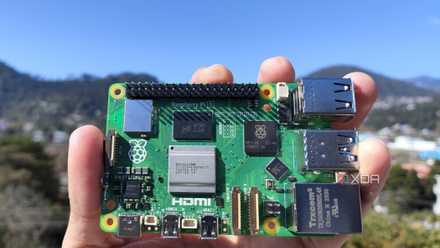
The Raspberry Pi 5 is a great way to spin up a home media server on the cheap, and is powerful enough for most tasks. With powerful media center software like LibreELEC, it's a media server and center in one, but it will struggle with 4K files if you need to transcode them to play on another device over your network.
- Cheapest option for a home media server
- Powerful enough for media streaming and file storage
- Has specialized media center operating system options
- No hardware-based transcoding
- USB drives only
You don't need to spend money on powerful hardware, as the Raspberry Pi 5 is capable enough to use as a media server. While the operating system needs to go on an SD card, you've got four USB ports to use with external hard drives, Bluetooth 5.0, Dual-band 802.11ac Wi-Fi, and a 1GbE port for networking use. It's also got a PCIe Gen 2.0 interface, so with a few additional parts, you can use speedy NVMe storage for your server. Our review shows that it has more than enough power for media streaming use, but it can get warm, so picking up some form of active cooling for the Broadcom SoC is a must.
Raspberry Pi 5 review: The holy grail of DIY projects got even better (and rarer)
The Raspberry Pi 5 is one of the most powerful consumer-grade SBCs out there. Sadly, its limited stock means you'll have a hard time finding one.
With customized operating systems like LibreELEC, the Raspberry Pi 5 can be turned into a media server simply by flashing the operating system onto an SD card. That will boot directly into Kodi, which is one of the better alternatives to Plex. It comes with a host of add-ons, so you can customize your media server and also set it up to handle media playback when one of the two HDMI cables is plugged into a display.
The low power consumption means running it 24/7 is no problem, but it might run into issues with transcoding 4K files to other devices on your network. That shouldn't be a problem if your network is fast enough and your media streaming device supports direct play, as it will send the 4K file directly over the network, but it's worth mentioning as you might be limited to 1080p video files otherwise. If you do need transcoding, the ZimaBlade has an Intel processor and works great as a media center with TrueNAS and Plex installed.
QNAP TS-464
Our favorite NAS for Plex use
- Brand
- QNAP
- CPU
- Intel Celeron N5095
- Memory
- 8GB DDR4 (max. 8GB)
- Drive Bays
- 4
- Expansion
- 2x M.2 PCIe 3.0, 1x PCIe Gen 3 x2
The QNAP TS-464 is a powerful four-bay NAS with a more stylish design than most. That means you'll want to keep it in view, and with IR support for remote control and HDMI output, it can be your media server and playback device at the same time.
- Two 2.5GbE ports and HDMI output
- Intel CPU for 4K transcoding support
- Two M.2 SSD slots and a PCIe 3.0 expansion slot
- No RAM upgrades
Our favorite NAS for running Plex is the QNAP TS-464, and that's why it deserves to be on this list. That said, it's fairly expensive, but you do get a lot of features for the price. For a start, the company has used the Intel Celeron N5095 processor, which enables 4K transcoding to any devices you might want to stream your media collection to. That's paired with 8GB of DDR4 RAM, and while you can't add more, that's plenty for home media server programs and most other NAS tasks.
The other thing you get is a stylish exterior, which is welcome, as most NAS devices look like boring matte black boxes. This NAS is sleek, shiny black and copper, and wouldn't look out of place in a visible spot near your TV. It's got two M.2 PCIe 3.0 slots inside for speedy SSDs, handy for caching purposes, and there's a single PCIe 3.0 expansion slot for upgrading the networking speed. Not that you'd possibly need to as it comes with two 2.5GbE ports, but it's nice to have options. Also, you get four USB ports on the back, and an HDMI port for direct viewing on your TV. With IR remote support, that means it can be your media server and media streamer all in one box, and with four 3.5" bays, can store your media files, the rest of your data, computer backups, and even run a home surveillance system.
QNAP TVS-h674-i3
Oodles of computing capacity
- Brand
- QNAP
- CPU
- Intel Core i3-12100
- Memory
- 16GB DDR4 (max. 64GB)
- Drive Bays
- 6
- Expansion
- 2x M.2 PCIe 4.0, 1x PCIe 4.0 x16, 1x PCIe 4.0 x4
The QNAP TVS-h674 is a powerful NAS that comes with a powerful price tag. Powered by a desktop-class Intel Core i3-12100, it can use up to 64GB of RAM, has six drive bays, two M.2 slots, PCI expansion, HDMI output, and fast networking ports.
- Powerful Intel Core CPU for 4K transcoding
- 6 drive bays for storage expansion
- Tons of computing power
- Expensive
- Power-hungry
The QNAP TVS-h674 is the kind of home media server device that you put on your "to splurge" wishlist, because while you probably don't need the amount of computing power contained inside for streaming files, it'd be awesome to own. This NAS is in another weight class, as it's powered by an Intel Core i3-12100, a desktop-class processor. That gives you much more power than the usual NAS enclosures, which will make transcoding through Plex a non-issue, but also opens new possibilities to run virtual machines and other fun stuff on your media server.
That said, it is an expensive enclosure, and that's before you think about the cost of disks to populate those six bays, or M.2 NVMe drives to fill the two PCIe 4.0 M.2 slots for caching purposes. It comes with 16GB of DDR4 RAM, and you can upgrade this up to 64GB. You also get two PCI slots for expansion purposes, which is handy if you have a 10GbE network at home. Otherwise, the NAS comes with two 2.5GbE ports, which are also an improvement over the 1GbE ports found on most devices. And there are multiple USB ports for adding external drives, so you can copy data directly instead of hogging up network bandwidth.
OWC Mercury Optical drive
What's a media server without media?
The OWC Mercury Optical drive is the missing link to populating your media server with content, giving you the tool you need to rip physical Blu-ray, M-Disc, and DVDs into digital copies that will last forever.
- Rugged design
- Blu-ray, M-Disc and DVD support
- Fast read and write performance
- Expensive
One of the best reasons for setting up a home media server is to digitally conserve your existing library of physical media. That's harder than you'd think, since most computers or laptops no longer come with drives to read optical media. The OWC Mercury Pro optical drive is the answer, with a rugged design that will outlast the ripping of your physical library, while doing so at fast speeds.
The tray loading drive can read Blu-ray, M-Disc, DVD, CD, and pretty much any format you can find that fits the platter. It can also write these formats, even the archival quality M-Disc, which was created for long-term data storage purposes. That means you can use it to burn off some photo albums for the family, while the originals stay safe on the NAS drives. It connects to your computer with USB 3.0, and needs supplemental DC power (included in the box). It's the best way to conserve your physical discs, and will make short work of the task.

Best optical drives in 2024
Optical drives are still relevant in 2023, though you'll likely have to go with a standalone option. Here are the best.
ASUS ZenWiFi XT9
Upgrade your in-home streaming speeds
Building a home media server is great, but to truly make the most of it you might want to think about upgrading your network hardware so that every device attached to it gets great speeds. The Asus ZenWiFi XT9 is a tri-band mesh kit with up to AX7800 speeds, all-but-ensuring stutter-free media streaming.
- Speedy AX7800 tri-band connection
- Includes AiProtection Pro for free
- Easy expansion with AiMesh routers
- Large mesh nodes
- Not Wi-Fi 7
Building a home media server is only part of the equation, as you should ensure every device streaming from it gets the best possible connection. That might mean investing in a new mesh router system, and the ZenWiFi XT9 is one of our favorites. Each mesh node is a tri-band Wi-Fi 6 router with an AX7800 connection, and one 2.5GbE port. With two 5GHz bands, it gives enough capacity for all of your home devices, plus space for the link between the mesh nodes. You also get support for 160MHz connections, great for any devices you own that can take advantage of the additional bandwidth.
All that bandwidth means 4K streaming to your media streamers, even while other users are backing up their files to your media server. Now, these mesh routers are bigger than the competition from Eero or TP-Link, but you also get more wired ports in exchange. Each mesh router has a 2.5GbE WAN port and three 1GbE LAN ports with aggregation, so you can get wired speeds of up to 2Gbps, perfect for connecting to your media server. And you get AiProtection Pro for free, for the lifetime of the router, keeping your network safe from threats online, including a robust suite of parental controls.

Best Wi-Fi routers in 2025
Upgrade your home Wi-Fi so your speeds are fast and consistent in every room of your house
Plex
Organize your media for streaming
- OS
- Windows, macOS, Linux
- Individual pricing
- Free, $6.99/month, $250/lifetime
Plex Media Server is the easiest way to access your digital media files at home or away. While you don't need the Plex Pass subscription to get started, it does bring a lot of added value and the one-time fee for lifetime access is often discounted.
- Share your media library with ease
- Plex Pass lifetime is a relative bargain
- Apps for almost any viewing device
- Hardware transcoding requires paid features
- iOS and Android apps require Plex Pass or expensive in-app unlock
The easiest way to stream the media library on your home media server is through a dedicated server app, and for my money, Plex is the best around. It takes all the headache out of organizing your library, adding metadata for all your files, and can even download subtitle files for you. It handles streaming video files to clients, and has a corresponding Plex app for pretty much any device you could want to stream to. You can also add a compatible TV tuner, like a HomeRun device, and stream over-the-air programming.
Now, to get the advanced features, like hardware transcoding, you need to pay for a Plex Pass. I don't recommend anyone signing up for this as a monthly subscription, although maybe for one month, just to see if you need the features it offers. Once you know, the lifetime Plex Pass is $120 (and often discounted below $100), and you never have to worry about a subscription for it ever again. That gives you access to the iOS and Android apps, features like the ability to skip the intros or credits in content that's in your personal library, and DVR capability (if you have a tuner attached). You can also stream music from Tidal, although you'll need a Tidal subscription if you want lossless quality.
Best Plex alternatives in 2024: Jellyfin, Emby, and more
If you're looking for an alternative to Plex, there are a few options that are just as good.
Seagate IronWolf
Dependable hard drives are key to any server
Seagate's IronWolf lineup of hard drives is purpose built for NAS use, with low noise and vibration, up to 256MB of cache for sustained performance, and 1M hours of MTBF for 24/7 reliability.
- Built for heavy workloads
- Up to 256MB of cache
- Up to 18TB of capacity
- Can be expensive
The final piece of the home media server puzzle is reliable hard drives to store all of your precious data on. My personal media server only uses Seagate drives, with a mix of IronWolf, IronWolf Pro, and Exos that have been in continuous use for years now with no failures. Now, you probably don't need the more expensive Pro or Exos ranges, as the standard IronWolf drives are dependable and fast enough for NAS use.
With up to 18TB of storage per drive, that's a lot of media space on your home media server to fill with shows, photos, music, documents, or backups. With 7200RPM of spin speed and up to 256MB of cache, these can sustain up to 180MB/s of data rates. With a 1GbE connection topping out at 80-125MB/s, that's enough drive speed to saturate most home networks when transferring data. You also get three years of complimentary data recovery services, in case the worst happens and you have a drive failure. Again, I've not had that happen to me yet, and my NAS is almost always busy.
What you need to know about making a home media server
Making a home media server doesn't have to be a drain on your resources. If you have old PC parts lying around, you can add Plex Server to those and get your home media server running at a minimum cost. While that's true enough, getting dedicated hardware will pay dividends, as NAS devices require lower power, an important consideration for something that will be running 24/7. You'll also want a NAS or other device that can transcode content, so really you should be looking for an Intel Celeron processor or above.
That's why the cost-effective Synology DS224+ is our pick for starting your home media server journey. It's powered by an Intel Celeron processor for transcoding 4K content, two drive bays, 2GB of RAM, and the best operating system for NAS devices. It's solid for rolling your own cloud storage, serving video files, and protecting your photo roll, and Synology's software catalog makes replacing other services simple. And while you're planning out your home media server, don't forget about the other side of the equation. Check out our favorite media streaming devices to complete your home theater setup.
Synology DiskStation DS224+
The most cost-effective home media server
- Brand
- Synology
- CPU
- Intel Celeron J4125
- Memory
- 2 GB DDR4
- Drive Bays
- 2
- Ports
- 2x 1GbE, 2x USB-A 3.2 Gen 1, 1x eSATA
The Synology DiskStation DS224+ is one of the most cost-effective ways to spin up your own home media server. It has two drive bays, Plex support, an Intel Celeron processor for transcoding support and support for Synology's excellent DSM operating system and catalog of apps.