
PC building myths are a dime a dozen. The number and flavor of these myths might change over time, but each PC component has various persistent myths surrounding it. Browse Reddit, watch YouTube, or talk to a friend — you'll inevitably come across one or more of these "thumb rules," especially when you're about to build a new PC.
These myths aren't always harmful, but many PC builders take them to heart and end up spending way more on their new PC than they really need to. I get it; building a PC is a serious endeavor, and you want to be doubly sure of the components you buy, but it's possible to build a great PC without succumbing to the modern myths surrounding PC hardware.

5 PC hardware purchases I regret the most
You shouldn't judge your past self harshly, but these mistakes deserve some regret
8 Future-proof your PC to save money in the long term
This almost never works out
Future-proofing is an oft-misunderstood concept that somehow keeps rearing its head whenever a new generation of CPUs or GPUs emerges. In a nutshell, it means buying more powerful hardware or more features than what you need right now so that you don't have to upgrade as often as you would otherwise, saving you money over the lifetime of your PC.
That reasoning might make sense on the surface, but it's often flawed. For starters, spending more on a feature like PCIe 5.0 graphics support, Wi-Fi 7, or Gen5 storage will prove wasteful since by the time the feature yields any tangible benefits in the future, you'll probably be due for another upgrade. At that point, you will buy more advanced hardware anyway, which would have become mid-range or even budget by that time. Hence, all you end up doing by "future-proofing" your PC is throwing money down the drain.
The argument for overspeccing for more performance by purchasing an overkill graphics card or high-end CPU is relatively more sensible but easily refuted, nonetheless. Suppose you buy the upcoming RTX 5090 with the hopes of making your PC last for years without an upgrade. Nvidia, however, will launch the RTX 6090 (or whatever it'll be called) for roughly the same price and with more AI-generated frames than ever before, making your RTX 5090 seem pointless, especially since you paid $2000 for it.
You'll also be used to owning the latest and greatest hardware and will feel compelled to upgrade to the most powerful components to stay in the same performance tier. With the current pace of hardware obsolescence, it makes more sense to buy mid-range hardware that satisfies your existing performance needs than to buy more power to "delay" upgrades.

How much is too much to spend on a gaming GPU?
What is realistically the right price for a gaming GPU to enjoy a reasonable gaming experience?
7 360mm liquid coolers are the minimum for modern CPUs
Stop the propaganda against innocent air coolers
This might sound absurd to many of you reading this article, but PC builders often fall into the trap of buying overkill liquid coolers for their 6-core and 8-core CPUs. Modern processors tend to run hot at stock settings but don't necessarily need a $150 360mm AIO cooler to tame them. Outside a handful of Core i9 and Ryzen 9 CPUs and systems with overclocked CPUs, air coolers are perfectly capable of cooling a modern chip, even satisfying the temperature and acoustic nerds.
You might be shocked to learn that even today, one of the most powerful and reliable CPU coolers is the Thermalright Peerless Assassin 120, a modest 120mm air cooler that costs only $35. It can handle even the Core i9-14900K at stock settings if you really want to push it. So, for the kind of CPUs most people buy, such as the Ryzen 5 7600, Core i5-14600K, or even the new Ryzen 7 9700X, liquid coolers are strictly optional.
Performance might not be the only reason to prefer a liquid cooler over an equally capable air cooler. A sleek RGB AIO cooler might appeal more to you than a humongous Noctua NH-D15. Both of them have their uses, but your personal aesthetic preferences might push you toward the AIO.

5 reasons why air coolers are better than liquid coolers
In a world crowded with fancy liquid coolers, there are still reasons you should probably choose air coolers.
6 Modern GPUs need overkill power supplies
All you're doing is wasting money better spent elsewhere
Over the last four years, graphics cards have become way too demanding regarding power requirements, making PC builders razor-focused on PSU capacity. Nvidia GPUs especially have been guilty of breaching 450W TDPs for their flagship cards, with the latest RTX 5090 confirmed to draw 575W at the maximum. This is a genuine concern for PC builders shopping for a reliable power supply to support a high-end system, but going overboard is not the solution.
Even the most power-hungry components like the RTX 4090 and Core i9-14900K don't need a 1200W, let alone a 1600W monster. Wattage is just one aspect of a power supply, with power efficiency and build quality often counting for more regarding reliable power delivery. This means that a high-quality power supply rated at 850W and 80+ Gold efficiency will be sufficient for any RTX 4090 build. You can go for a 1000W or 1200W PSU for more peace of mind and room for future upgrades, but it's not strictly needed, at least not from a safety standpoint.
You should never cheap out on your power supply, but taking it to the other extreme of buying more power than you'll ever need is also not recommended. High-wattage power supplies aren't inherently better than lower-wattage units, besides having marginally better efficiency at 50% load.

What are PSU Ratings? 80 Plus and Cybenetics explained
When choosing a new PSU for your PC, it is crucial to make sure that it has a proper rating.
5 The faster the SSD, the more the FPS
Lower the awareness, more the wastage
When building a gaming PC, you don't want storage, of all things, to become a bottleneck. Hence, buying a modern SSD is a given when building a new system (and breathing new life into old systems). However, some users overestimate the impact of SSD speed on gaming performance. Your SSD is responsible for supplying game textures to the graphics card without slowing down the entire pipeline, but after a point, a faster SSD will yield no tangible difference in loading times.
As for in-game FPS, you'll be hard-pressed to find any statistically significant difference between a cheap SATA SSD and a high-speed Gen5 SSD. Whether it's the OS boot time, overall system responsiveness, or gaming performance, a well-regarded Gen4 NVMe SSD is all you need today. DirectStorage still hasn't picked up pace, and has a long way to go before making Gen5 SSDs worthwhile for gaming.
If you're building a new PC for gaming in 2025, you should ignore Gen5 SSDs altogether and simply go for a 2TB Gen4 NVMe SSD to set you up for the next few years. They don't cost a lot ($110-$120), offer around 7,000MB/s read/write speeds, and are also great for productivity workloads.

3 reasons that SSD speeds don't matter anymore
You might think you need the fastest SSDs on the market, but you probably don't
4 RAM speed matters a lot for AMD CPUs
It matters only up to a point
This is an interesting one — while not technically a myth, it's an overblown fact convincing people to buy faster (and more expensive) RAM than they need or should buy. Due to how the "Infinity Fabric" (the interconnect between various CPU components) of AMD Ryzen processors is designed, faster RAM speed improves the CPU performance, helping users realize performance gains in various applications. This is why people will usually recommend new builders to focus more on their memory speed when building an AMD system than an Intel one.
However, the effect of RAM speed on the Infinity Fabric performance only scales up to a certain point, beyond which any higher RAM frequency won't yield any significant benefits. For Zen 4 and Zen 5 Ryzen CPUs, this sweet spot is still 6,000MT/s. Intel CPUs can usually utilize faster memory kits, such as those rated at 6,400MT/s, 6800MT/s, and even 7,200MT/s.
Another major reason for limiting yourself to 6,000MT/s DDR5 memory kits on Ryzen CPUs is that the CPU's memory controller cannot handle faster frequencies without manual adjustments that might introduce other performance penalties. For the average user, getting a memory kit faster than 6,000MT/s to work reliably with a modern Ryzen CPU can become more frustrating than expected. Hence, it's better to save money and get a DDR5-6000 CL30 kit, enjoy the maximum performance from your CPU, and call it a day.

Sure, your RAM speed does matter, but how much?
Bigger numbers go faster, right? Well, when it comes to RAM specifications, it's not quite that simple.
3 Invest in a high-end motherboard for overclocking
Fortunately, $200 motherboards are more than enough
Ah, the "invest in the best" adage — too bad that it's ill-advised for most users. The motherboard is one of the components that can easily hijack your gaming PC budget since you probably don't need the extras on an over-expensive model. To keep it simple, all you need from a gaming motherboard is a mid-range chipset, decent build quality, multiple M.2 ports with at least one being PCIe 5.0, support for your memory kit, Wi-Fi & Bluetooth, and a decent I/O selection. Other niceties like PCIe 5.0 slots for the GPU, AI features, metal covers, or RGB lighting are just money-sucking gimmicks.
The overclocking card is often used to justify spending big on your motherboard, but how many of you are overclocking your CPU these days? An overkill VRM design and dozens of PCB layers might be worth the premium to the enthusiast overclocker, but for the majority of users, the stock performance of modern CPUs is already close to the maximum right out of the factory.
The best thing is that even $200-$250 motherboards today are capable of overclocking your CPU if you really want to give it a go. Whether you want a white motherboard, a Gen5 M.2 slot, an X670 or Z790 chipset, 2.5Gb Ethernet, BIOS flashback, or tool-less slots, you don't need to spend more than around $225 on a motherboard.

Why it no longer makes sense to overclock your processor
Modern CPUs offer excellent performance from the factory
2 Buy a high-core-count CPU to avoid bottlenecking
A CPU bottleneck doesn't work how you think it does
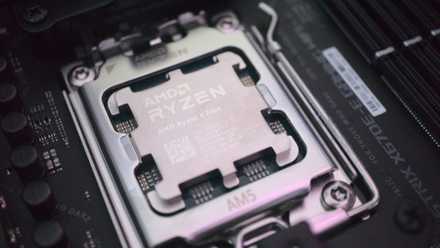
Fellow PC users might recommend you buy "at least" a modern 8-core CPU to avoid bottlenecking your GPU. While it's important to pair the right CPU with your GPU to avoid leaving performance on the table, you don't need to stress about it as much as you think. You'll be fine if you aren't pairing a weak CPU with a high-end graphics card (a Ryzen 5 3600 with an RTX 4070 Ti Super). Most users pick a modern 6-core processor for their gaming builds, which is perfectly fine for the majority of games.
Sure, an 8-core CPU will benefit you in some genres, such as RTS and simulation and productivity applications. Still, if you're playing a mix of games and aren't really using your PC professionally, it doesn't make sense to overspend on the CPU. Besides, completely eliminating bottlenecks on your gaming PC is impossible. Online bottleneck calculators might have you convinced that you need a 12-core chip to eliminate a 10% CPU bottleneck, but better-informed PC users know better than to trust those scams.
Is a 6-core CPU enough for gaming in 2025?
6 cores might be enough in most games, but more cores can still make a difference
1 An Nvidia GPU is the only real choice
Not everyone loves ray tracing as much as Nvidia
Nvidia has maintained its stronghold in the desktop GPU market for many years now, dominating the charts in the Steam Hardware Survey and enjoying the most consumer mindshare. Thanks to the successful marketing of innovations like ray tracing, DLSS, and frame generation, Team Green has convinced consumers that an Nvidia GPU is the only option for a gaming PC. AMD has been playing catch-up over the last few generations, trying to improve their GPUs' ray tracing and upscaling performance, but have now stepped down from competing in the high-end GPU segment.
You probably have an Nvidia graphics card in mind for your next gaming PC, but it's worth considering an AMD or even Intel alternative before making the final decision. Chances are that if you aren't sold on the wonders of ray tracing, want to game at high resolutions, and don't want to spend $800-$1,000 (or more) on a graphics card, a mid-range or even premium AMD GPU will be perfect for you. The current-gen Radeon RX 7900 XT for $700 is great value against the $850 RTX 4070 Ti Super, providing virtually the same rasterized performance and being an overall excellent 4K gaming GPU.
AMD graphics cards are known to provide more VRAM than the Nvidia offerings, even on their mid-range GPUs. For gaming on 1440p and 4K, ample VRAM is essential to avoid stutters and insufficiently loaded textures. If you're after a budget GPU, AMD has good options in that segment, but you should also consider the new Intel Arc B580. A $250 GPU with 12GB VRAM and excellent 1440p performance for the price, it's one of Intel's best discrete GPUs to date.

3 reasons why it's time for NVIDIA to start ponying up more VRAM on their mid-range GPUs
NVIDIA has been skimping on VRAM for far too long.
Don't be misled into always buying the best hardware
Premium and flagship components have their perks, but only if you can benefit from the extra performance and features. If you aren't sure that you need expensive PC components, then you probably don't. PC building myths and misconceptions often mislead new PC builders into overspending on their gaming PCs, often buying hardware that they'd never fully utilize.