
When you are building a new PC, you'll probably decide your overall budget first, and then go around shopping for components (unless you have an endless budget). It makes sense, therefore, to optimize your gaming PC budget so that you don't end up with an imbalanced CPU and GPU combo, and more importantly, don't blow your budget on stuff that has a lesser impact on performance.
You probably know that the bulk of your gaming PC budget should be reserved for the CPU and GPU. However, it's easy to get swayed by high-end expensive motherboards, power supplies, cases, and coolers, and spend more on them than you need to. Specifically, there are 5 such components that you should not overspend on when building a gaming PC.

4 overkill components & peripherals you should avoid to save money on your PC build
It's very easy to overspend while putting together a new gaming PC setup.
5 PC case
You can probably skip a premium case
The case is an important part of any build, and you shouldn't save too much money when buying a case. That said, many PC builders tend to adopt the "go big or go home" policy when choosing a case. This can quickly descend into splurging upwards of $150 or even $200 on one of the best PC cases. Even if you have a relatively generous budget of $1,500, a $200 or $300 case is a big chunk of change.
It dictates your PC's overall looks, component compatibility, and future upgradability. However, you can easily buy something for under $100 that does a great job in each of those departments.
Considering the number of budget PC cases which offer everything you could want — ample airflow, tons of connectivity, cable management features, great esthetics, RGB lighting — for your gaming PC, it's prudent not to waste precious money on features you'll never use. Even if you're a fan of the fish tank cases popularized by Lian Li and NZXT, you can choose from one of my favorite PC cases without blowing your budget wide open.
A case is a big decision. It dictates your PC's overall looks, component compatibility, and future upgradability. However, you can easily buy something for under $100 that does a great job in each of those departments, and save the rest of the money for your GPU and CPU.

8 of the most unique PC cases we've seen
Weird cases for builders thinking outside the box
4 Case fans
You don't need LCDs or interlocking designs
Another area where impulse can override sensibility is case fans. With brands like Lian Li and Corsair offering fans with customizable LCDs and magnetic daisy-chaining, you might decide to overspend on your case airflow for a little more convenience. If you're buying a case that doesn't come with pre-installed fans (many don't), you'll probably need to buy 3 to 6 case fans. Buying 6 of these fancy fans can easily cost you $150-$300.
Most users don't need LCDs on their fans spitting out RPM and temperature info, and they can work just fine with fans that connect to each other with cables. Sure, it's more convenient snapping fans together, but are you really willing to spend hundreds of dollars for that privilege? You can instead get some of the best case fans for under $80 (for six Corsair AR120 RGB fans).

3 CPU cooler
No, even your 360mm AIO shouldn't cost $250
High-end cooling is indispensable if you're using a modern power-hungry Core i9 or Ryzen 9 processor. Even non-flagship SKUs need serious cooling these days to perform at their fullest potential. However, this shouldn't give you the license to waste money on an overpriced 360mm AIO with an LCD screen.
If you're buying a 6-core or 8-core processor for gaming, you don't need the most decked-out cooler to keep it cool.
Even a $100 liquid cooler comes with a 360mm radiator, top-notch cooling performance, and a brilliant RGB design. This presents incredible value when you're trying to spend the most on a high-end graphics card and a powerful CPU (maybe even an 8-core chip). Additionally, if you're buying a 6-core or 8-core processor for gaming, you don't need the most decked-out cooler to keep it cool.
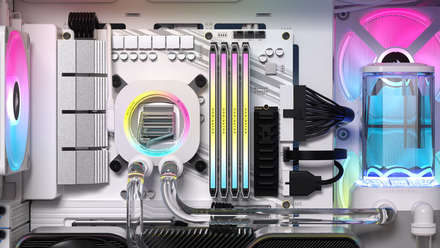
Water cooling your PC is a gimmick for most people
If you're an enthusiast who likes water cooling, just know that not everyone needs it.
2 Power supply
A 1000W PSU is enough for your RTX 4090
Many PC builders still overspend on their power supply, buying units rated for 1600W when their PC's power demands are way below 1000W. Even after accounting for momentary spikes and future upgrades, most gamers do not need anything more than an 80+ Gold 850W power supply, with 1000W units only making sense for PCs with an RTX 4090 and a Core i9-14900K.
Around $100-$120 is the maximum that most gamers should spend on their power supply.
The best power supplies on the market are well-built, well-reviewed, and come with up to 10 years of warranty. You don't need to "overspec" just to ensure reliable power for your precious components. It's never advisable to skimp out on your PSU, but going to the other extreme is also not something users should be doing today. Around $100-$120 is the maximum that most gamers should spend on their power supply.

PC builders need to stop using these 6 overused components
We've seen enough RGB fans for a lifetime
1 Motherboard
Aah, the biggest budget sink
The motherboard is, by far, the most egregious component in terms of budget wastage. Even though it makes little difference in performance, gamers continue to spend up to $500 on their motherboard. And for what — needless features, overly flashy designs, touchscreen displays, and extreme VRM solutions?
Whether it's a sturdy VRM solution, integrated heatsinks, PCIe 5.0 M.2 ports, or enough PCIe lanes for your GPU and NVMe SSD, you can get all this on a decent mid-range motherboard.
Even if you're overclocking your CPU, connecting a dozen USB devices, and using dual Gen5 SSDs, you rarely need to spend more than $250 on a motherboard. You can even get the best white-themed motherboard for around $250, so there's little reason to sacrifice your precious money for a premium motherboard.
Whether it's a sturdy VRM solution, integrated heatsinks, PCIe 5.0 M.2 ports, or enough PCIe lanes for your GPU and NVMe SSD, you can get all this on a decent mid-range motherboard. The money you save is better spent on high-speed DDR5 RAM, a quality gaming SSD, and, of course, a better GPU and CPU.

5 things you will not get by spending more on a high-end motherboard
High-end motherboards can do a lot for your build. But these 5 things are not some of them
Your gaming PC is a passion project, but it doesn't have to be needlessly expensive
Building a gaming PC can often be a deeply personal exercise, and you should totally spend on components that you genuinely want on your PC. However, this can be done without blowing your budget on components that are expensive just for the sake of it. It's better to allocate the bulk of your budget to a high-end GPU, powerful CPU, fast RAM, and ample storage. You can then decide if you have the room to spend on nice-to-haves.
Sure, if you have a $3000 budget, you can go crazy with it. Most users, however, will start with a relatively lower budget of around $1000 or maybe $1500. This necessitates that you make smart choices and control your impulses when coming across premium components that don't directly impact your PC's performance.