
It's World Backup Day for 2025! Like other notable dedicated mentions throughout the year, today marks the day when we celebrate the power of data storage, regular backups, and share tips and resources on why it's more important than ever to keep your data safe. Our lives are increasingly digitized, and we're storing more data than ever in the cloud and locally on devices, making backups a must-do for all homes, regardless of usage and size.

There's a good chance you don't back up
We've all been there
World Backup Day launched in 2011 as a way for brands and the general tech industry as a whole to promote healthy backup practices. Highlighting the importance of protecting sensitive information, backups must be made of all your data to safeguard against potential data loss. We'll be launching some guides, features, and tips throughout the week on how to better protect your data and devices against ransomware, hardware failure, and more.
And that's a real issue with today's digital world. Just like a rainy day savings fund, most people in the world don't have access to recent copies of all their personal data. Do you have a copy of any installed games from your Steam library? How about photos from your smartphone, and yes I'm specifically talking about the media not backed up to Apple iCloud because it's full. How about your NAS or other smart home hardware and their config files?
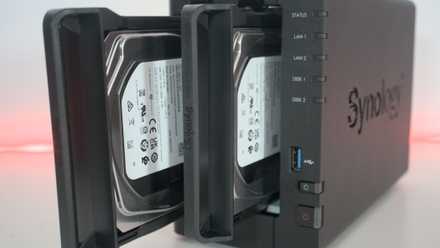
Arranging backups or performing them manually can be a task that is continuously pushed back, but it only takes a few minutes. With a NAS available, you could configure all your devices to automatically back up to the server. This is also great for those less tech-savvy in the household, as it allows everything to be handled by the network-attached storage (NAS) and available software. But don't worry if you don't own a NAS, as you can quickly build one with an existing PC or use external drives and cloud storage.
Why you should back up your data
Don't lose a single file
"It'll never happen to me!" This is something many continue telling themselves when declining any prompt recommending data to be backed up, even if it's a simple solution using Microsoft's OneDrive. The issue with this mentality is that it can (and oftentimes will) happen at some point, resulting in data loss and potential headaches. Ransomware is also rampant, with more people moving to self-hosting data and services with NAS.
Ransomware is also rampant, with more people moving to self-hosting data and services with NAS.
Imagine this situation. You successfully transferred all your data to a NAS server at home and are running a few publicly accessible services from the same device. Everything runs smoothly until the family begins to switch phones and/or computers. Now there's only one copy of the data available and that NAS either has a RAID failure or ransomware somehow infects the LAN and encrypts everything on the storage drives — You've just lost everything.
Start backing up right now
Here's how to safeguard your data
There's no excuse for not backing up your data. You'll find a few mentions of the 3-2-1 backup rule here on XDA. It's a good rule to follow when backing up all your devices. It's formed by keeping 3 copies of data on 2 storage devices, with one located off-site. The off-site storage location could be cloud storage, though this would likely require a subscription fee when handling larger files and multiple device backups. Having a total of three backups at all times would also take into account unforeseen natural disasters.
It's easy to get started. Consider what you wish to back up and how many devices will be included. If you only have a PC to extract files from, an external device such as a small USB drive would suffice. If you require more than a few GBs of capacity, that's where an external enclosure with an installed SSD or HDD will come into play. For a few devices, a DAS could work without requiring considerable upfront capital. Finally, we've got cloud storage and NAS for a busy home or office.
Stay tuned to our feeds for more World Backup Day content!
How to follow the 3-2-1 backup rule for NAS and protect your data
Keep it secret, keep it safe