
Although I’ve started reducing the VS Code extensions in my coding arsenal, I consider some of them borderline essential for my programming tasks. For example, I continue to rely on extensions for C++, Python, Terraform, Ansible, and other coding/IaC languages I use to train my DevOps skills. Likewise, I’ve got Container Tools for my self-hosting experiments, while Prettier makes my terribly formatted code a bit more readable.
However, there’s one extension that I consider more important than anything else in my setup – llama-vscode. If you haven’t heard of it, llama-vscode is designed to pair large language models with VS Code, and I daresay it’s better than GitHub Copilot for my coding needs, especially once I pair it with the bulky LLMs running on my local workstations.
I rebuilt my VS Code setup from scratch this year, and it's the fastest it's ever been
My VS Code was drowning in extensions
I’m not fond of the Copilot functionality built into VS Code
Its subscription fees and privacy issues make it terrible for my workloads
Let’s be clear: I’m not trying to say that the Copilot integration baked into VS Code is underpowered. If anything, it’s far superior to my local models when it comes to crunching hundreds of billions of parameters. However, sheer numbers aren’t everything, and certain 26B-35B models are powerful enough to serve as decent replacements for their cloud counterparts (and I’ll get to that in a bit).
What really makes me avoid using Copilot is its subscription-heavy cloud-based nature. The free version imposes restrictions on the number of chat prompts and auto-completions, and I’m bound to hit those caps in a handful of coding sessions. Sure, it might be cheaper than other AI-powered VS Code rivals, but I’d rather not spend extra money on subscription fees every month.
Even if I give up on my cheapskate nature, there’s also the privacy problem (or rather, the lack thereof) when relying on an external server for my coding tasks. I often use LLMs to debug complex projects or to understand what a certain function does – and this involves uploading multiple snippets (and sometimes entire config files) to the clanker. Between the confidential nature of many project files and the fact that I often toss in sensitive information like user credentials and network details when asking AI for help, you can see why I don’t want to use cloud-based models in my workflow.

Your old GPU can still run big LLMs – you just need the right tweaks
There's a lot you can do with these models
The llama-vscode extension has all the AI features I can ask for
It’s enough to replace Copilot on my VS Code setup
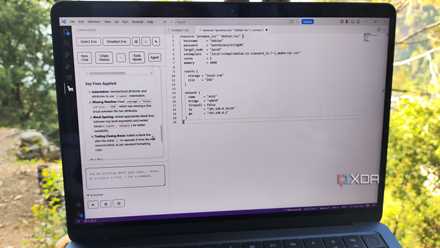
Despite its self-hosted nature, llama-vscode is capable enough to hold its ground against the Copilot functionality baked into VS Code. The auto-suggest facility works really well, especially when it’s paired with a decent LLM. I also love how there are different shortcuts for accepting the first word, line, or even the entirety of the suggested snippets.
The chatting functionality is just as useful for asking my LLMs about random functions, and I can even add entire files as context when pinging the clankers for help with troubleshooting/debugging a project. Better yet, VS even supports agentic coding, and I can fine-tune the tools and MCP servers I want my LLMs to harness during a coding session. While its UI is a tad more complicated to use than VS Code’s Copilot, I got accustomed to llama-vscode in just a few hours of using it for the first time.
The extension can even spin up a llama.cpp environment
But I’ve paired it with bulky models running on local llama-server instances
As for the models, llama-vscode includes built-in templates for common LLMs, ranging from simple Qwen 2.5 coder models that can run on CPUs to full-fledged GPT OSS (20B). There are even provisions for accessing OpenRouter-based models, but I stay away from them for obvious reasons. I currently use two dedicated llama.cpp servers that I already configured before I transitioned to llama-vscode, as it’s a lot easier to fine-tune the model parameters on a separate LLM-hosting server.
Deals on AI software and subscriptions for developers
On my main PC, I’ve got an RTX 3080 Ti running Qwen3.6-35B-A3B, and I use it for the majority of my VS Code tasks. But for the rest of my self-hosted app stack, I’ve deployed a Gemma-4-26B-A4B instance on my GTX 1080. Since they’re both Mixture-of-Experts models, I can just offload the experts and less-used parts of the LLM to the system RAM, while leaving the attention layers on the GPU, thereby running the models on VRAM-starved hardware and still getting reasonable token generation speeds. Connecting them to llama-vscode was as easy as heading to the Settings menu and entering the IP addresses of my systems under the endpoint URL fields.
Qwen3.6-35B-A3B, in particular, is extremely useful for my coding projects. I rely on it for everything from debugging weird functions to troubleshooting the terminal outputs from botched Proxmox experiments, and it hasn’t let me down even once. The best part? Since the inference tasks only take a few seconds, my LLM-hosting servers barely have any impact on my energy bills.