
Building a home lab started as a fun experiment for me, but has since doubled as a way to save money by replacing some subscription-based services with self-hosted alternatives. Google was one of the ecosystems that I was most excited to get out of, since I was paying monthly on a few of their products and never felt right about giving them so much of my data.
The self-hosted services that I run honestly work just as well as those from Google, which begs the question, what was I paying Google for? The answer is convenience. With Google, everything just works. You don't pay with your wallet for these free and open-source alternatives, but you do pay with an initial time investment and with the overhead of responsibility to ensure that everything stays running smoothly. It's important to be honest with yourself about whether you're willing to sacrifice the convenience of Google for DIY software. I was.
The only prerequisites to hosting your own services are a reliable home lab environment (nothing fancy, just a machine that can run all the time), and an inquisitive attitude. The desire to lower your monthly bills and get full control over your own data are also good motivators to keep you going whenever something doesn't work right and requires extra tinkering.
I replaced Google Photos, Drive, and Docs with these free self-hosted services — and they're better, too
If you want to de-Google your life, then these are some of the best services to get started.
Ditch Google Photos and let Immich manage your memories
I can barely tell the difference
Google Photos only gives you 15GB for free, which I can easily burn through in a matter of weeks, especially with 4K videos. Storing my memories feels like a basic right that I shouldn't need to pay monthly for. Plus, I don't trust Google to protect my private photos. I'm sure irrecoverable failure on Google's servers almost never happens, but I'd still rather be totally in charge of that irreplaceable data than delegate the responsibility to Google.
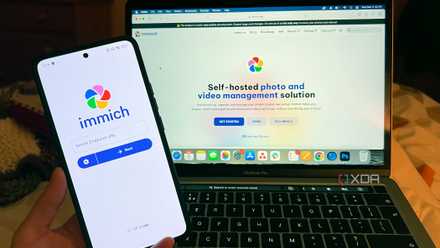
Immich is a self-hosted photo and video library that feels tremendously similar to Google Photos. The menus and UI didn't take any getting used to, because it's all very familiar after using Google Photos. The functions are also mostly the same across both services, with Immich supporting facial recognition, object and scene search, automatic album suggestions, RAW files, etc. There's also a free phone app that backs up your photo roll automatically, essentially providing the same set-it-and-forget-it experience as Google Photos.
One thing I like is that Immich's storage is only limited by the capacity of my server. If I need to save more photos and videos, I just add more storage. My uploads were creeping toward the 2TB limit that I purchased in Google One, which was costing $10 a month. It's nice to be in charge of my own storage capacity and to not have the lingering worry of price hikes upping my monthly fee.
There's one caveat you should take seriously when hosting your photos and videos yourself. These are precious sentimental memories for most people, and the burden of backups rests with you once you decide to manage all your data yourself. Before you commit to throwing your whole library into Immich, have a backup strategy in place that follows the 3-2-1 backup rule: three copies of your data, on two different types of media, one of which is offsite.
Immich
- Key highlights
- Self-hosted
- iOS compatible
- Yes
- Android compatible
- Yes
Immich is a self-hosted backup solution for photos and videos, comparable to Google Photos.
Nextcloud replaces Google Drive and a slew of other Google products
I replaced most of Google's suite with one software package
Google Drive shares the same pool of storage as Google Photos, both of which are bundled into the Google One subscription. I needed a way to continue hosting files the way Google Drive had let me, and I landed on Nextcloud as the best alternative. Not only is Nextcloud a good stand-in for Drive, but installing it is a really efficient way to end your reliance on Google apps because it comes with services to replace Docs, Sheets, Slides, Calendar, Contacts, and Keep.
Google's free apps like Docs and Sheets don't take up much storage, even if you have a lot of documents, so my primary motivation for Nextcloud was just to replace Google Drive. It allows me to sync files across devices, and it comes with a free mobile app to access the files on the move. I can also access it through the web interface from any device, which makes it pretty comparable to Google Drive.
Nextcloud Office works a bit differently than Google, but it didn't take that long to get used to. It has its own built-in app store, so you can add more features and customize the experience, which is another reason why people choose the self-hosting route in the first place.
Nextcloud
- Key highlights
- Self-hosted, open source
- iOS compatible
- Yes
- Android compatible
- Yes
- OS
- Windows, macOS, Linux
- Desktop compatible
- Yes
Nextcloud provides a way to host files and a suite of collaborative software.
Jellyfin can play everything I own, so I stopped paying for YouTube
It allows me to stream my music collection on any device
I really don't have any complaints about YouTube Music other than the monthly cost. But what I found is that when listening to music, I reach for my curated playlist 99% of the time — just the same songs over and over. YouTube Music's biggest draw is the access to millions of artists for one price, but I was only playing music from a few hundred of them. It didn't make sense to keep paying a monthly charge for that in my eyes.
Jellyfin is a full media server that allows you to stream your audio (video, too) files to any device. The only catch is that you first need to own the music, like in the form of FLAC or MP3 files. Ripping CDs that you own or buying digital music files is a good way to start accumulating tracks. Once you're hosting them in Jellyfin, you can download the Jellyfin app on your phone to stream music from your server. There are also third-party apps that can interface with your server, in case you don't like the official one.
The big trade-off here is that I no longer have instant access to an endless music catalog. For me, that hasn't been a huge problem, and I'm glad to not be spending the extra $11 a month on a service that I wasn't fully taking advantage of.
Jellyfin
- iOS compatible
- Yes
- Android compatible
- Yes
- Desktop compatible
- Yes
Jellyfin is a self-hosted solution for streaming audio and video files to any of your devices.
Staying in control of my data and saving money
Between Google One and YouTube Music, it's easy to find yourself spending $20–30 a month without thinking twice. Immich, Jellyfin, and Nextcloud are able to cover everything those subscriptions were providing, while saving me money and giving me an excuse to use some old hardware. If you have an old PC gathering dust and an afternoon to spare, it's worth giving self-hosting a shot.