
Just like your motherboard, your SSD has firmware that governs every drive operation. You might never have updated your drive's firmware, or even have known it existed — you could be suffering due to outdated firmware without even being aware of it. Up-to-date firmware ensures your SSD isn't left behind when the manufacturer patches major performance and stability bugs. However, it's not just speed and efficiency that you lose out on; it's your data integrity. The effects of outdated firmware usually become apparent after a while, at which point it may be too late to save your critical data. Hence, keeping your SSD firmware updated is part of regular PC maintenance that no one should ignore.

6 crucial PC maintenance tasks I don't ignore anymore (and you shouldn't either)
PC maintenance can be time-consuming, but it'll benefit you in more ways than one
When did you last update your SSD firmware?
It's probably been years
Most people assume that their SSD doesn't need updates in the way their motherboard, GPU, or network adapter does. While it's true that SSD firmware updates are relatively rarer than driver, BIOS, and Windows updates, manufacturers still release new firmware when needed. If you are not in the habit of keeping your SSD updated, you may very well miss critical firmware updates intended to improve performance, patch security vulnerabilities, or enhance data protection features.
SSD firmware sits below the OS and file system, functioning as a sort of microcode to translate system requests into physical NAND operations. It works in conjunction with the controller and NAND flash to execute regular SSD operations, such as garbage collection, wear leveling, and error correction, among others. The snappiness that you experience on your system when launching applications or running heavy productivity workloads is a direct result of how effectively your SSD's firmware executes the drive operations.
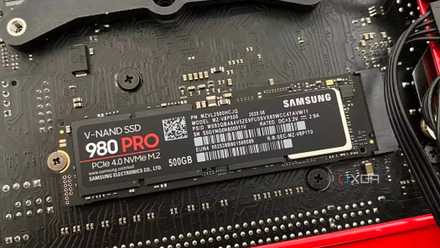
Your drive might have been running the latest firmware when you first installed it, but over the years, the manufacturer might have released one or more major firmware updates. In some cases, these updates are critical to resolve drive degradation issues and prevent early failure, similar to what happened with early batches of Samsung's 980 Pro SSDs. The company released an update to fix the issue, but it goes to show the depth of the effects of faulty or outdated firmware.

SSD firmware is the most underrated performance fix nobody installs
It's not always the drive, it's also what controls it.
You may be leaving performance on the table
A quick firmware update can make your SSD snappier
A firmware update can materially impact SSD performance in more ways than one, considering it directly impacts operations like garbage collection, wear leveling, caching behavior, and power behavior. Changes to any of these can show up in sustained transfer speeds, latency improvements, and drive responsiveness. For instance, your drive's firmware controls the intensity of garbage collection performed by the controller. Garbage collection is the process of clearing partially filled cells, so new data can be written to them. A new firmware can modify how the controller uses garbage collection to balance background maintenance and foreground activity, prioritizing performance over cleanup. If your SSD needs to perform garbage collection during write activity, especially after the SLC cache is exhausted, it can slow down severely. Firmware updates can modify garbage collection thresholds to minimize such performance slowdowns.
Wear leveling is your SSD's way of distributing write operations evenly across the NAND cells to extend drive lifespan. New firmware often modifies wear leveling algorithms, affecting how effectively your drive prevents write amplification and improves long-term performance. Even the caching behavior of your SSD is linked to the firmware. Your SSD has a pseudo-SLC cache that is allocated by the controller. The firmware can modify your SSD's cache performance, thereby impacting speeds during sustained activity.
Samsung 990 EVO Plus
- Storage capacity
- 1TB, 2TB, 4TB
- Hardware Interface
- PCIe Gen 4 x4 / Gen 5 x2
- TBW
- 600TB per TB
- DRAM
- N/A
One of our favorite budget-oriented SSDs, should you be in the market for more storage.
Your SSD also has multiple power states with different latency properties. How fast your SSD can exit a particular power state determines its snappiness. This behavior is controlled by the firmware via the controller and the OS. SSD manufacturers may improve resume-from-sleep behavior by modifying the transition thresholds between various power states, making your SSD feel faster simply due to a firmware update.
Here's why your old SSD feels slower than it used to be
Your SSD performance can drop with time, but you can do something about it
SSD firmware is a silent guardian, a watchful protector
It's the hero we always need
Even if you haven't noticed your SSD slowing down over time, it's worth checking for a firmware update. New firmware isn't responsible for performance improvement alone; it also keeps your drive's data protection algorithms up-to-date. Any bugs associated with wear leveling, garbage collection, and power loss handling can lead to data loss sooner or later. In the worst cases, you may even run into firmware-linked drive failures, something that happened to Samsung's 980 Pro SSDs during their early days.
Considering how important wear leveling and garbage collection are to your SSD's efficient operation, any associated bugs can lead to inaccurate data deletion or relocation, resulting in corrupted or missing data. Your SSD may not handle power loss as well as it should if the firmware isn't equipped to do so. The manufacturer might have spotted the problem and released a firmware update to patch it, but it might not have reached your system yet, leaving your SSD unprotected. While backing up your data provides you with a failsafe, keeping your SSD firmware updated is a quick and seamless way to avoid the worst. No one likes to deal with data loss or drive failure, and updated firmware is just one of the easiest ways to minimize that possibility.

5 S.M.A.R.T. attributes that actually predict HDD and SSD failure
Always double-check these values after running S.M.A.R.T. tests on your storage drives
Check for new SSD firmware for your new SSD
You don't need to constantly be on the lookout for new firmware, but checking for it at least once after you install it is the bare minimum. Developers probably don't keep fixing issues with a drive for years after its initial release, so the newer your SSD is, the more important it is to check for an update. Most major issues are ironed out during the first few months after the launch of an SSD, but it doesn't hurt to check for an update using your SSD's software twice a year or so.