
Gone are the days of spending countless hours perfecting a specific configuration for my CPU, GPU, RAM, and motherboard to achieve maximum performance from my system. It's hard to believe a decade has passed since I was more into the custom water cooling scene, with overclocking at the forefront of my main rig. I even kept hold of a trusty AMD FX 4100 to see how hard I could push it on a dedicated test bench. Toying around with components was my jam, and I appreciated the delicate balance of power and stability, mixing in undervolting for good measure. Those days are long behind me now, and I don't feel like I'm losing out on anything, as modern components have smarter algorithms that enable them to boost much higher for longer.
The same goes for my trusty AMD Radeon RX 9070 XT. It may not have the performance of the Nvidia GeForce RTX 5090, but it can hold its own at 4K with ray tracing enabled, thanks to AMD's development of FSR and finally using machine learning. I usually play games using a QHD super ultrawide panel, resulting in a maximum resolution of 5120 x 1440. Though this GPU is powerful enough for handling this many pixels, I thought it would be a good idea to try some undervolting to reduce the power draw slightly without sacrificing any of the RDNA 4 gains over previous-gen AMD graphics cards. The results were more than positive, allowing me to get higher clock speeds with the same power draw and temperatures.
Undervolting the AMD Radeon RX 9070 XT
It's easier than you think
The process of undervolting an AMD RDNA GPU is so straightforward that anyone can do it. All you need is AMD's Adrenalin software, which has slowly become one of the best in the business for managing your AMD GPU and other hardware, including Ryzen processors. The app is excellent, allowing you to update drivers, adjust settings for components, and even tweak how your hardware runs each installed game. It's quite the package and one you'll learn to love (or hate) when attempting to work with FSR. At least everything is within a single app, and it's all laid out well.
For undervolting my GPU, all I had to do was:
- Navigate to Performance > Tuning.
- Click Custom.
- Enable GPU Tuning.
- Move the Volage Offset (mV) slider to the left.
- Click Apply Changes.
Load up a game or stress test and see what happens. If the system runs well without stability issues, consider moving the slider further to the left, taking note of any changes to temperatures, clock speeds, and in-game frame rates. Your mileage here will vary, so I cannot give you a definitive value that will work, but have a play and see how your AMD GPU performs. My AMD Radeon RX 9070 XT managed to perform well with a bunch of test games at around -80 mV. Start with -75 mV and see how that fares. Adjust accordingly to obtain the best results.
So, what happened to the Radeon RX 9070 XT with these settings? Before, I would achieve around 2.6 GHz under heavier loads in games or benchmark tests. With this one setting adjusted, the AMD GPU boosted to just shy of 2.8 GHz, a near 200 MHz improvement (174 MHz to be precise). This resulted in between 2 and 4% gains in various tests, from GeekBench and Port Royal to Cyberpunk 2077 and Shadow of the Tomb Raider. Using in-game FPS is slightly more difficult to measure at low differences and not put it down to a margin of error, but there were clear improvements for benchmarks.
AMD's Radeon RX 9070 XT is the most exciting GPU to launch in years
It's here. It's brilliant. Go and buy one.
A small setting with a big impact
It's not ground-breaking, but noticeable
Modern graphics cards, even those from a few generations back, can still play the latest games. Results will vary depending on the rest of the system, your monitor, and expectations, but it's possible. Undervolting (and applying a mild overclock) can help these GPUs attain better frame rates. It's also interesting to see AMD's software not hard-press the undervoltage setting throughout the GPU's performance curve. It's not linear and can adjust depending on load and constraints. I saw a reduction of around 30 mV at full load and not the configured 80 mV. The test rig consisted of the following:
|
CPU |
AMD Ryzen 9 9950X |
|
RAM |
32 GB DDR5-7200 G.SKILL Trident Z5 RGB |
|
Motherboard |
Gigabyte B650 Aorus Elite AX Ice |
|
OS |
Windows 11 (24H2) |
|
AMD Driver |
25.3.1 |
I fired up a few games and noticed the aforementioned improvements, consisting of around 2% across the board. Two notable results were Cyberpunk 2077 and DOOM Eternal, which saw notable gains with repeated testing, showcasing just how much of an impact this one setting change can make. Of course, this all depends on your system, the GPU, its BIOS, driver version, and support from AMD. You could enjoy more gains from reducing voltage or see very little difference in-game.
|
Game |
RX 9070 XT |
RX 9070 XT (Undervolted) |
|---|---|---|
|
Cyberpunk 2077 (Ultra) |
|
|
|
DOOM Eternal (Ultra Nightmare) |
|
|
Getting any extra frames out of your GPU for free is a no-brainer.
A few frames may not sound like much of an improvement over base results, but combine this with FSR and frame-gen technology, and you've got more real frames to work with, resulting in a far superior gaming experience when factoring in advanced graphics settings such as ray tracing. AMD GPUs have typically lagged behind Nvidia for ray tracing, but RDNA 4 proves the company is working in the right direction, and getting any extra frames out of your GPU for free is a no-brainer.

4 ways FSR 4 gives DLSS 4 a run for its money
FSR is no longer an afterthought for gamers
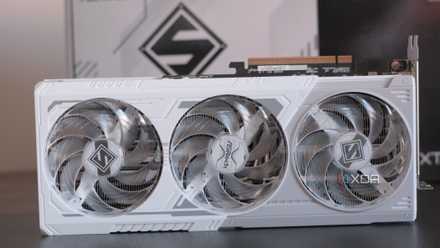
ASRock Radeon RX 9070 XT Steel Legend
- Memory Clock Speed
- 2518 MHz
- Architecture
- RDNA 4
- Process
- 5 nm
- Shader Units
- 128
AMD's RX 970 XT is a huge leap for the company with new architecture, improved ray tracing, and the same great value compared to rival Nvidia. It's also a solid GPU for playing the latest games.