
SteamOS is one of the main drivers of Linux adoption these days thanks to its inclusion with the Steam Deck and recent Lenovo gaming handhelds, but Valve has kept official support for it to a very limited number of devices. Of course, you can try to mimic the SteamOS experience with alternatives like Bazzite, but what would happen if you were to try and run proper SteamOS on a PC that isn't even designed for gaming in the first place?
That's what I set out to discover, and, surprising as it may be, the results were pretty positive. I put the official SteamOS release on a Minisforum V3 tablet, and I had a pretty good experience using it this way. At the end of the day, it's Linux, and it works as well as you could expect it to. Let's take a look.

5 reasons you should use Bazzite instead of Windows on your gaming PC
It may be time to say goodbye to Windows
How to set up SteamOS
It sure is a Linux distro
Installing SteamOS on your device is not radically different from any other Linux distro, though there are some caveats. Part of the reason I chose the Minisforum V3 tablet for testing SteamOS is that all the devices that have some form of support for SteamOS run on AMD processors, so I chose this to be safe, and you might want to do the same. If your machine has an Intel processor, your experience may vary, and I also can't speak to how it handles discrete GPUs.
Otherwise, SteamOS is only distributed as a recovery image, so when creating a bootable drive for it, not every software may support the BZ2 format it comes in. You can use balenaEtcher, or, if you're on Linux, just use the following command in your terminal to flash the image to your flash drive:
bzcat steamdeck-recovery-4.img.bz2 | sudo dd if=/dev/stdin of=/dev/sdX oflag=sync status=progress bs=128M
Of course, you'll need to change sdX to the label of your USB drive, such as sda, and you may also need to change the name of the bz2 file to match the image you downloaded.
After that, disable Secure Boot on your target PC by going into its BIOS (if you need some help, check this article). While you're in the BIOS settings, you may also want to change the boot order of your PC so that it boots from your USB drive instead of the internal storage, allowing you to install SteamOS.
The setup process is a little different than something like Bazzite, though. That uses a similar installation UI to Fedora, but here, you just boot into KDE Plasma and you can choose to install the OS from there, which happens entirely within the terminal. Once that's done, you just boot into the new OS and go through the first-time setup similar to booting a Steam Deck for the first time.
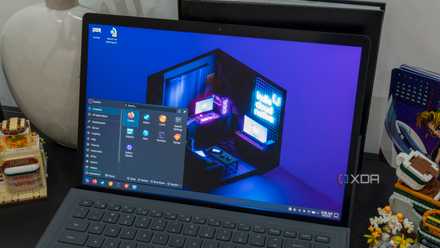
SteamOS proved the Linux desktop doesn't need to look like Windows to succeed
Desktop only when one's needed.
SteamOS just works
There isn't much to it
Despite having no official support outside of a small handful of devices, SteamOS ran perfectly fine on the Minisforum V3, and maybe that shouldn't be too surprising. At the end of the day, it's Arch Linux, and that distro has pretty strong hardware support, so it only makes sense for things to work mostly okay.
SteamOS automatically boots into the gaming experience offered by Valve, but you don't even have to sign in. You can open the Steam menu, go to Power > Switch to Desktop, and you'll arrive at the desktop environment. SteamOS uses KDE Plasma as its desktop and that's one of my favorites in the Linux ecosystem, so I was pretty happy about it.
SteamOS is also immutable, so installing other desktop environments may not be the wisest approach, and that's something to keep in mind if you'd rather use GNOME or anything else. On that note, installing any package using the typical package manager (pacman) is probably best avoided, and you may want to stick with the included Bazaar app storefront instead. This app serves Flatpaks, which are a more secure, isolated way to install apps without modifying system files. Some apps are also available as AppImage files, which are portable and can run on any Linux distro, and between these two options, the vast majority of apps are already available to you.

SteamOS made me realize Windows has been holding back my gaming PC
Windows doesn't have to be the default for gaming
For my personal needs, I installed the Vivaldi web browser, OnlyOffice, and downloaded Beeper (one of those AppImage apps I mentioned earlier). This covers most of my needs for day-to-day use. Plenty of more advanced tools are also available through these methods, including OBS Studio for streaming, Kdenlive if you need a video editor, and apps like GIMP or Krita for image manipulation. You can also use apps like Distrobox to run other Linux distros in containers so you can set up a development environment without the limitations of an immutable operating system.
I even tried running a quick performance test on this device with Geekbench 6. It only tests CPU performance, but I thought it could make for an interesting point of reference, and I got 2,737 for single-core performance and 10,938 for multi-core. Back when i reviewed this device on Windows, I got 2,523 and 10,237, respectively, so it's actually a good bit better on SteamOS.
But what if you do want to game?
As competent as you could hope
For this experiment, I wasn't necessarily coming at it from the perspective of using this as a gaming, it was more so about discovering whether it's a viable operating system for a typical computer. But it is SteamOS, and the gaming mode is front and center, so of course I had to at least give it a shot.
I tried a handful of games, including Elden Ring, Hellblade: Senua's Sacrifice, and Control, and I had a fairly good experience across the board. I first tried running these games in Steam's gaming mode, though the built-in performance overlay isn't available in this mode, so I don't have exact figures for that. However, Elden Ring ran smoothly at 1920x1200 resolution and using the Medium quality preset, while Control required me to lower the overall preset to the Low level to be playable, and Hellblade was playable, albeit not very smoothly, at the High preset with ray tracing turned off.
Performance outside of gaming mode tends to be a little worse, but playing the same games at the same settings, I saw 40 to 45 frames per second in Elden Ring, whereas Control stuck between 35FPS and 40FPS, and Hellblade was hovering slightly above 35FPS during calmer scenes, dropping just under 30FPS for more demanding scenes.

I installed Bazzite on my PC, and it has me reconsidering Windows
Bazzite surprised me by running more of my games smoothly and making Windows feel less essential to my PC setup.
This is just to show that the platform is completely usable and there aren't major performance downsides. These games wouldn't run significantly better on this hardware if the operating system was different, and that's the point. SteamOS is a viable platform for a standard PC, even if Valve isn't able to officially support it.
SteamOS, Bazzite, or something else?
Until now, I had been convinced that if you wanted a SteamOS-like experience on Linux, Bazzite was your best bet, and that was true for some time, but it seems like that's not the case anymore. SteamOS itself should be in your list of considerations, and it works much better than I expected going into this experiment. If you feel like trying it out yourself, I'd say you have nothing to lose.

5 reasons Bazzite will still be better than SteamOS (at least at first)
Bazzite is still the better option