
A few years back, LG released a 45-inch, 21:9 OLED monitor. It was, and continues to be, one of the most mind-boggling displays I've ever seen. Despite being so large and immersive, it came with a resolution of 3440 x 1440 — the same resolution you'll find on any 34-inch ultrawide. It just didn't look sharp enough with its massive size and steep 800R curve against some of the best gaming monitors. LG took the form factor back to the drawing board, added a few million pixels, and now we have the UltraGear 5K2K OLED.
The name is a bit deceiving because this monitor has a resolution that's far closer to 5K than it is to 2K, using a horizontal resolution as wide as a 5K display, but a vertical resolution that's as high as a 4K one. And, as if that wasn't enough, it comes with LG's signature dual mode capabilities, allowing you to chop down the resolution to boost the 165Hz refresh rate to 330Hz.
It's a gobsmacking display, and it has excellent panel performance backing up its marquee features. Still, this is one of the most expensive gaming monitors you can buy, and unless you fall within some specific boundaries, it likely isn't the monitor for you.

45” UltraGear OLED 5K2K Gaming Monitor
- Resolution
- 5120 x 2160
- Screen Size
- 44.5 inches
- Brand
- LG
- Connectivity
- 2x USB-A, 1x USB-C
The LG UltraGear 5K2K OLED is big, bold, and unashamed, and for a select number of large-format users, there's nothing better.
- Tack-sharp in 5K mode
- Deeply immersive gaming experience
- The brightest OLED I've ever tested
- 800R curve isn't for everyone
- 330Hz requires a major resolution sacrifice
- Only the highest-end PCs can drive the 5K mode
LG UltraGear5K2K OLED pricing and availability
Expensive, but are you surprised?
The LG 5K2K OLED is a unique monitor, so much so that it's titled by its specs instead of some long model number string. There aren't any direct competitors to it, at least not any that do everything it does. And because of that, it's priced in accordance with how unique the design is, not in-line with some broader monitor market with stiff competition. All of that is to say that, at $2,000, the UltraGear 5K2K OLED is expensive, but it's hard to say that it isn't worth that price.
The main alternative to the 5K2K OLED is LG's own Ultragear 45 OLED, which is available for $1,700 at the time of writing. When it comes to form factor and finish, the two monitors are indistinguishable, both packing a massive 44.5-inch WOLED panel and an aggressive 800R curve. There are some clear spec differences between them, however. In addition to the higher resolution on the 5K2K monitor, it also comes with support for DisplayPort 2.1 and dual-mode capabilities that allow you to run the monitor at a lower resolution, but a faster 330Hz refresh rate.
LG is competing with itself for large, 45-inch OLED displays, but there are other large-format monitors that may pique your interest. From Samsung's camp, there's the Odyssey G9 QD-OLED, which is a 49-inch, 32:9 monitor with a 240Hz refresh rate, and it clocks in at $1,800 — at the time of writing, it's actually on sale for $1,100. For maximum pixel density, there's the Odyssey Neo G9 at 57 inches with a dual 4K resolution and 240Hz refresh rate. It clocks in slightly above LG's 5K2K at its list price of $2,300. However, it often goes on sale for $2,000, and sometimes for even less.
45” UltraGear OLED 5K2K Gaming Monitor
- Resolution
- 5120 x 2160
- Screen Size
- 44.5 inches
- Brand
- LG
- Max. Refresh Rate
- 165Hz / 330Hz
- Response Time
- 0.03ms
- Inputs
- 2x HDMI 2.1, 1x DisplayPort 2.1
- HDR
- DisplayHDR True Black 400
- Brightness
- 275 nits (typical)
- Speakers
- Yes
- Touchscreen
- No
- Display Technology
- WOLED
- Dimensions
- 39.0" x 26.2" x 13.5"
- Contrast Ratio
- 1,500,000:1
- Tilt
- -10~15º
- Swivel
- -10~10º
- Pivot
- No
- Height Adjustment
- 120mm
A bold and unashamed gaming monitor
Better clear off some desk space
The LG 5K2K OLED is a unit, and you feel that in every aspect of its design. The core of the chunky, polygonal base is a thick slab of metal, which connects to a wide stand that effectively hides your cable bulk thanks to a routing slot carved into the bottom. You're given a surprising amount of adjustment given how large the stand and monitor are, with a standard 4.7 inches of height adjustment, along with 20 degrees of swivel and 15 degrees of tilt. You won't be rotating the monitor sideways with the included stand, but it's still enough to get adjusted to a comfortable position. And, if you want to ditch the stand, there's a standard 100mm x 100mm VESA mount on the back.
A monitor arm will probably be best for most desks, too. The 5K2K OLED is big — that shouldn't come as a surprise to anyone — but it takes up a ton of room with its steep 800R curve. It's so curved that, if you're using the monitor long enough, flat screens will look bowed backwards. I'm partial to a more subtle curve, like the 1800R curve on the Alienware AW3425DW, but it comes down to personal preference. Just keep in mind that, if you haven't seen a display this large with this aggressive of a curve, it's definitely an acquired taste.
I'm happy to not only see a USB-C input here, but also with up to 90W of power delivery.
To support the tack-sharp resolution, the 5K2K OLED comes with DisplayPort 2.1, though, unsurprisingly, there's only a single DisplayPort connection. Other devices will need to use one of the two HDMI 2.1 ports, or the USB-C input. I'm happy to not only see a USB-C input here, but also with up to 90W of power delivery. There's even a KVM switch built into the monitor, so you can use the monitor's internal USB hub to swap your peripherals between inputs.
You can get around the 5K2K OLED with a tiny four-way joystick built into the display, but unlike a display like the Asus ROG PG32UCDP, there's no way to control the monitor with your keyboard and mouse. In the on-screen display (OSD), you'll find a handful of features, including picture-by-picture, picture-in-picture, and a variety of different screen sizes and aspect ratios. You don't need to use the full size at all points. Unfortunately, PbP is less useful here than it is on something like the Samsung Odyssey OLED G9 due to the fact that this is a 21:9 display. You'll only be able to see one full 16:9 source at any given time.
The big feature of the UltraGear 5K2K, however, is its dual mode capabilities. With the full resolution, the display tops out at a 165Hz refresh rate. However, you can bump the refresh rate all the way up to 330Hz by cutting the resolution down to 2560 x 1080.

Researchers discover a "game changer" for OLED monitors
Next-gen OLED monitors might see a big boost in immersion.
Great color, and even better highlights
Watch the sharpness at WFHD, though
LG claims its latest MLA+, or micro lens array, tech leads to highlights in HDR that exceed 1,300 nits. Among the WOLED monitors I've tested up to this point — which use the same MLA+ tech from LG Display — I haven't seen a panel pass that 1,300-nit line quite like the UltraGear 5K2K OLED does. It absolutely smashes that barrier in HDR. This is the brightest OLED monitor I've ever tested, maintaining peak highlights of over 1,000 nits even when going beyond a 1% window size.
|
Peak HDR brightness (1% window) |
1,427 nits |
|---|---|
|
Peak HDR brightness (5% window) |
1,061 nits |
|
Peak HDR brightness (10% window) |
861 nits |
You can see my results for up to a 10% window above. This monitor is insanely bright, and it feels even brighter considering how large it is. Although the actual luminance hasn't changed, the UltraGear 5K2K OLED is, quite literally, a massive light source. The brightness feels searing, even at half brightness with HDR turned off. The brightness helps a lot here, too. LG uses a matte coating on the 5K2K OLED, which can wash out shadows when you're at low brightness levels. Thankfully, the insane highlights of the monitor are enough to overcome the matte coating and provide the deep, rich contrast that OLED is known for.
Unfortunately, colors aren't as impressive as they should be with a matte coating. By the numbers, the UltraGear 5K2K is excellent, clocking great coverage of both AdobeRGB and DCI-P3, as well as a color error of just over 1 when measured against sRGB. You just don't get the plump saturation you see on a monitor like the Alienware AW2725Q that comes with a glossy finish.
|
sRGB coverage |
100% |
|---|---|
|
DCI-P3 coverage |
96% |
|
AdobeRGB coverage |
88% |
|
Color error (sRGB) |
1.05 |
Outside of color and brightness performance, resolution is the UltraGear 5K2K OLED's main claim to fame. I mean, it's right there in the name. The standard resolution is 5120 x 2160, which is as wide as a 5K display, but only as tall as a 4K display. Another way to think about the UltraGear 5K2K OLED is as a 4K monitor, just with extra horizontal resolution for a 21:9 aspect ratio. That's how I like to think about the display because, despite how high the resolution is, the pixel density isn't anything special.
The monitor is still tack-sharp, with a pixel density of 123 pixels per inch (PPI), but it's still not as sharp as a 32-inch 4K monitor, which has a density of 137 PPI. With the full resolution, the display looks fantastic, but it's important to keep the pixel density in mind due to the fact that this is a dual mode monitor. When you toggle over to 330Hz, the resolution drops to 2560 x 1080, which comes out to a density of just 61 PPI on this 45-inch display. It's extremely blurry. Even LG's own marketing material that you can see above compares the 125 PPI on this display to 70 PPI, exaggerating how pixelated the lower pixel density is. And yet with the 330Hz mode of the 5K2K OLED, you're getting even worse pixel density.
4 things no one tells you about owning an OLED monitor
OLED monitors come with their own set of quirks.
Pixel density is critical for a display like this because it's large, and due to the aggressive curve, you'll be sat relatively close to it. As a point of reference, LG's own UltraGear Dual Mode OLED goes from a density of 137 PPI at 4K to 69 PPI at 1080p. The density is not only lower on the 5K2K OLED, it's also more obvious due to the fact that the monitor is so big.
The most immersive gaming experience money can buy
Assuming you have the PC hardware to support it
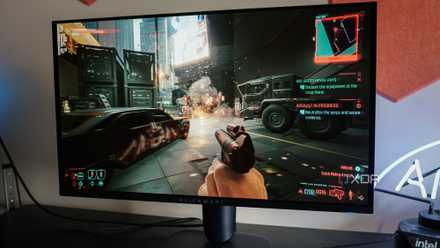
Gaming on the UltraGear 5K2K OLED is like stepping into another world. Yes, the curve makes flat screens look warped, and yes, the display is so wide that you'll need to clear basically everything off your desk. But when you boot up Cyberpunk 2077 or Clair Obscur: Expedition 33 and take control of your character, you feel like you're living in that world. You really have no other option but to get immersed in whatever game you're playing with how large and commanding the 5K2K OLED is.
Unsurprisingly, LG includes everything you need for a solid gaming experience, including both FreeSync Premium Pro and G-Sync certifications. With the full resolution, the 165Hz refresh rate feels responsive, particularly with the ultra-low response time of OLED. Of course, 330Hz feels better when you're playing a game like Marvel Rivals or Counter-Strike 2 where resolution isn't the primary concern. I may not like how blurry the lower resolution mode is, but it's hard to pixel peep too much when you're knee-deep in a gun fight.
I wouldn't even consider the UltraGear 5K2K OLED unless you have an RTX 5080, RTX 5090, or maybe an RX 7900 XTX.
You'll need an extremely high-end PC to drive this display, which shouldn't be surprising considering it clocks in at $2,000. The 330Hz mode won't put too much stress on your rig, but the full resolution carries with it a total of 11,059,200 pixels. For reference, a 4K resolution is just shy of 8.3 million pixels, while 1440p is just short of 3.7 million. LG's 5K2K name is almost literal. You have to drive close to the number of pixels as a 4K monitor and a 1440p monitor combined.
I wouldn't even consider the UltraGear 5K2K OLED unless you have an RTX 5080, RTX 5090, or maybe an RX 7900 XTX from AMD, assuming you want to fully saturate the refresh rate. In addition to raw GPU horsepower to drive such a high resolution in games, it's important to keep the input in mind, too. Nvidia's RTX 40-series GPUs don't support DisplayPort 2.1.

5 reasons now is the time to upgrade to an OLED monitor
The stars are finally aligning for OLED.
Warranty and burn-in prevention
Behind the curve, if only by a bit
LG is behind the rest of the market when it comes to burn-in protection. The vast majority of monitor brands selling OLED displays, including MSI, Asus, Alienware, Gigabyte, and Corsair, all include a three-year warranty that covers burn-in. LG offers a two-year warranty. If you're using the burn-in prevention features included in any OLED monitor, you shouldn't encounter burn-in problems within three years, much less two. Still, it's disappointing that LG can't match the rest of the industry. I suspect it wouldn't see a significant uptick in support costs if it extended its OLED warranties to three years.
There are several burn-in prevention features built into the 5K2K OLED, so hopefully you never have to take advantage of the warranty. In addition to pixel cleaning, which you can set to automatically run after a few hours of continuous use, there's also three different levels of pixel shifting built into the display. You shouldn't see the pixels move, but pixel shifting wears down the organic compounds in an OLED panel more evenly. You're also free to turn off pixel shifting, though I wouldn't recommend it.

10 simple ways to prevent burn-in on your OLED monitor
Burn-in on OLED monitors is unfortunately all too real. Here are some quick tips to help you delay the inevitable.
Should you buy the LG 5K2K OLED monitor?
You should buy the LG UltraGear 5K2K OLED if:
- You have a PC with an RTX 5080, RTX 5090, or RX 7900 XTX.
- You have ample desk space.
- You don't plan on having a multi-monitor setup.
You should NOT buy the LG UltraGear 5K2K OLED if:
- You have anything less than the latest and greatest hardware in your PC.
- You haven't used a display with an 800R curve before.
- You need multiple 16:9 sources for multi-tasking.
The UltraGear 5K2K OLED is fantastic. It's insanely bright, the colors are immaculate, and when you sit down to play a game, there's nothing else like it. The bump in resolution does wonders for a screen this large, which previously struggled with a relatively lower 3440 x 1440 resolution. This is an expensive, niche display, though. If you aren't sold on all of its features, you're likely wasting money. And if you're on the fence, I'd highly suggest trying to track down a unit in-person at a retailer so you can see the size and aggressive curve up close.
45” UltraGear OLED 5K2K Gaming Monitor
- Resolution
- 5120 x 2160
- Screen Size
- 44.5 inches
- Brand
- LG
- Connectivity
- 2x USB-A, 1x USB-C
The LG UltraGear 5K2K OLED is big, bold, and unashamed, and for a select number of large-format users, there's nothing better.