
Between the modularity of the PC and the simplicity of a console, many buyers tend to prefer the latter, and it isn't all that difficult to understand why. Consoles have always offered a dedicated, curated gaming experience that the PC ecosystem, or more accurately, the Windows ecosystem has historically lacked. Booting into a game without first dealing with the OS, the launchers, the background optimization has always been a console privilege.
Xbox Mode looks to be Microsoft's attempt to close that gap, and after spending a few days with it as my default way to game on my desktop, I'm surprised as to how effectively it does so. Built around a full-screen, controller-first interface that pulls your game libraries into a single dashboard, the Xbox Mode brings the seamlessness of the console experience to your powerful rig. Here's what it is, and why I'm enthused.
What is the Xbox Mode on Windows 11?
And who is it for?
The Xbox Mode is Microsoft's dedicated, gaming-focused shell for Windows 11, which was initially introduced as the Xbox Full Screen Experience on the ASUS ROG Xbox Ally. After expanding to other handheld devices through early 2026, the feature officially rolled out to desktops, laptops and other Windows-based devices on April 30.
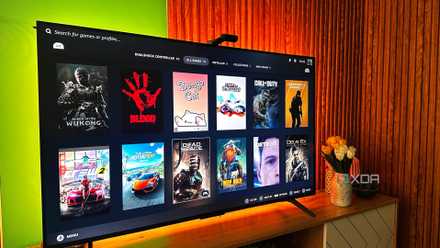
Based on initial impressions, the interface is a clean, console-inspired dashboard that's mimetic of the Xbox Series console experience. It consolidates installed games across Steam, Epic Games Store, GOG and your Game Pass library into a navigable build. The Windows taskbar, notifications, and the broader desktop environment all go away when it's active, and it's just as easy to get out of as it is to get in.
I spent $10 to turn my PC into a wireless console, and it's the best couch gaming upgrade possible
My PC gaming library is finally playable the console way
A gaming-first UX that feels complete
My hands-on experience with the Xbox Mode
Having spent some time inside the Xbox Mode has revealed how Microsoft has approached addressing the usability gaps that define Windows as a gaming platform. The first problem the mode solves is the irksome launcher fragmentation which has plagued PC gaming for the better part of a decade now. Inside the shell, the mere fact that I do not have to bounce between three different client applications to launch a game is a remarkable achievement.
Regarding the interface, it is unmistakably console-first. The full-screen dashboard, featured titles, and the "recently added to Game Pass" carousel all mirror the Xbox Series X layout closely enough that muscle memory transfers almost immediately. Controller inputs are accompanied by the characteristic Xbox chime, and that sound feedback, albeit a minor detail, adds to the console-like feel.
What's even more remarkable is that the interface feels like it was designed for gaming, and that design choice is echoed throughout the ecosystem. Not once during my experience did I feel the need to regain control through my mouse and keyboard, and a part of the reason for this is how the Settings overlay and broader input options are integrated.
For example, the text input is well-polished. The on-screen keyboard pops open whenever a search bar is selected, and navigation with a controller is a breeze. The full QWERTY keyboard appears with controller button prompts mapped to each modifier (such as LB/RB for shift) and search results populate as you type. This is the level of detail that determines whether the experience holds up when you're on the couch and a keyboard isn't in the vicinity.
The Settings overlay helps to keep all the essential menus at your fingertips. A quick-access panel brings to the screen the essentials, such as volume, brightness, network and Bluetooth settings without exiting the Xbox Mode. The Gamepad Cursor is particularly noteworthy as well, which lets you use a thumb-stick as a cursor. It's a valuable addition since it bridges the gap for apps that don't have native controller support, or if you feel the need for a cursor at any time.
Microsoft is turning the PC into an Xbox
And it looks stunning
Microsoft has long been aware that it is losing the console war to Nintendo and Sony, and the company's strategic pivot has been obvious for some time. The Game Pass has become the new centerpiece of Xbox's commercial identity, and the broader push to integrate it across every Windows device is an understandable response to the simple reality that, at any given time, more people own a PC than an Xbox, and the PC install base is by far the more lucrative ecosystem to convert.
Score Gaming Gear Deals for Couch-Style PC Play
Fortunately for Microsoft, the Game Pass itself is a solid product, and it wouldn't be surprising to see it eventually position itself as the "Netflix of gaming". Given that trajectory, it's only natural for Microsoft to streamline its ecosystem specifically for PC gamers and dominate the market. Xbox Mode is the most cohesive expression of that strategy to date, and it makes perfect sense since Windows already commands the lion's share of the desktop space.
The feature may have come from Microsoft as a strategic directive, but for the PC gamer, it's a quality-of-life upgrade that was long overdue.
The power of a PC with the comfort of a console?
What makes Microsoft's execution particularly impressive is that nothing worth keeping is sacrificed in the process. The other gaming launchers continue to operate with Xbox Mode without conflict, the launcher epidemic is largely resolved through library aggregation, and for anyone wanting to use their PC as a living room console, the mode is a genuinely valuable addition. The feature may have come from Microsoft as a strategic directive, but for the PC gamer, it's a quality-of-life upgrade that was long overdue. So, if you were indeed looking forward to breaking free of the constraints of your desk and carrying your gaming experience to the couch, all you will need is an HDMI cable, a controller of your choice, and a display to kick back and enjoy.
Xbox PC app
The Xbox app is Microsoft's native gaming hub for Windows, offering access to the Game Pass, cloud gaming, and installed game libraries.