
One of the big draws to console gaming is that you can pick up your controller whenever you feel like playing, and jump straight into your favorite games. That's something that PC gaming can't quite claim, despite the impending release of SteamOS 3 which will go a long way to streamlining the process. But with a few changed settings, an Xbox-compatible controller, and a couple of other apps, I turned my gaming PC into a powerful gaming console to plug into my TV, so I could get through my backlog in comfort on the couch. The best part? It didn't take that long, leaving me to wonder why I hadn't done it sooner.

Waiting for the official SteamOS 3 release? Bazzite is the next best thing you can install on any gaming handheld
It might even be better than SteamOS, to be honest.
Why use a PC as a console?
Why not? They're powerful, have tons of games, and can plug into your TV
Gaming consoles have a reputation for being seamless in being able to wake them from sleep and go straight into a game. Gaming PCs aren't known for being as streamlined, but you know what they are known for? More powerful hardware and a wider variety of games. Why shouldn't you use one as a console replacement at home?
You don't need to have a large, unsightly tower next to your TV anymore either, as mini PCs are as powerful as consoles and far easier to stash under the entertainment cabinet. Or you could build a SFF PC in a shoebox-sized case, and then it's even more console-esque.

5 reasons a mini PC is the best gaming console replacement you can get
Mini PCs are small and powerful enough to put your console to shame
Set Windows to auto-login
Consoles never ask for your account log-in details after the first time you set them up, and that's how we want our TV PC to behave. It's fairly simple to set Windows to not ask for your password on boot, but I would caution that this gives anyone who has access to your computer easy access to whatever is saved on it. It might be a good idea to only install games on this machine, and to block cloud storage, etc., so that it doesn't save your important documents.
Here's how to get Windows to not ask for login details on every boot:
- Open the Start Menu and search for netplwiz, then run the program.
- Uncheck the box next to Users must enter a user name and password to use this computer.
-
If you can't see the checkbox, open an admin Command prompt and enter:
reg ADD "HKLM\SOFTWARE\Microsoft\Windows NT\CurrentVersion\PasswordLess\Device" /v DevicePasswordLessBuildVersion /t REG_DWORD /d 0 /f
You might have to reboot after entering that string into the registry, or you might only need to exit the netplwiz tool and launch it again. Once the checkbox is clear, you can reboot and Windows will stop asking for your login details.

10 best keyboard shortcuts every Windows user should know (and probably doesn't)
Your keyboard is hiding a huge productivity boost
Installing Playnite
One launcher to play them all and, in the living room, unite them
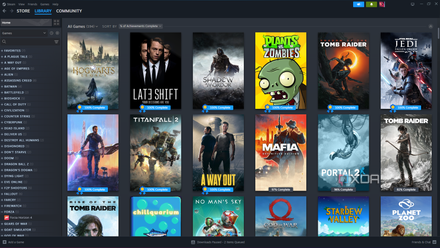
Steam isn't the only game launcher on PC, and chances are you have games on several launchers to choose from. You could add every other game as a non-Steam game, but it would take forever. Instead, it's easier to set up a launcher that connects all the other launchers together. The most fully-featured is Playnite, which is our favorite to use on the ROG Ally, but you could also choose GOG Galaxy, or Heroic Games Launcher if you want to add Epic Games Store and Amazon Games.Playnite takes five minutes to set up once downloaded, and you can add games from the following launchers:
- Amazon Games
- Battle.net
- Epic Games Store
- GOG
- Humble
- itch.io
- EA
- Steam
- Ubisoft Connect
- Xbox GamePass / MS Store
Playnite
If you've already got your games installed on your PC, Playnite will scan for them, download the relevant metadata, and populate its own dashboard. And you can link those accounts as well, so you can use Playnite to see the games you own but don't have installed. Once set up, use Task Scheduler to have Playnite run when your PC boots, so you'll always be at the dashboard when you want to game.
6 best game launchers to organize your game collection
Tired of scrolling through dozens of launchers to find a game you want to play? use one of these apps to store your entire collection in one place
Now for some cool add-ons
You'll want some accessories as well
Consoles wouldn't be very convenient without a good controller, and the Xbox wireless controllers are the best option for PC users who want to turn their computer into a console. While there are many third-party options, you'll need individual dongles for each to play wirelessly. The first-party Xbox controllers not only connect via Bluetooth, but if you can find the Xbox Wireless Adapter for Windows 10, you can connect up to 8 via Wi-Fi direct, just like a real Xbox console.
Add a wireless keyboard with an integrated touchpad for those few times you need to type or use a mouse, and you're all set to start gaming.
-
Xbox Wireless Controller
Cloud gaming is one of best ways to play games on the Surface Pro 9, and if you're going to be using Xbox Cloud Gaming, the Xbox Wireless Controller is a must. It's very comfortable and comes in a range of colors that's always growing.
-
Microsoft Xbox Wireless Adapter for Windows 10
The Microsoft Xbox Wireless Adapter lets you connect up to 8 Xbox controllers to a Windows 10 or 11 PC.
-
Logitech K400 Plus
For those times you really can't avoid using a keyboard and mouse on your console computer, get a wireless keyboard with integrated touchpad to make it even easier.
Set up Wake-on-LAN so you can get things ready from anywhere
Wake-on-LAN is a cool feature that lets you turn your PC on from anywhere, but it's slightly clunky to use. Wolow is an awesome mobile app that links to your PC and lets you use WoL from anywhere, so you can get your console replacement ready for action wherever you are.
I set up WoL on my PC, and now I can turn it on from wherever I am in the house. If I set up an L2 VPN, I'd be able to send the magic packet from anywhere, and then my console computer would be ready and waiting when I get home.
Now kick back and relax
Couch gaming isn't just for consoles
Now you've got a couch gaming console replacement that will be easy to control, and likely more powerful than the consoles available on the market. The only thing you won't have is some of the console-exclusive games, so keep that in mind while deciding if you prefer a more powerful PC or a gaming console plugged into your TV.

10 biggest console-exclusive games that make me wish I wasn’t a PC gamer
There’s nothing more tantalizing than a game you can’t play.