
Summary
- Milk-V Mars is a budget-friendly RISC-V system that suffers from software issues, lacking Wi-Fi and Bluetooth functionality.
- Debian doesn't support many essential apps, while Ubuntu is extremely difficult to set up.
- Purchasing the Milk-V Mars may lead to frustration due to software glitches and limited app compatibility.
RISC-V processors may not be as popular as their Arm counterparts, but they’ve started making their appearance in the consumer space over the last couple of months. If you’re as excited about this emerging technology, you’ve likely heard about Milk-V, a company that’s manning the RISC-V helm by producing budget-friendly RISC-V systems instead of expensive industry-grade hardware.
The Milk-V Mars is one such affordable SBC that ditches conventional Arm and x86/64 CPUs in favor of a processor backed by the RISC-V ISA. Specs-wise, the Mars is one of the more powerful boards from Milk-V and is miles ahead of its Duo and Duo S siblings in terms of processing capabilities.
But having spent some time with the Mars board, I noticed plenty of glaring weaknesses in the SBC — and I'm not even talking about the performance issues that the RISC-V ISA is infamous for.

6 of the best starter SBCs for your DIY projects
Want to get into the world of SBCs but aren't sure where to start? Here are six of our top recommendations
About this review: Milk-V sent me the Mars SBC alongside other devices, including the Jupiter mini-ITX motherboard. But the review is filled with my own opinions and the company had zero input into the contents of the article.
Milk-V Mars
It's mostly useless in its current state, though
- Storage
- microSD card, eMMC
- CPU
- Starfive JH7110
The Milk-V Mars is a credit-card-sized SBC armed with a Starfive JH7110 processor that's based on the RISC-V instruction set architecture. While it's cheaper than other SBCs on the market, the Mars is afflicted with several glaring issues on the software front.
- Budget-friendly
- Decent selection of I/O ports
- No Wi-Fi or Bluetooth functionality
- Official OS images are a complete mess
- Pathetic app support
- Occasional glitches and bugs
Pricing and release date
The Milk-V Mars debuted last year, with the cheapest version of the SBC bearing 2GB RAM and a $40 price tag. if you want more RAM, you can upgrade to 4GB or 8GB variants by shelling out $50 and $70 respectively. International users can purchase the device from Arace, where the products are often available at discounted prices. You can technically buy it on Amazon as well, though third-party sellers tend to charge exorbitant rates for the SBC.
Milk-V Mars
- Storage
- microSD card, eMMC
- CPU
- Starfive JH7110
- Memory
- Up to 8GB LPDDR4 memory
- Operating System
- Ubuntu 24.04, Debian 11
- Ports
- 4x USB Type-A, 1x RJ45, 1x M.2 E-Key, 1x MIPI-CSI
- Display
- 2x MIPI DSI, 1x HDMI
- Wireless Connectivity
- No
Design and ports
A cool design marred by a lack of wireless connectivity options
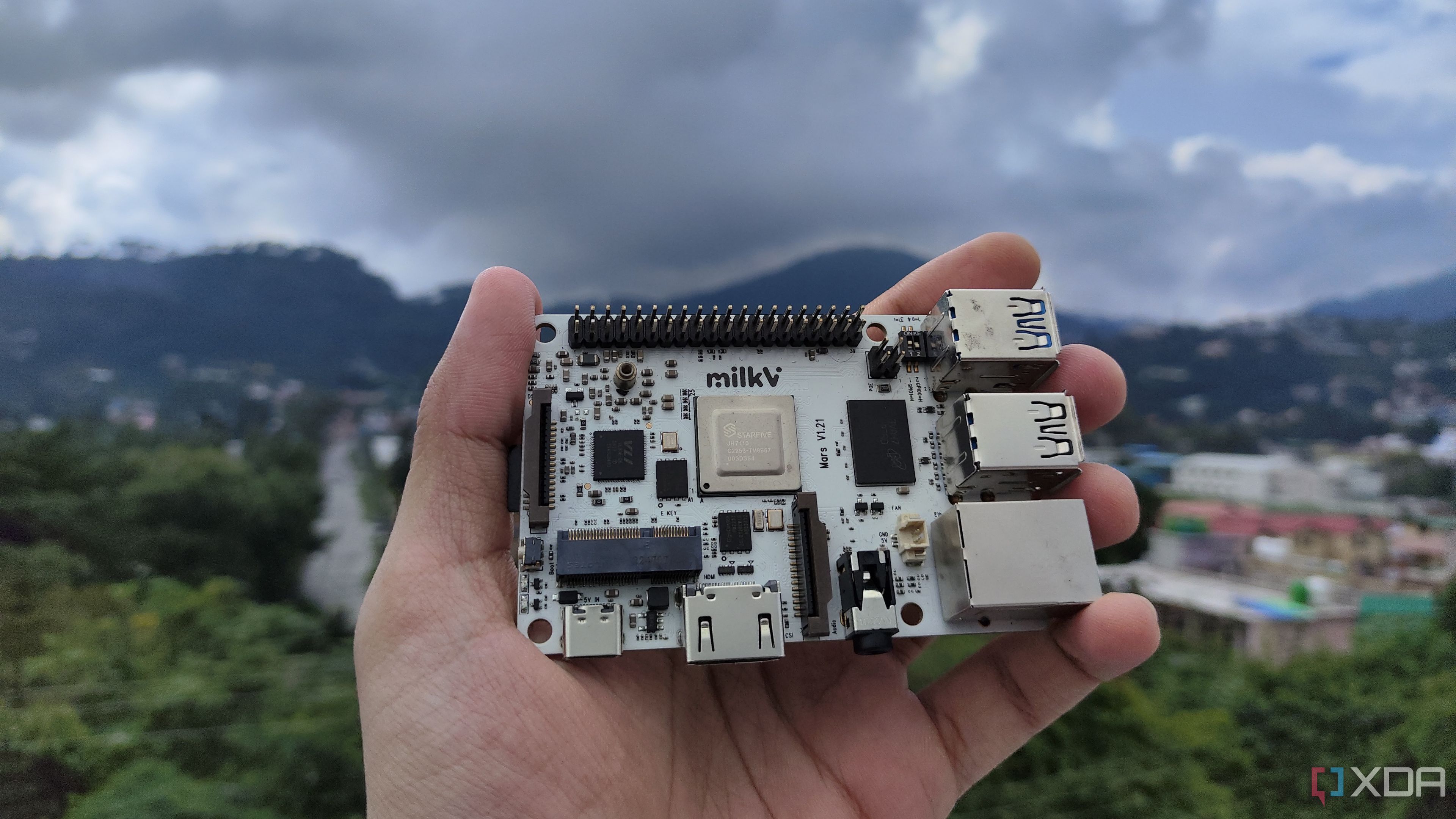
The Milk-V Mars is an all-white board with a RISC-V-based StarFive JH7110 SoC as its main draw. On the RAM front, you can choose between 2GB, 4GB, and 8GB of LPDDR4 memory, while an eMMC slot and a microSD card serve as the storage provisions.
Apart from the cool-looking white exterior, the SBC is the same size as the Raspberry Pi 5, though there are plenty of differences between the two. For instance, you get only one full-sized HDMI connection instead of two mini-HDMI ports alongside a dedicated microphone jack.
You also get a decent selection of USB ports alongside two MIPI-DSI sockets and one MIPI-CSI header. The lack of Bluetooth and Wi-Fi facilities is a real buzzkill, though the SBC comes with an M.2 E-Key slot where you can install a small WLAN card. There is an onboard Ethernet connector that’s capped at 1GbE bandwidth, and you have the regular 40-pin GPIO headers you’d expect in an SBC.
The lack of Bluetooth and Wi-Fi facilities is a real buzzkill.
Software
Debian 11 has several compatibility issues
With the striking appearance of the Milk-V Mars out of the way, it’s time to go over the software aspect of the SBC. Milk-V lists Ubuntu and Debian as the official images for the Mars, though both of them have some terribly annoying problems that need to be addressed in-depth. Leaving the issues plaguing the Ubuntu image for later, setting up Debian was fairly straightforward, as all I had to do was flash the ISO on a microSD card and use it as the boot drive.
Since the Mars is equipped with a DIP switch, I just had to toggle the GPIO0 and GPIO1 toggles to 1 and 0 respectively to boot from the microSD card. After supplying power to the Milk-V Mars via the USB Type-C port, I connected it to my Acer KG281K monitor via the HDMI port. And that’s when things started going downhill.
Before I could type milkv as the password on the login page, the monitor began displaying horizontal lines running along the screen. A few seconds later, the screen started flickering before going completely dark. I changed the display and power cables for both the monitor and the Milk-V Mars, but the end result was the same. Since I was unable to reproduce any of these issues on my other PCs, it became clear that the monitor wasn't the source of the problem. When I connected my Uperfect UGame K118 portable monitor to the Milk-V Mars, the horizontal lines made an appearance once again.
I eventually connected it to my 1920x1080 Acer KG221Q, and apparently, a monitor with a slightly lower resolution was all I needed to boot into Debian. Once I’d finally entered the OS, I was greeted by a lackluster selection of apps. In fact, the only usable applications were Firefox, Files Manager, Extensions, and the good ol’ Terminal – and the last three are built-in utilities rather than third-party applications.
Regardless, I had to extend the primary partition to 64GB microSD if I wanted to install more apps on the SBC. So, I installed GParted using the terminal. But after extending the partition, I was unable to install any other app besides GParted and Gimp. Even common applications like Docker, Snap Store, Thunderbird, Chromium, and LibreOffice failed to work on the SBC.
Even common applications like Docker, Snap Store, Thunderbird, Chromium, and LibreOffice failed to work on the SBC.
Leaving aside the slow performance when running Gimp, Firefox was the only app I could use on the Milk-V Mars, though it became a lagfest the moment I opened more than three tabs. To add insult to injury, the Debian ISO was last updated in November 2023, so the company has had plenty of time to fix things. With Debian 11 being a colossal failure (yeah, it’s not even the latest version of the distro), it was time to look at the other operating systems. I low-key wish I’d stopped reviewing the Milk-V Mars at this stage, because things were about to get a lot worse…
Ubuntu isn't worth installing, while DietPi fails to boot
With Ubuntu being ported to practically every device, you’d think the golden child of the Linux ecosystem would at least work on the Mars. While there is an official version of Ubuntu 24.04 available for the SBC, installing it is an absolute nightmare.
For example, you can’t boot into Ubuntu by conventional means. Of course, you’ll have to flash the image on a microSD card, but you’ll also need a USB-to-Serial-TTL cable to SSH into the SBC. If you’ve used the Milk-V Duo S, you may already be familiar with this cable, though the setup procedure is a hundred times more difficult. We'd be here all day if I talk about everything that went wrong with the installation process for Ubuntu. So, I'll conclude by adding that while I was somehow able to get Ubuntu working on the SBC, it wasn’t worth all the hassle.
We'd be here all day if I talk about everything that went wrong with the installation process for Ubuntu.
But there was still some hope left for the SBC, as some forum posts mentioned that it was compatible with an experimental version of DietPi designed for the StarFive JH7110 SoC. Sadly, I was unable to boot into the OS even after flashing the image on separate microSD cards!
Should you buy the Milk-V Mars?
👁 A person holding a Milk-V Mars SBC
The Milk-V Mars is worth your hard-earned money if:
- You don’t mind buying a semi-useless SBC that can only run a handful of tools.
- You’re willing to wait another year or two in the hopes that the Mars will get the app support it deserves.
You should stay away from the Mars if:
- You value your sanity and don’t want to subject yourself to the ordeal of setting up Ubuntu on the device.
- You want a simple, beginner-friendly SBC that works with various OS images.
- You plan to use it for any tinkering projects.
As much as I wanted to love the Milk-V Mars, I just can’t recommend it to anyone, and it’s easily the worst item I’ve reviewed on XDA. That’s a shame, because I’m a fan of the RISC-V ISA and desperately want it to go mainstream. If it were a regular, difficult-to-use microcontroller that cost under $10, I wouldn’t complain about it so much.

I tried to build a NAS with my RISC-V system - here's how it went
Despite some hiccups, the makeshift RISC-V NAS worked surprisingly well
But we’re talking about a $40 SBC which has been out for quite a while. Even if I were to overlook the quirks flaws given its RISC-V roots, the abysmal software and bugs are inexcusable. What's even worse is that when I recently reviewed the Milk-V Jupiter, the mini-ITX motherboard had an extremely straightforward installation process for its operating systems, including different versions of Bianbu, Fedora Workstation, and Ubuntu. In its current state, I'd suggest skipping the Milk-V Mars. Instead, you should check out the budget-friendly Duo S or the recently-released Jupiter motherboard if you want to get a taste of the RISC-V experience.
Milk-V Mars
It's mostly useless in its current state, though
- Storage
- microSD card, eMMC
- CPU
- Starfive JH7110
The Milk-V Mars is a credit-card-sized SBC armed with a Starfive JH7110 processor that's based on the RISC-V instruction set architecture. While it's cheaper than other SBCs on the market, the Mars is afflicted with several glaring issues on the software front.