
Summary
- Milk-V Duo S offers an affordable entry to RISC-V, but lacks GUI support. Nevertheless, it's still ideal for tech-savvy users.
- Flipper Zero is a powerful hacking tool for cybersecurity enthusiasts.
- ZimaBlade is the best SBC for NAS tasks with its Intel processors.
Single-Board Computers may serve as amazing cost-effective solutions for DIY projects, but they can be rather complex for beginners. As if their quirky connections and reliance on the Linux terminal weren’t enough, newcomers to the SBC space may get intimidated by the plethora of options available on the market. So, I’ve compiled a list of the best starter SBCs to help you pick the right device for all your tinkering needs.

Best Raspberry Pi alternatives
The Raspberry Pi is just one of many great single-board computer options available for a variety of projects.
6 Milk-V Duo S
An affordable RISC-V system
Although RISC-V isn’t the perfect platform for beginners, there’s no denying that it has become much more accessible for the average user. That’s mostly thanks to Milk-V’s budget-friendly options, like the Duo S. Priced at a mere $10, the Duo S packs a surprisingly fast SG2000 SoC and can switch between RISC-V and ARM cores at the push of a button.

My first hands-on experience of RISC-V is with the Milk-V Duo S, and I'm excited
The Milk-V Duo S is a RISC-V SBC that has an Arm CPU in tow, though you can't make use of it just yet.
Unfortunately, the Duo S isn’t placed higher on this list because you can’t load a GUI operating system on the SBC. Instead, you’ll need to connect it to your PC and execute commands over SSH, which isn’t very beginner-friendly. Despite its flaws, the Duo S is hands-down the best SBC if you’re looking to get in on the RISC-V action.
Milk-V Duo S
- Brand
- Milk-V
- Storage
- eMMC option available
- CPU
- 1x RISC-V 1GHz, 1x Arm
- Memory
- 512MB
- Operating System
- Linux
- Ports
- USB-A, Ethernet 100Mbps, USB-C
5 Flipper Zero
To unleash the cybersecurity enthusiast inside you
Let me preface this section by saying that the Flipper Zero isn’t exactly an SBC in the conventional sense. However, the ability to flash custom firmware and interface GPIO devices helps it make the cut for this list. If you haven’t heard about it, the Flipper Zero is an all-in-one hacking-cum-pen testing tool and has been quite a hit in the cybersecurity space.
For example, you can use it to check the confidentiality of your Wi-Fi password or analyze wireless signals from your IoT devices. If you’re eager to learn the ins-and-outs of cybersecurity, the Flipper Zero is more than worth your money.
Flipper Zero
4 ZimaBlade
For all your NAS needs
Not everyone needs a noisy, power-guzzling NAS system connected to tons of storage drives. That said, SBC-powered NAS solutions can alleviate your backup and file-sharing woes without occupying a lot of space or skyrocketing your electricity bills.
Designed for NAS workloads, the ZimaBlade is easily the best SBC for anyone who needs a compact storage server. The Intel processors powering the ZimaBlade are far more capable than the Arm CPUs on rival SBCs. Besides possessing built-in SATA ports, this cool-sounding SBC can also be outfitted with 16GB of memory for better performance in virtualization tasks.
ZimaBlade
- Brand
- IceWhale
- Storage
- 32 GB eMMC 5.1
- CPU
- Intel N3450, J3455, E3950
- Memory
- 1x DDR3L SODIMM
- Operating System
- CasaOS, ZimaOS
- Ports
- 2x SATA III, 1x 1GbE, 2x USB-A 3.0, 1x PCIe 2.0 x4, 1x Mini-DisplayPort 1.2
3 Raspberry Pi Zero 2 W
The perfect balance between price and functionality
The Milk-V Duo S may be the cheapest SBC on this list, but the Raspberry Pi Zero 2 W is far more intuitive for beginners. Despite its adorable size, this highly affordable SBC can run the GUI-based Raspberry Pi OS without major slowdowns. While it lacks the horsepower of the mainline Raspberry Pi boards, you can replicate many of the popular community-created projects on the Zero 2 W.
If you’ve never owned an SBC and just want to dip your toes into the DIY landscape without shelling over $20, there’s no better option than RPi Zero 2 W.
Raspberry Pi Zero 2 W
2 Orange Pi 5 Pro
When performance takes priority over all else
At the other end of the performance spectrum is the Orange Pi 5 Pro, a beast of an SBC that’s powered by the high-end Rockchip RK3588S processor. Besides its built-in 6 TOPS NPU and 16GB memory capacity, the Orange Pi 5 Pro ships with a plethora of ports, including the ultra-rare full-sized HDMI connection and a proper PCIe 2.0 slot that doesn’t require you to invest in an external adapter to use SSDs.
The device isn’t lacking on the OS front either, as you can use seven first-party operating systems on the SBC. With its superior performance, the Orange Pi 5 Pro would have dominated this list if not for the perks offered by its sworn nemesis…
Orange Pi 5 Pro 16GB LPDDR5
- Brand
- Orange Pi
- CPU
- Rockchip RK3588S (octo-core 2.4GHz)
- Memory
- 16GB LPDDR5
- Operating System
- Orange Pi OS (Droid), Orange Pi OS (Arch), Ubuntu, Debian, Android 12
- Ports
- 1 × USB 3.0, 3 × USB 2.0, 1 × Gigabit Ethernet, 3.5 mm audio input/output
- Display
- 1 × HDMI 2.1, 1 × HDMI 2.0, 1 × MIPI DSI 4 lane
1 Raspberry Pi 5
The golden standard for SBCs
The Raspberry Pi Zero 2 W may be the best option for budget users, but the RPi 5 wipes the floor with all competition when it comes to software compatibility and community support. As the flagship entry in the most popular SBC lineup, the Raspberry Pi 5 can be used to build any project imaginable, be it a retro gaming machine, home assistant hub, weather station, FM radio, or even a network-wide firewall!
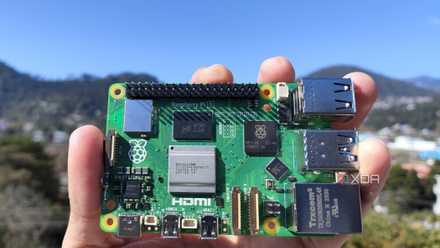
Raspberry Pi 5 review: The holy grail of DIY projects got even better (and rarer)
The Raspberry Pi 5 is one of the most powerful consumer-grade SBCs out there. Sadly, its limited stock means you'll have a hard time finding one.
Having built my fair share of projects with the Raspberry Pi 5, I’ll admit that the device has some flaws. The RPi 5 isn’t the most powerful SBC by any means, and you’ll have to invest in a cooling solution as the device tends to overheat even when in minor workloads. But there’s no denying that the Raspberry Pi is the best pick for any newcomer who wants the most painless experience when building SBC projects.
Raspberry Pi 5
- CPU
- Arm Cortex-A76 (quad-core, 2.4GHz)
- Memory
- Up to 8GB LPDDR4X SDRAM
- Operating System
- Raspberry Pi OS (official)
- Ports
- 2× USB 3.0, 2× USB 2.0, Ethernet, 2x micro HDMI, 2× 4-lane MIPI transceivers, PCIe Gen 2.0 interface, USB-C, 40-pin GPIO header
- GPU
- VideoCore VII
- Starting Price
- $60
Bring your cool ideas to life with these useful SBCs
Apart from the options I’ve highlighted so far, there are a couple of noteworthy additions you should keep on your radar. If you’re planning to run AI and machine learning algorithms, the Libre Compute Alta is a cost-effective SBC that’s equipped with a 5 TOPS NPU. Meanwhile, the Odroid H3+ is perfect for those who want NUC-tier performance from an SBC-sized device. For fans of retro titles, the Anbernic RG35XXSP is a neat little gaming handheld that can emulate plenty of consoles without blowing a hole in your wallet.

These 8 SBCs are perfect for running AI at home
After all, not all LLMs require a full-blown AI PC