
With most next-gen processors including dedicated neural processing units (NPUs), AI is well on its way to becoming mainstream. However, you don’t need cutting-edge AI PCs to utilize the newest artificial intelligence facilities; even a tiny SBC can provide enough horsepower to run the latest LLM models and image generation tools.
-
Orange Pi 5 Pro 16GB LPDDR5
Raspberry Pi on steroids

Best single board computers in 2025
If you've been thinking of tinkering with a SBC, we break down the most common ones and why you'd want them.
In fact, there are quite a lot of SBCs that can pull their own weight in AI tasks. So, we’ve compiled a list of the best SBCs for anything and everything related to AI to help you pick the ideal board for your next project.
Our favorite SBCs for AI workloads in 2024
Nvidia Jetson Orin Nano
Performance for days
The Jetson Orin Nano wraps Nvidia's advanced Tensor cores into a tiny, SBC-sized package. While it's far from affordable, you're not likely to find an SBC that can hit 40 TOPS in AI tasks. Factor in the extensive tools included in Team Green's Jetson SDK, and it's clear that the Orin Nano takes the cake as the AI SBC.
- Built-in Ampere GPU crushes most ML tasks
- Packs all the ports you'll ever need
- Feature-laden Jetson SDK platform
- Expensive
Team Green has always been a key player in the artificial intelligence landscape, and with the popular GPU manufacturer doubling down on chips centered around high-performance AI computations, it shouldn’t come as a surprise that Team Green designed the best SBC for AI workloads. Priced at nearly $500, the Jetson Orin Nano is more expensive than most SBCs on this list, but you get what you pay for.
Although the Orin Nano’s 6-core ARM CPU is decent on its own, the Ampere GPU is what you’re here for. With a max frequency of 625MHz and a whopping 32 Tensor core count, Nvidia’s pint-sized SBC can provide superb AI processing capabilities. As per Team Green, the Orin Nano can achieve an AI performance metric of 40 TOPS, which is rock solid for a tiny system. You also get a decent port selection for other DIY projects, as the SBC possesses four USB-A 3.2 Gen 2 ports, one RJ45 connection, one DisplayPort socket, and a USB Type-C Upstream-Facing Port.
As for the headers and interfaces, the Orin Nano is armed with the usual 40-pin expansion header, two M.2 Key M interfaces, one M.2 key E socket, two MIPI/CSI ports, and a 12-pin power header. The SBC can be powered via a barrel connector, and Nvidia provides a robust set of tools, APIs, and libraries with Orin Nano-compatible JetPack SDK. If you’re someone looking to kickstart your journey into deep learning but aren’t willing to shell out thousands of dollars on a huge system, the Nvidia Jetson Orin Nano is hands-down the best SBC on the market.
BeagleBone AI-64
A cool-looking, high-performance SBC
The BeagleBone AI-64 is an all-white SBC armed with an advanced C7x DSP, allowing it to hit 8 TOPS in AI-related work. A bit lacking in the memory department, the AI-64 is still a worthwhile purchase if you want solid AI performance without sacrificing the number of ports on your SBC.
- Lots of IO connections
- Can easily hit 8 TOPS
- Plenty of documentation
- Memory capped at 4GB
If you’ve been a part of the DIY projects landscape, you may have seen BeagleBoard’s set of sleek white SBCs. The BeagleBone AI-64 is one of the newest boards from the company, and it’s a solid option for those who wish to build AI projects with an SBC. On the processor side, the BeagleBone AI-64 rocks two Arm Cortex-A72 processors, though it's the programmable C7x Digital Signal Processor (DSP) chip that sets the AI-64 apart from most SBCs.
For starters, the C7x has a huge 512-bit SIMD data path on top of a neural network accelerator. Combine these with the SBC’s matrix multiply and vision processing accelerators, and it’s easy to see how it can hit up to 8TOPS. The max 4GB DDR4 memory is a bit of a buzzkill, especially if you’re planning to run complex AI tasks that require at least 16 GB RAM.
The port and interface selection, despite not being as diverse as the Orin Nano or even the Raspberry Pi 5, is still pretty decent. You get two USB 3.0 Type-A ports, two CSI connectors, a (separate) DSI interface, a microSD card slot, an M.2 E-key connection, a mini-DisplayPort socket, an eMMC slot and a 1GbE jack alongside two UART debug pins, which offer solid connectivity for most DIY enthusiasts.
Libre Computer Alta
Amazing despite its cheap price
- Storage
- MicroSD card
- CPU
- Amlogic A311D SoC
- Memory
- 4GB LPDDR4 RAM
- Operating System
- Debian, Raspbian, Fedora Workstation
Built for budget DIY experts, the Libre Computer Alta is an affordable SBC that crams four Tensor Cores and eight Neuro Cores into a miniature chassis. It also has an AI accelerator that can deliver 5 TOPS of performance, though app compatibility is another issue althogether.
- Solid hardware encoding provisions
- Plenty of ports
- Affordable
- 4GB RAM can cause issues in demanding workloads
One of the biggest reasons to invest in SBCs is that they won’t blow a hole in your pocket. So, if you’re in the market for a tiny and affordable system that can process AI tasks with relative ease, then you should look no further than the Libra Computer Alta. The Amlogic A311D SoC on the SBC pairs four 2.01GHz Arm Cortex-A73 processors with two slightly slower Arm Cortex-A53 chips and a Mali-G52 MP4 graphics card.
For the artificial intelligence workloads, you get a 5 TOPS AI Accelerator with four Tensor Cores and eight Neuro Cores, which are more than enough for an SBC this inexpensive. Like the BeagleBone AI-64, the Alta’s memory is also capped at 4GB, but it should be more than enough for most SLMs and some of the simpler LLMs.
IO-wise, you’re looking at four USB 3.0 Type-A, an RJ45 socket, a 40-Pin GPIO interface, a UART header for debugging, a microSD card slot, and an HDMI 2.0 socket capable of 4K output. Its Amlogic Video Engine 10 decoder is another useful feature of the SBC, though it’s not something you’ll use a lot in AI tasks. All-in-all, the Libre Computer Alta may not be the fastest device for AI workloads, but it’s easily the most affordable option on this list with its $70 price tag.
Raspberry Pi 5
Be sure to connect the right accessories
- CPU
- Arm Cortex-A76 (quad-core, 2.4GHz)
- Memory
- Up to 8GB LPDDR4X SDRAM
- Operating System
- Raspberry Pi OS (official)
- Ports
- 2× USB 3.0, 2× USB 2.0, Ethernet, 2x micro HDMI, 2× 4-lane MIPI transceivers, PCIe Gen 2.0 interface, USB-C, 40-pin GPIO header
- GPU
- VideoCore VII
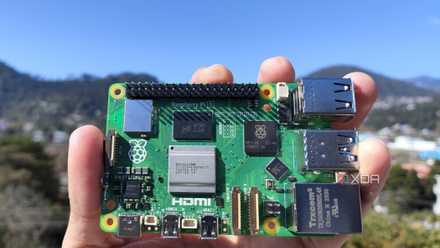
The Raspberry Pi is back, and the fifth iteration of the SBC is a lot more capable than the older models. From a new quad-core Arm Cortex-A76 CPU, support for dual monitor setups at 4K 60Hz, and a dedicated power button, there's a lot to love about this palm-sized computer.
- Dual 4K display support
- Up to 8GB of LPDDR4X RAM
- Relatively inexpensive
- Not all that impressive on its own
The Raspberry Pi series is easily the most talked-about family of boards in the SBC landscape. However, as someone who previously attempted to run LLMs via Ollama on the Raspberry Pi 5, I can confidently state that on its own, the fastest RPi board still has a lot of ground left to cover on the AI front. XDA’s SBC maestro Daniel Allen also arrived at a similar conclusion when he tinkered with some chatbots on the SBC.
Sure, the 2.4GHz quad-core Arm Cortex-A7 processor and VideoCore VII GPU can provide decent performance on most DIY SBC projects, but AI workloads are a different story altogether. However, the tide turns in the RPi5’s favor once you arm the SBC with the unique accessories developed for the SBC. For instance, connecting the Coral Edge AI TPU to the Raspberry Pi 5 can boost its capabilities in machine learning tasks to the next level.
Raspberry Pi 5 review: The holy grail of DIY projects got even better (and rarer)
The Raspberry Pi 5 is one of the most powerful consumer-grade SBCs out there. Sadly, its limited stock means you'll have a hard time finding one.
That’s before you include the new official AI accelerator HAT the Raspberry Pi Foundation released for the RPi 5 a few weeks ago. According to the Cambridge-based firm, the M.2 HAT can boost the Raspberry Pi 5’s computational prowess to 13 TOPS, making it the second most powerful SBC on this list! The 8GB of LPDDR4X RAM and the humongous set of IO options, including 4 USB Type-A ports, Ethernet jack, dual micro-HDMI connections, PCIe 2.0 interface, and 40-GPIO pins, among others, also cement its standing as a solid SBC.
Without its “crutches,” the Raspberry Pi 5 would easily fall over in AI tasks. But if you’re willing to invest in extra accessories, then the newest Raspberry Pi board can become an absolute powerhouse at running LLMs.
Orange Pi 5 Pro 16GB LPDDR5
The more powerful all-blue rival to the RPi family
- Brand
- Orange Pi
- CPU
- Rockchip RK3588S (octo-core 2.4GHz)
- Memory
- 16GB LPDDR5
- Operating System
- Orange Pi OS (Droid), Orange Pi OS (Arch), Ubuntu, Debian, Android 12
- Ports
- 1 × USB 3.0, 3 × USB 2.0, 1 × Gigabit Ethernet, 3.5 mm audio input/output
Armed with a powerful RK3588S chip, the Orange Pi 5 Pro handily beats some of the best SBCs out there, including the Raspberry Pi 5. Performance-wise, it's easily at the top of the SBC charts, and with its built-in NPU, this tiny SBC can even handle AI-oriented tasks.
- Possesses an RK3588S SoC
- Supports a whopping 16GB of memory
- Decent OS support
- Not a lot of documentation or community support
Despite its superior performance, the Orange Pi family is often overlooked because of the uber-popular Raspberry Pi series. But once you compare the AI processing capabilities of the Orange Pi 5 Pro and the barebones Raspberry Pi 5, the former is the undisputed victor. It’s powered by an 8-core RK3588S chip and an Arm Mali-G610 GPU, and both rank pretty high up on the performance tier.
You also get up to 16GB of LPDDR5 memory, which is the second-highest amount of RAM on this list. What’s more, the Orange Pi 5 Pro possesses an embedded NPU that maxes out at 6 TOPS. It also supports a decent number of operating systems right-out-of-the-box, including Unbuntu, Debian, Android, and even its own Arch and Droid-flavored Orange Pi OS.

Orange Pi 5 Pro review: Best bang for the buck
It's like a Raspberry Pi 5, but faster and better
On the ports front, the Orange Pi 5 Pro ships with four USB Type-A ports, an audio jack, an Ethernet socket, two full-sized HDMI connections, a MIPI CSI slot, 40 GPIO headers, a micro-SD card slot, and an M.2 M-Key interface. In short, the Orange Pi 5 Pro serves as a solid option for those who want a more powerful version of the Raspberry Pi 5 without investing in additional peripherals.
Odroid H3+
NUC-grade hardware in an SBC form-factor
The Odroid H3+ is a highly-capable device that, unlike your average SBC, is powered by an Intel Pentium N6005 processor. Once you include the Intel UHD Graphics and support for 64GB of memory, it's clear that the Odroid H3+ can crush pretty much any SBC-oriented workload you can throw at it with ease.
- Intel Pentium N6005 is a powerful CPU for an SBC
- Can handle up to 64GB of memory
- Enough SATA and M.2 ports for all your storage needs
- Expensive
Most SBCs, be it the premium Nvidia Jetson Orin Nano or the budget Libre Computer Alta, are equipped with Arm chipsets. Unfortunately, most Arm processors can still compete with desktop-grade CPUs on an even footing when it comes to performance. Luckily, the Odroid H3+ is a blazing-fast SBC that forgoes energy-efficient Arm processors for a full-fledged Intel Pentium processor.
To be more specific, the H3+ ships with a quad-core Intel Pentium N6005 CPU that can hit a burst frequency of 3.30GHz. Assuming you have adequate cooling provisions, you can even toggle an Ultra Processing Mode on the H3+ and force the N6005 to operate at max frequency.
Thanks to its 64GB memory capacity, you don’t have to concern yourself with the high RAM requirements of the more complex LLMs. Its storage provisions are just as interesting: instead of featuring a microSD card slot, the H3+ comes with a 4-lane PCIe 3.0 socket for NVMe SSDs alongside two SATA connections, where you can plug additional storage drives.
The rest of the port layout is just as solid, with two 2.5GbE ports, one DisplayPort socket, one HDMI port, four USB Type-A connections, a 24-pin expansion header, and dedicated audio jacks providing ample IO connections for you to plug in your favorite accessories.
Coral Dev Board
Enough APIs for any projects
True to its name, the Coral Dev Board is designed for developers who wish to integrate TensorFlow libaries and APIs into their SBC projects. While it's a bit lacking on the performance front, the Coral Dev Board's selling-point lies in its top-notch software and programming tools.
- Amazing set of tools for any project
- Powered by Google's Edge TPU
- Low performance for the price
- Limited IO functionality
If you thought Coral’s USB accelerator for the Raspberry Pi 5 was neat, then you’ll be pleased to know that the Google-owned firm has a robust set of AI tools, including a full-blown SBC! Built to help in the development of machine-learning projects, the Dev Board leverages the onboard Google Edge TPU coprocessor to provide a horsepower of 4 TOPS.
At its core, the Coral Dev Board houses an NXP i.MX 8M SoC alongside the GC7000 Lite integrated graphics processor. Sadly, RAM isn't the Dev Board’s finest aspect, as you’re limited to a maximum of 4GB LPDDR4 memory. The same goes for the device’s ports, as you only get one USB Type-C connection, a USB Type-A 3.0 port, a USB Type-B micro serial console interface, an RJ45 socket, a 40-pin GPIO interface, a full-size HDMI 2.0a port, a 3.5mm audio jack, and dedicated eMMC and SD card slots.
Nevertheless, the Coral Dev Board’s plethora of APIs, pre-trained TensorFlow modules, and rich documentation should more than makeup for its drawbacks.
Khadas VIM4
For those who love switching between distros
The Khadas VIM4 is a solid SBC for DIY enthusiasts who love working with different operating systems. With an adequate port selection, decent performance, and plenty of first-party peripherals, the Khadas VIM4 provides enough features to justify its pricing. It even has an NPU model for those who like tinkering with AI.
- Compatible with the Wi-Fi 6 standard
- Decent number of ports
- Supports 8K24FPS decoding
- The NPU model could have been more powerful
Khadas is yet another SBC manufacturer that has created some great boards that specialize in AI tasks. One such device is the Khadas VIM4, which packs solid deep-learning capabilities with an affordable price and a bevy of supported operating systems. The Khadas VIM4 has an Amlogic A311D2 SoC powering the SBC, which is an upgraded version of the SoC on the Libre Computer Alta. However, that’s where the similarities end, because the VIM4 supports up to 8GB of LPDDR4X memory.
On the AI side of things, the VIM4’s NPU can only manage to hit 3.2 TOPS. On paper, the VIM4 should be weaker than its predecessor in AI-intensive workloads, since the latter can achieve 5 TOPS with its built-in NPU. However, the larger memory bandwidth, combined with the superior processor and GPU specs, allows the VIM4 to outperform every other Khadas SBC at more complex deep-learning algorithms.
The Khadas VIM4 also rocks a solid collection of ports, including two USB Type-A connections, an M.2 slot, a microSD card, an RJ45 socket, a 40-pin header, two CSI, and one DSI interface. Between its multitude of first-party accessories, inexpensive price, and support for tons of OS, there’s a lot to love about this SBC.
Modern SBCs are more than capable of running AI
Besides the options we’ve mentioned so far, there are plenty of other boards that are worth checking out if you wish to incorporate AI into your projects. For example, the Udoo Bolt lineup houses ultra-fast Ryzen Embedded chips and Vega iGPUs, making it great for AMD lovers. Likewise, the Ultra96-V2 makes for a fine addition to any ML enthusiast’s SBC collection.
But for those who want sheer processing power, then there’s no beating the Nvidia Jetson Orin Nano and its Tensor cores. If budget is an issue, then you can go for the cheaper Libre Computer Alta instead. Then there’s the Raspberry Pi 5, a highly versatile SBC that gets more powerful once you start outfitting it with the proper accessories.
Nvidia Jetson Orin Nano
Performance for days
The Jetson Orin Nano wraps Nvidia's advanced Tensor cores into a tiny, SBC-sized package. While it's far from affordable, you're not likely to find an SBC that can hit 40 TOPS in AI tasks. Factor in the extensive tools included in Team Green's Jetson SDK, and it's clear that the Orin Nano takes the cake as the AI SBC.