
The Raspberry Pi 5 is the latest entry in the uber-popular SBC lineup, and it packs enough upgrades to make it a worthwhile addition to any tinkerer's workshop. From its superior quad-core Arm Cortex A76 processor to the new PCIe Gen 2 interface and a dedicated power button, this powerful little SBC is not only great for hobbyist projects, but can also serve as a portable PC for everyday tasks.
Although you can technically use it in a headless setup, you might want to look into some extra peripherals if you want to push this palm-sized system to its limit. With so many Raspberry Pi accessories available online, it's easy to feel overwhelmed. But don't worry, we’ve curated a list of the best peripherals to help you make the most out of your Raspberry Pi.
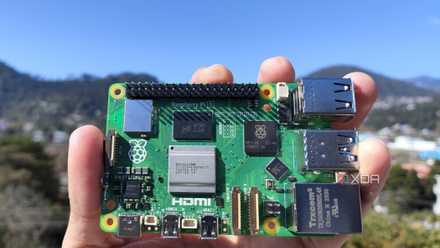
Raspberry Pi 5 review: The holy grail of DIY projects got even better (and rarer)
The Raspberry Pi 5 is one of the most powerful consumer-grade SBCs out there. Sadly, its limited stock means you'll have a hard time finding one.
Our top picks for Raspberry Pi 5 accessories in 2024
-
Best microSD card
SanDisk Ultra microSD card
$20 $26 Save $6The Raspberry Pi SBCs primarily rely on a microSD card to store everything from the operating system to the files. Thanks to its 1.5TB max capacity and a blazing-fast 150MB/s transfer speed, the SanDisk Ultra is the perfect storage companion for the Raspberry Pi 5. It’s also quite inexpensive, so you can grab more than one of these microSD cards without breaking the bank.
-
Best camera module
Freenove 5MP Camera for Raspberry Pi
The newest member of the Raspberry Pi family supports dual 4-lane MIPI connectors instead of separate DSI and CSI ports. As such, it requires a specialized 15-pin ribbon connector instead of the usual 22-pin cable. This kit from Freenove contains both cables alongside a 5MP camera module that you can mount on an adjustable holder.
-
Best touchscreen display
GeeekPi 7 Inch Capacitive Touchscreen for Raspberry Pi
GeeekPi’s 7-inch touchscreen display has a 1024x600 resolution and a 60Hz refresh rate, which is more than enough for most Raspberry Pi 5 projects. Besides providing audio output thanks to a set of speakers, the portable monitor can also be mounted on top of the latest Raspberry Pi board, making it perfect for those who want a compact display for the SBC.
-
Best metal case
Geekworm Metal Case P579-V2
Since the Raspberry Pi 5 doesn’t ship with a protective case, it can easily accumulate dust or get damaged by accidental spillage. As such, the Geekworm P579-V2 Metal Case is the perfect way to safeguard your Raspberry Pi 5. Plus, it’s a large case that provides ample space for you to plug in other accessories. What’s more, the P579-V2 also includes the official Active Cooler, so you don’t have to buy the latter separately.
-
Best cooler
Raspberry Pi Active Cooler
Aside from the low supply, one of the biggest issues you’ll encounter while using the Raspberry Pi 5 is its tendency to overheat at even the most basic workloads. Therefore, it’s a good idea to invest in the Official Active Cooler for the Raspberry Pi 5 as it not only includes a highly-capable blower fan, but also has an aluminum heatsink and pre-applied thermal pads to prevent the SBC from getting too toasty.
-
Best USB Hub
Anker 4-Port USB 3.0 Hub
$15 $18 Save $3If you’re someone who loves to make projects with the Raspberry Pi, it’s possible to run out of ports on the device after plugging in all your peripherals. That’s where Anker’s inexpensive USB comes in handy: by splitting one of the Raspberry Pi 5’s USB 3.0 sockets into four ports, you can easily connect all your USB-powered accessories to the SBC.
-
Great for circuitry projects
Raspberry Pi Monitor
Like its brethren, the Raspberry Pi 5 can be used in a headless setup. However, a dedicated monitor has plenty of perks, including easier troubleshooting and the ability to use your green little board as a regular PC. Thanks to the inexpensive Raspberry Pi Monitor, you can get a 15.6-inch, 1920x1080 IPS display for just $100!
-
GeeekPi N04 M.2 NVMe to PCIe Adapter
$13 $23 Save $10Up until the Raspberry Pi 4, you could only connect portable SSDs to the Raspberry Pi boards, but thanks to the PCIe interface, you can even pair a high-speed NVMe SSD with the SBC. Since you can’t directly plug the SSD into the PCIe interface, you’ll need an NVMe to PCIe adapter, and the GeeekPi N04 HAT is one of the best HATs for this purpose.
-
Best NVMe SSD
Kingston NV2 2280 NVMe SSD
While you can technically pair ultra-fast PCIe Gen 5 SSDs to the Raspberry Pi 5, you’re not going to see much of a difference if you opt for a cheaper NVMe drive. Kingston is well-known for manufacturing high-quality drives that strike the perfect balance between price and performance, and the company’s NV2 M.2 2280 is easily one of the best SSDs for the flagship Raspberry Pi board.
-
Best power supply
CanaKit 45W USB-C Power Supply
Unlike the Raspberry Pi 4, which requires a power supply of 5V/3A, the Raspberry Pi Foundation raised the power requirements of the newest RPi board to 5V/5A. While you can use any ol’ power adapter with the Raspberry Pi 5, doing so will limit the amount of current sent to the USB ports. This makes CanaKit’s 45W power adapter perfect for the SBC, and its high power rating means you can use it to charge other devices, too.
-
Best sound card
Ugreen USB Sound Card
$14 $17 Save $3With the AUX port missing from the Raspberry Pi 5, you’ll require some kind of adapter to play back audio from the SBC. Ugreen's USB Sound Card is perfect for this purpose; unlike your average USB-to-AUX adapter, this sound card has a built-in DAC to improve sound quality. To top it off, it even has a microphone port that you can use for audio recording purposes.
-
Best mini-tower case
GeeekPi Mini Tower Kit
If you’re planning to use your Raspberry Pi 5 as a miniature PC, then you might want to consider the GeeekPi Mini Tower Kit. Aside from the RGB-lit mini tower case, you also get a GPIO extension board alongside a powerful air cooler. As if that’s not enough, the case even houses a small OLED screen, which you can freely program with the Raspberry Pi 5.
-
Best Micro HDMI Cable
Amazon Basics Micro HDMI to HDMI Cable
Modern monitors and graphics cards are equipped with full-sized HDMI or DisplayPort interfaces. So, the average user may not possess the adapters and cables for smaller HDMI ports. Unfortunately, the Raspberry Pi 5 continues the trend of sending video output via micro HDMI. This makes the Amazon Basics Micro HDMI to HDMI Display Cable an essential accessory for anyone who has to connect the Raspberry Pi 5 to a monitor.
-
For AI enthusiasts
Raspberry Pi AI Kit
Designed to work in tandem with a camera module, the Raspberry Pi AI Kit adds a Halio AI Accelerator capable of providing 13 TOPS of performance to the newest member of the RPi family. Although you can't use it with LLMs, the official AI Kit is highly useful for developers who require image recognition capabilities in their SBC projects.
-
Great for circuitry projects
Allecin Breadboard and Jumper Wires Kit
Armed with a 40-pin GPIO header, the Raspberry Pi 5 can connect with a variety of sensors, motors, and other circuitry modules. Once you start working with resistors and LEDs, you can use a breadboard to prototype the circuit without soldering each component - and that's where this breadboard and jumper wires kit from Allecin comes in handy.
Enhance your Raspberry Pi 5's functionality with our favorite peripherals
While there’s no doubt each of the accessories above can improve your Raspberry Pi 5 experience, you don’t have to go out and buy them all at once. Apart from the microSD card and the Micro HDMI to HDMI cable, the rest of the peripherals, cables, and cases depend entirely on your use-case.
For newcomers, I’d suggest buying the Geekworm P579-V2 Metal Case, as it not only provides solid protection to your Raspberry Pi 5 but also prevents it from hitting obscenely high temperatures thanks to its active cooling. From there, consider picking up the Anker 4-Port USB 3.0 Hub and GeeekPi Touchscreen Display, as they are useful in almost any project.
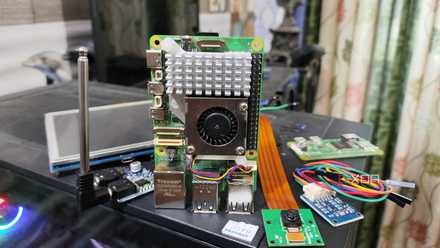
Channel your inner DIY god by building these 10 complex Raspberry Pi projects
Here are ten complex Raspberry Pi projects to train your tinkering muscles
Conversely, you can probably save the Freenove camera module for last since it's a niche product with specific uses-cases, and the same holds true for the PCIe SSD and its adapter. But if you're not willing to drop hundreds of dollars on optional peripherals, there are a number of cool ideas you can bring to life with your Raspberry Pi.
Raspberry Pi 5
- CPU
- Arm Cortex-A76 (quad-core, 2.4GHz)
- Memory
- Up to 8GB LPDDR4X SDRAM
- Operating System
- Raspberry Pi OS (official)
- Ports
- 2× USB 3.0, 2× USB 2.0, Ethernet, 2x micro HDMI, 2× 4-lane MIPI transceivers, PCIe Gen 2.0 interface, USB-C, 40-pin GPIO header
- GPU
- VideoCore VII
- Starting Price
- $60
The Raspberry Pi is back, and the fifth iteration of the SBC is a lot more capable than the older models. From a new quad-core Arm Cortex-A76 CPU, support for dual monitor setups at 4K 60Hz, and a dedicated power button, there's a lot to love about this palm-sized computer.