
I used to think my PC was just a tool, but after integrating it into my home lab, I’ve realized it’s actually the heart of my entire digital ecosystem. For a long time, monitoring my system meant glancing at Task Manager or checking temperatures when things felt sluggish. However, bringing that data into Home Assistant has completely changed the game.
In a self-hosted environment, Home Assistant acts as the central nervous system, and adding your PC to that dashboard is a massive power move. It’s no longer just about seeing CPU usage; it’s about visibility, power management, and creating a workspace that actually reacts to how I work. I started it as a "nice-to-have" project, and quickly it turned into an essential part of my workflow. Here is why connecting my PC to the smart home is a bigger deal than I thought.
How I set it up
Connecting my PC to my homelab in a simple way
I didn’t want a complicated or over-engineered setup. My goal was simple: get useful data from my PC into Home Assistant without spending hours tweaking things.
I started by setting up an MQTT broker using Docker. I used Mosquitto because it’s lightweight and works pretty fine. This acts as the middle layer that lets my PC send data to Home Assistant. Once the container was running and exposed on port 1883, I added the MQTT integration inside Home Assistant and confirmed it was connected.
Next, I installed HASS.Agent on my Windows PC. The setup was straightforward. I just pointed it to my MQTT broker using the local address and port.
After connecting, I enabled a few sensors inside HASS.Agent — CPU usage, memory usage, disk space, idle time, and similar. These are the basics, but they’re enough to understand what’s going on. Almost instantly, these sensors started appearing inside Home Assistant as individual entities.
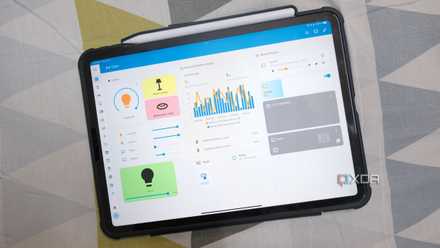
From there, I created a simple dashboard. I added gauge cards for CPU and RAM, a history graph to see trends, and an idle-time sensor. Nothing fancy, just clean and functional.
The entire setup took around an hour. No complex configs, no deep technical hurdles. Just a few tools connected together, and the setup is done.

This lightweight program is a must-have for Home Assistant users like myself
This Windows-based companion app lets you monitor your PC and perform actions without opening Home Assistant.
This is where the value hits
Real-time insights that changed my daily PC usage
Once the data started flowing into my Home Assistant dashboard, it started becoming genuinely useful in my day-to-day life.
Before this, I only noticed my PC when something felt off, like slow performance, random lag, or overheating. Now, I can actually see what’s happening in real time inside Home Assistant. If my CPU suddenly spikes or memory usage stays high, I know immediately. No guessing, no waiting for things to break.
The biggest change for me was awareness. I started noticing patterns. Sometimes, certain apps would quietly eat up RAM over time. Sometimes my PC would stay active even when I wasn’t using it. Earlier, I would never have caught that.
The idle time sensor turned out to be surprisingly useful. It helped me understand how often I step away from my desk and how long my system stays unused but still running. That alone made me rethink how I use my PC daily.
It also helped with small decisions. Should I restart? Is something running in the background? Is my system under load or just feels slow?
It’s not just data, it’s clarity. And once you have that, you start using your PC more intentionally.
Automations changed everything
When my PC started acting instead of just reporting
I connected my PC with Home Assistant for basic monitoring, but automations are what made this setup truly powerful.
Once my PC data was inside Home Assistant, I started creating small automations around it. Nothing complex, just simple actions based on real usage.
For example, when my PC stays idle for a while, I automatically turn off lights and reduce unnecessary power usage. If I start using my PC again, things come back on. It feels seamless and natural.
I also set up alerts for high CPU usage. If something unusual is happening in the background, I get notified instantly. Earlier, I would only notice after things slowed down.
These small automations added convenience to my daily routine without me thinking about it. I don’t have to manually check anything or remember to do basic tasks.
5 useful Home Assistant automations I wish I had in my life sooner
From energy tracking to turning off devices when not in use, Home Assistant helps improve my life by automating my smart home.
This is actually a bigger deal than I thought
What started as a small experiment turned into something I now rely on every day. I didn’t expect monitoring my PC through Home Assistant to make such a difference, but it changed how I interact with my setup.
I’m no longer reacting to problems; I can see them coming. My PC isn’t just a device anymore; it’s part of my overall system. It works with my environment, not separate from it. Looking back, this feels less like a “nice to have” and more like something I should’ve done much earlier.