
Microsoft OneNote has been my loyal note-taking companion for years. I mastered it, navigated its quirks, and built my entire note-taking system around it. But as my needs grew, its limitations started to affect my workflow. That's why, after much consideration, I've made the switch to UpNote.
UpNote seems to address OneNote’s pain points with its lightning-fast sync, elegant Linux support, and intuitive organization features like pinning, favorites, Spaces. Here’s why UpNote is the breath of fresh air my note-taking desperately needed.
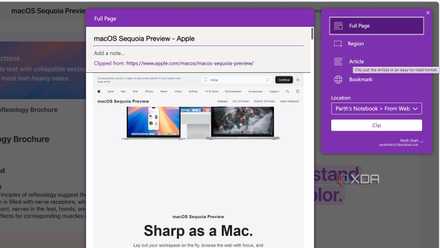
OneNote is Microsoft's neglected masterpiece
OneNote is a surprisingly great tool that manages to fly under Microsoft's radar
UpNote has a native app on Linux
A true cross-platform solution
OneNote offers native apps on all the platforms, except for Linux. It wasn’t a dealbreaker for me before. However, now that I have started tinkering with home lab and Docker containers, Linux has become a crucial part of my workflow. I can use OneNote web version to access my home lab notes, but let’s face it, the web version is simply average compared to a native solution.
This is where UpNote shines. The fact that it offers a proper, native application for Linux is no longer just a nice-to-have; it's become a significant advantage. It results in a seamless, consistent note-taking experience across all my devices.
OneNote sync speed is still terrible
UpNote is way better here
Despite being in the market for years, OneNote’s sync speeds still leave a lot to desire. There have been many instances where I lost my edits, and even worse, new notes. I can't even remember how many times that happened. Because of this, I didn't always trust that my notes were safe and up-to-date.
Then I started using UpNote. The speed at which it saves and shows my notes on all my devices is amazing. When I type something on my computer, it shows up on my phone right away. This quick updating makes it much easier to work because I don't have to wait around or worry if I have the latest version of my notes. It just works. This fast and reliable syncing in UpNote is a big improvement over how slow and sometimes unreliable OneNote was for me.
UpNote has a range of writer-friendly features
Let me draft a rough document in no time
As a writer, certain features enhance my creative process and workflow. The handy add-ons like word count, paragraph count, and sentence count are invaluable for keeping track of my writing progress directly within my notes. The automatically generated table of contents is also a fantastic feature for quickly navigating longer drafts and ensuring a logical flow.
Moreover, the Focus mode is a true boon for concentration that allows me to remove all the distractions. This is a stark contrast to my experience with OneNote. When I needed to work on a quick draft, I had to switch to Microsoft Word to get the job done.

5 best Evernote alternatives to create an effective digital cabinet
The time has come to ditch the green elephant
Quick access to my favorite notes
OneNote lacks such a basic feature
OneNote lacks crucial features like the ability to mark a note as a favorite or pin it to the top. Again, these limitations weren’t a dealbreaker before. I initially managed with its section and page structure. However, as my digital footprint grew with dozens of notebooks and hundreds of pages, it became increasingly difficult to find relevant notes.
This is where UpNote offers a welcome improvement. The ability to mark notes as favorites and pin them to the top of a Space provides a much-needed layer of prioritization. Now, my important meeting notes, ongoing project briefs, or frequently referenced information are just a click away.
In future updates, I would love to see an inclusion of home (like Evernote) where I can have a centralized view of all my most important notes. A calendar view would be a welcome addition too.
Notes organization is basic in OneNote
UpNote Spaces is a game-changer
OneNote follows a basic note organization with notebooks, sections, and pages. It somewhat felt limiting as your notes grew. UpNote, on the other hand, introduces the concept of Spaces, which offers a more intuitive and powerful way to organize information.
I can have a Personal space, a Work space, and individual spaces for different projects I’m involved in. My personal notes remain distinct from my work-related information, and each project has its own dedicated area. This higher-level organization makes it much easier to focus on the task at hand.
My journey to a new system
Making the switch from a long-term companion like OneNote wasn’t easy. However, the improvements I have experienced since switching to UpNote have been undeniable. Of course, it's not perfect. I would love to see drawing tools and support for math equations in the future. These are nitpicking, though. UpNote's fast sync speeds, native Linux app, and intuitive organizational tools have made a positive impact on my productivity.
If you are dealing with similar OneNote frustrations or looking for a well-designed alternative, give UpNote a try. Even the premium plans are reasonably priced at $2 per month or $40 for lifetime licenses. While UpNote covers the basics, it misses out on AI integration. Check out my separate post if AI is your priority.