
Most people consider NAS boxes as just some glorified hard drives meant to transfer and hold data, but only over the network for convenience. But mine doubles, triples, quadruples as a beast that can handle so much more than just being a storage dump. It’s a little server right at my home that does things SaaS companies often charge a hefty monthly fee for. These seven services run on my NAS, not just to offer me some amazing functionality but also to save cash every single month in unnecessary subscriptions.
Pi-hole
Ad-blocker for your entire home
I used to use ad-blockers that came bundled with VPN subscriptions to avoid additional costs. But once I set up Pi-hole on my NAS, it was game over for online ads for good. It works at the network level, so anything connected to my Wi-Fi benefits from it — from my laptops and phones to the TV and family tablet.
I didn’t need to set it up on each of my devices separately, saving me a ton of time. Now I don’t see any pop-ups, banners, or tracking scripts, sparing quite a bit of bandwidth for other, more important tasks.

How I filter out all ads on all my devices with my NAS
Enjoy an ad-free online experience.
Umami
Clean analytics without the cost
Google Analytics is typically the default tool for anyone who wants to track their or their client’s web pages for traffic. However, you can host Umami instead on your NAS to keep track of your personal projects or anything that requires its page views, traffic sources, etc., to be tracked.
There are other alternatives available, such as Fathom and Simple Analytics, but Umami is a free tool and is also open-source, offering added privacy. Its dashboard looks good and works well, and the best part is that it only needs a one-time setup with no recurring cost whatsoever.
Nextcloud
Google Drive, but the one you own
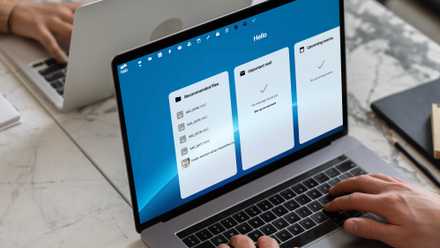
Nextcloud is the next best thing to Google Drive; you can get on your NAS — one that you manage and have physical control over. It runs quietly in the background, syncing files, contacts, calendars, photos, and whatnot. And it’s got convenient apps for both Android and iOS. It lets me share collaborative notes or backup PDFs from my phone without any issue.
While the service may not be as slick-looking as Google Drive, it still gets you the peace of mind of storing your personal files away from Big Tech. If you’re not tied to cloud storage, you can easily cut your Google One or iCloud subscription for this.
6 ways Nextcloud beats Microsoft 365 entirely for free
Nextcloud is the ultimate free Microsoft 365 alternative
Calibre-web
Book collection without Amazon’s hold
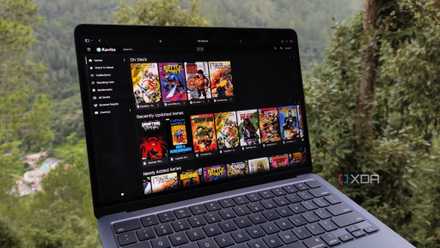
Amazon Kindle is to ebooks what Google Drive is to cloud storage. But when you have your own NAS, you can break away from their shackles with tools like Calibre-web. It’s a web interface that helps you download and read ebooks and other material with complete freedom. It has turned my digital book collection into a searchable, sortable library that I can access on any device.
With it, I don’t have to rely on the cloud to fetch my purchased Kindle books or pay a subscription fee for reading. It can even push books wirelessly to my Kindle device over Wi-Fi for easy reading.
This free, self-hosted app is basically Jellyfin for comics and books, and I absolutely love it
Kavita is hands-down the best self-hosted utility for comic book lovers
Jellyfin
Local Netflix without a monthly fee
A lot of us here are huge fans of Jellyfin — much more than Plex — because of one simple reason: it gives you all the perks of a self-hosted media server without the constant nudge to pay for a subscription. Jellyfin turns your NAS into a local Netflix, with a nice UI that includes your watch history.
I use it to stream my downloaded media across devices — whether it's a phone or TV — without any device restrictions, and I can even use it remotely with a remote access setup. My entire family has their profiles for personalized watch history.

I discovered 6 Jellyfin features you’re not using, but definitely should be
These under-appreciated Jellyfin features and plugins turned my home media server experience up about a dozen notches
LinkAce
Self-hosted Pocket alternative
Pocket was my go-to app for storing web links for later reference and reading. It comes with a premium service for some extra perks. But none of that matters now, considering Mozilla is going to shut the app down for good pretty soon.
That’s why I went on a hunt to find a self-hosted alternative so that I never have to worry about services shutting down. LinkAce turned out to be a decent alternative that helps me bookmark articles, tag them, and archive them with support for full offline reading. For something that’s free, it’s quite feature-rich.
Synology Photos
Google Photos, but without the storage cap
Google Photos is a fantastic tool, but it became quite underwhelming when it abruptly killed unlimited backups. Thankfully, my Synology NAS had an alternative already built in that saved me. Synology Photos is a solid app — available in both web and phone versions — to back up all your family's media.
I use the app to keep a full-res copy of all my photos and videos on the NAS — all saved up and away from the prying eyes of an ad company. And it’s packed with features for sharing with your family and friends, for creating albums, and for easy searches with face tagging.

I self-hosted a Google Photos alternative with a Synology NAS — here's how it went
Build your own photo management platform with a NAS!
Savings add up quickly
Getting yourself a NAS is a solid way of saving money at home by simply replacing your services with their free and open-source alternatives, offering several perks. These savings from individual services may seem small, but they quickly add up to see a noticeable difference in your credit card bill. In the long run, getting yourself a NAS is an investment that pays for itself.
TerraMaster F4-424 Max
- CPU
- Intel Core i5-1235U
- Memory
- 8GB DDR5 non-ECC SODIMM (up to 64GB)
- Drive Bays
- 4 HDD bays + 2 NVMe SSD slots
- Ports
- 2x USB Type-A (10Gbps), 1x USB Type-C (10Gbps), 1x HDMI 2.0, 2x 10GbE RJ45
The TerraMaster F4-424 Max is a premium hybrid NAS enclosure that combines a solid Intel Core i5-1235U processor with ultra-fast 10GbE ports and ample storage capacity. It also supports up to 64GB RAM and is as amazing for home lab workloads as it is for storing your precious data,