
Networking doesn’t always require enterprise-grade software with high subscription costs. There are many free and low-cost networking tools that are lightweight and built to solve specific problems in real time. Free doesn’t always mean limited and low-quality, and these tools are a good example of this.
Over the years, I have experimented with a number of networking tools and finally settled on a set of tools that solve networking problems without adding more complexity or cost. These are the tools that I use every week to run and manage my home network. The tools are not flashy, but are free, lightweight, and solve the problems I run into.
Tailscale replaced my VPN, port forwarding, and dynamic DNS in one install
It's now an indispensable part of my home lab
Termius
One terminal for every server
Termius is one of the most used networking tools in my system; whether it is local development or remote server access, it works as a single hub for both. It gives me a consistent interface across all my projects instead of juggling multiple terminal windows and saved SSH configs.
For server-side tasks, Termius handles all my SSH access to my self-hosted environments. I can connect to any of my servers in one click, as it stores all my hosts, keys, and credentials cleanly. On the local side, whether it is running a React frontend server, a Python backend, or a Cloudflare Worker deployment, I use Termius for almost everything.
Profiles, saved commands, and a clean session history make it easier for me to switch between projects more easily, especially when I am working on multiple stacks in parallel. Like me, if you regularly move between local developments and self-hosted environments, Termius will become a go-to terminal app for you.
Tailscale
Remote access without port forwarding
Tailscale is one tool that I rely on when I need secure remote access to any of my local or self-hosted services without any router setting modifications like port forwarding or firewall rules. I don’t have to worry about exposing my services to the public internet, as it helps me access my home network remotely.
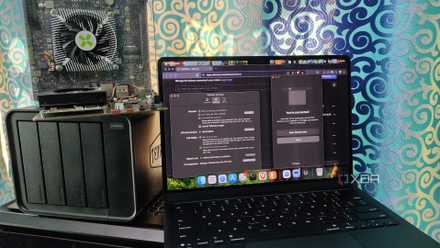
For instance, I am traveling with just my MacBook while writing this article, and my Windows PC and NAS are at home behind a CGNAT connection (a limitation Tailscale solves for me). It allows me to access them securely without exposing anything on the hotel Wi-Fi or dealing with port forwarding.
In my setup, Tailscale does all the heavy lifting of giving me access to my local apps and services from anywhere, as if they were on the same network. As mentioned, I get a CGNAT connection from my ISP without any static IP; Tailscale makes remote access much simpler for me. Once devices are added to the same Tailscale account, they are connected to each other all the time.
In many months of using Tailscale, I noticed how little maintenance it requires. Once the initial setup is done, it automatically handles access control, device visibility, and encryption.
Sniffnet
A simpler way to see what’s happening on your network
Sniffnet is a simple network monitoring tool, less used but very useful while troubleshooting network issues. It is a lightweight option I use when I need to have a quick glance at what’s happening on my network without jumping to complex packet analysis.
It provides real-time visibility of activities on my network in an easy way that everyone can understand. I jump into it when something feels off on my network, like unfamiliar traffic or unexpected bandwidth usage, or when I want to check whether my apps are actively communicating or not.
What makes Sniffnet useful is how simple and accessible it is when compared to other traditional networking monitoring tools that are too heavy for a home lab. It doesn’t require an extensive setup—just select the appropriate adapter from the list, like Wi-Fi or LAN, and start analyzing the network activity, making it a go-to app for quick checks.
OpenSpeedTest
A self-hosted speed test you actually control
OpenSpeedTest isn’t something that I use every other day; I run it once or twice a week, but I am glad to have it when I need it. This is a self-hosted speed testing tool that lets me measure local network performance using my own system, unlike public speed test services on external endpoints.
It is helpful in many ways, such as checking internal network speeds and validating whether the network issues are from my end or my internet connection. Since it is hosted on my own system, I can test real LAN throughput and network inconsistencies between my devices.
If you manage a home lab or self-hosted services, OpenSpeedTest can be useful because of the controls it offers, as results aren’t affected by overloaded public servers and routing quirks outside my network. It can help you test actual network performance.
It isn’t meant to replace widely available public speed test services like speedtest.net or fast.com but to measure network performance within your devices and server.
Simplewall
Fine-grained outbound control without replacing Windows Firewall
Windows Firewall does the job, but whenever I want more visibility and control over outbound connections, Simplewall is the tool I turn to. It acts as a controller over the Windows Firewall, exposing which applications are trying to access the network and providing me with a clear way to block or allow the connections.
Simplewall comes in handy when I am installing software from an unfamiliar publisher or setting up a new system. There is no heavy configuration or complex onboarding process, as it is not replacing the existing firewall but working alongside it.
If you want tighter control over what leaves your Windows system. Instead of blanket rules or a full firewall suite, you need full control over the outbound access at the application level with minimal complexity; Simplewall can be a good tool to have.

A practical networking toolkit that works
Every tool on my list has earned a place by solving specific networking problems in my setup without overcomplicating the process. I don’t use every tool every day, but each tool helps me simplify my workflow, whether it is day-to-day access and terminal work or visibility, testing, and outbound control of the network. One thing common to all these tools is that they are lightweight, practical, and free to use.