
My bookmarks are usually a mess because when I’m researching, the last thing I worry about is how neatly I organize them. I could be researching Obsidian and bookmarking its various features, then trying to connect the main ideas they share. So instead of erasing the folder, I moved it to NotebookLM to make sense out of it all. I thought I was going to get something I wouldn’t be able to work with, but I got a research partner who actually helps me make sense of it.
NotebookLM helped me figure out what all those bookmarks were actually saying
I didn’t have to open 7 tabs just to piece the same thing together
When I'm researching a topic, I save all the bookmarks I think will help me. The bad thing about that is that I end up with so many of them that I can’t make sense of them when they pile up. I don’t have to end up with a headache trying to see the common idea since NotebookLM does that for me.
For example, I had a bunch of bookmarks on Obsidian’s Command Palette, but I couldn’t remember the main idea they shared. I had no idea whether I saved them because I was researching tips and tricks or because they explained what it does. After using the chat in NotebookLM, I saw that the main idea they shared was that Obsidian’s Command Palette was the fastest way to get features, shortcuts, and commands without digging through menus. That made the whole folder make a lot more sense.
5 ways NotebookLM completely changed my workflow (for the better)
Hey Siri, how did I ever survive before NotebookLM?
NotebookLM’s chat helped me figure out what to ask next
The follow-up prompts and citations helped me review the info without reopening every bookmark
After NotebookLM helped me figure out what those bookmarks had in common, I still had questions. I finally understood the core idea they all shared, but I still had more questions about the Command Palette. The follow-up questions at the end of the chat were very helpful because they suggested questions that I didn’t think of at the moment.
If I saw a detail I wanted more info on or wanted to see where it came from, I could click the inline citation. The left side panel would open with the info so I could read it carefully. All of this made NotebookLM feel like the research partner I needed to make sense of the bookmarks I ended up with.
NotebookLM’s Studio helped me work with my bookmarks in different ways
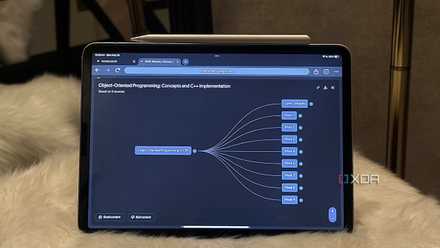
I could listen to my bookmarks, use a Slide Deck, or see Mind Maps
After NotebookLM helped me make sense of my bookmarks, I didn’t always want to go back to them the same way. For example, when I felt like reading, the chat was enough. Other times, when I was too tired to read, the Audio Overview helped me “hear” my bookmarks to get an idea of what they were about. One of many things I liked about the Slide Deck was that it didn’t just turn my bookmarks into more text. I got a visual of what the Command Palette consisted of, which was easier to take in.
One slide had the Command Palette right in the middle, with lines leading to options like insert templates, execute actions, and more. Another slide showed three ways to open it, including:
- A keyboard shortcut
- The mobile ribbon
- The swipe-down gesture
The Mind Map also helped by breaking the Command Palette into sections like access methods, core functionalities, and best practices. I clicked on an option when I was ready to move on. The visuals made it easier to understand, and that's what made NotebookLM a research partner I’m not parting ways with any time soon.
NotebookLM helped me a lot, but it still depends on what I save
If I bookmark weak or old sources, I can still get faulty answers
If what I save isn't from a trustworthy source or isn’t up-to-date, NotebookLM can only do so much with it. I’m going to get weak answers that can lead me to the wrong conclusion. So, if I suspect I've bookmarked outdated information, I’m going to waste time going back to clean things up.
Controlling what sources form part of my research is what makes me trust it
I’d rather double-check a link than trust an answer from nowhere
I already have my list of trustworthy sources, so anything outside of that gets checked immediately. If it turns out to be a trustworthy, up-to-date source, it gets added. If I do run into a source I’ve never come across, I only take a few seconds to decide whether to keep it or discard it. I like this because I have full control over my sources, and that gives me a better chance of getting good answers.
My bookmarks finally stopped feeling like a mess
Before I added my bookmarks to NotebookLM, trying to make sense of my sources didn’t always go well. I would add various sources on a topic without remembering why I saved them in the first place. Now, I can dump all of them into NotebookLM and use the chat or Studio to get the answers I need. NotebookLM is a research partner I’m sticking with because it helps me make sense of what I save.
NotebookLM is an AI-powered notebook that summarizes your specific documents and turns them into interactive study guides.