
Summary
- Radxa X4 offers better performance compared to the Raspberry Pi 5.
- Radxa X4 supports faster Ethernet, M.2 SSD, and USB 3.2 Gen 2 ports.
- Radxa X4 is compatible with multiple operating systems, including Windows 11, due to its x86 processor and built-in BIOS.
Ever since its debut in 2012, the Raspberry Pi series has dominated the SBC industry. While many challengers have appeared over the years, none could match the affordable and beginner-friendly nature of the Raspberry Pi family. For instance, certain manufacturers cram as much horsepower as possible into their boards, leading to the SBCs costing way more than their Raspberry Pi rivals. Meanwhile, other budget-oriented devices tend to fall flat in the software and OS compatibility departments.
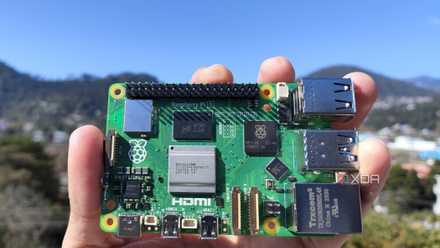
However, the Radxa X4 is a lot different from anything else we’ve seen so far. Despite costing the same as the Raspberry Pi 5 at the time of its launch, the X4 surpasses the latest RPi board on multiple fronts.

Radxa X4 review: An affordable, beginner-friendly x86 SBC
Capable of running a myriad of operating systems, the Radxa X4 strikes the right balance between performance and affordability
5 2.5GbE Ethernet
The Radxa X4 is capable of running projects that can benefit from the faster transfer speeds
In the grand scheme of things, the 1 Gigabit Ethernet on the Raspberry Pi 5 may not seem like a big deal. Sure, slow Ethernet isn’t ideal for a Raspberry Pi-powered NAS, but the device itself is too slow for most home lab and storage server workloads.
Meanwhile, the Intel N100 processor, combined with humongous amounts of memory, makes the Radxa X4 more than capable of running a low-power containerization server or a makeshift file-sharing NAS. If you’re attempting to run TrueNAS Scale, Unraid, or OMV on the X4, you'll see significantly higher transfer speeds when using an SSD for the storage pools. And while we’re on that subject…
4 Easier means to attach an M.2 SSD
Better read/write speeds, and no more awkward PCIe-to-NVMe adapters
The PCIe Gen 2.0 interface was quite a neat addition to the newest Raspberry Pi board. While you could use it to attach a bunch of peripherals, including the official AI kit and even a GPU, most users will prefer to connect an SSD to the PCIe slot. Unfortunately, doing so requires you to invest in a PCIe-to-NVMe adapter. Not to mention, the Gen 2 x1 interface will limit the transfer speeds of most modern-day SSDs.
Meanwhile, the Radxa X4 features a full-blown M.2 M-key slot that utilizes four PCIe Gen 3 lanes to provide significantly faster read/write speeds. Although you are restricted to SSDs in the M.2 2230 form-factor, you won’t have to play Lego with NVMe adapters just to add a fast storage drive to the Radxa X4.
3 Faster I/O ports and Wi-Fi 6 connectivity
It even has an aux jack!
Another advantage that the Radxa X4 has over its Raspberry-flavored rival is its ultra-fast IO port collection. Compared to two USB 3.0 Type-A sockets on the RPi 5, the Radxa X4 comes with three USB 3.2 Gen 2 ports. Sure, they’re not as fast as USB 4, but they’re quick enough for most mini-PC tasks. Additionally, you get an audio/microphone aux connector, an important port that's missing from the Raspberry 5.
I’ll admit that the lack of dedicated CSI/DSI sockets can be disappointing, but for most of my projects, the faster USB ports make up for this drawback. Plus, you even get Wi-Fi 6 and Bluetooth 5.2 support for better speeds over wireless networks.
2 Support for multiple operating systems
x86 processors and built-in BIOS are a terrific combo for tinkerers
One of the reasons behind the Raspberry Pi’s popularity is its compatibility with a myriad of operating systems. Be it the robust first-party Raspberry Pi OS, emulation-centric Recalbox, media server hub LibreELEC, or good ol’ Ubuntu, there are many distros and operating systems you can run on these credit-card-sized boards. But due to the ARM chips powering these devices, x86 operating systems are a no-go unless you’re planning to mess around with unofficial builds with broken functionalities.
In contrast, the affordable Radxa X4 is armed with an Intel N100, which is the same mobile CPU from Team Blue that you’d find on mini-PCs. Combine that with the built-in BIOS facility, and the SBC can easily run Windows 11, Linux distros, and even virtualization environments like Proxmox and XCP-ng. Compared to the nightmarish procedure to install Windows 11 on the Raspberry Pi 5, setting it up on Radxa is a walk in the park. While some aspects may not work after the initial boot, Radxa provides all the drivers you’ll need to get Microsoft’s flagship OS running on the X4 without any issues.
1 Significantly better performance
Considering it’s just a $60 SBC
During my review of the Raspberry Pi 5, I was disappointed when the device couldn’t stream YouTube videos at anything higher than 1080p without turning them into choppy slideshows. In fact, the SBC is prone to slowdowns even when you drive a single 4K monitor at its native resolution, let alone two of them. Plus, installing x86 applications such as Steam is a major pain – and so is attempting to run demanding emulators on the device.
But thanks to the x86 processor, the Radxa X4 provides solid performance at an affordable price. From running 4K videos without any dropped frames to running 2D titles at solid frame rates at 1080p, it's a surprisngly capable SBC that can hold its own against many entry-level mini-PCs.
Radxa X4: An affordable yet powerful competitor to the Raspberry Pi 5
So far, I’ve discussed the pros of the Radxa X4, but the device has a couple of issues that prevent it from becoming a Raspberry Pi killer. The absence of a microSD card slot is a real buzzkill, and the 40-pin GPIO header can’t be used to interface Raspberry Pi HATs with the X4, even though the pins are powered by an RP2040 microcontroller. Its thermals are far worse than the RPi 5’s – to the point where it was impossible for me to install Windows 11 without mounting the official heatsink. x86 SBCs aren’t exactly new, either, and the older Odroid H3/H3+ boards can outclass the Radxa X4 when it comes to sheer horsepower.
Raspberry Pi 5 review: The holy grail of DIY projects got even better (and rarer)
The Raspberry Pi 5 is one of the most powerful consumer-grade SBCs out there. Sadly, its limited stock means you'll have a hard time finding one.
However, the X4 makes up for all these drawbacks with its solid specs and amazing OS support. If you’re willing to spend a couple of extra bucks on a heatsink and a cheap PCIe 3 SSD, I daresay the Radxa X4 is better for performance-heavy projects than the Raspberry Pi 5.
-
Radxa X4
- Storage
- M.2 M-key slot, eMMC storage (optional)
- CPU
- Intel N100
- Memory
- Up to 16GB LPDDR5
- Operating System
- Most x86 operating systems, Windows 11
- Ports
- 3x USB 3.2 Gen 2, 1x USB 2.0, 1x 2.5GbE RJ45, 1x audio/microphone AUX jack, 40-pin GPIO
- Display
- 2x micro-HDMI
-
Raspberry Pi 5
- CPU
- Arm Cortex-A76 (quad-core, 2.4GHz)
- Memory
- Up to 8GB LPDDR4X SDRAM
- Operating System
- Raspberry Pi OS (official)
- Ports
- 2× USB 3.0, 2× USB 2.0, Ethernet, 2x micro HDMI, 2× 4-lane MIPI transceivers, PCIe Gen 2.0 interface, USB-C, 40-pin GPIO header
- GPU
- VideoCore VII
- Starting Price
- $60