
Windows 11 may be the most popular desktop operating system in the world right now, but that doesn't mean it's the only option, or even the best one. In the past year or so, I've been using Linux on one of my laptops while also keeping Windows on another, and using each one as needed.
Ultimately, though, when it comes to productivity and getting work done, I'm always choosing Linux whenever I can. The difference may not always be evident to everyone, but to me, it's an easy choice.
The tools I need are on both platforms
Or great alternatives exist
Let me start by addressing the biggest potential downside of Linux, which is software compatibility. Most users worry that they wouldn't be able to run the apps they need on Linux, and that's a fair concern as there is something of a gap when it comes to available apps. For me, though, as time has gone on, that gap has become smaller and smaller, and everything I need to do runs on Linux now.
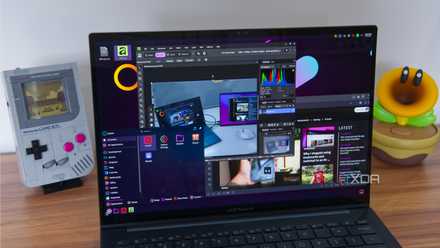
For my actual job, that's mostly pretty easy. I spend most of my time in a web browser, and most browsers have native Linux versions. I use Vivaldi, and thanks to its built-in email client, I don't need to worry about finding another app for that, either. The only other notable tools I use for work are Affinity for editing images, which I can run on Linux thanks to the Affinity on Linux project, and a spreadsheet program to help me with creating some reports. I usually create these reports using OnlyOffice, and this too has a native Linux version that works pretty flawlessly, so I'm good there.

Outside of work, I recently discovered that I can use DaVinci Resolve on Linux to help me edit some of my YouTube videos, and it also works about as well as I could hope for. And for live streaming, OBS Studio also has a native Linux version that works great for my needs. Launching all my apps is done through Vicinae, a keyboard-based launcher that's very much like Raycast or Flow Launcher, so I can get to things quickly and easily, just as I could on Windows.
Linux feels faster
And it doesn't get in my way
One thing I've noticed about using Linux and Windows on my PC is that things just generally happen faster on Linux. Starting with something as simple as booting up, even with the short pause for choosing an entry in my bootloader, I generally get to my desktop faster on Linux than I do on Windows. Even when the desktop itself is shown, Windows can sometimes take a while to launch some of the background services, whereas Linux feels ready to use more quickly.
Overall, things seem to load faster, too, with something as simple as context menus in the file manager load instantly on Linux, whereas Windows needs a second to think, even with the modernized context menu. Not only that, but animations in Windows can actually add to the sense of things taking longer, though you can at least disable animations. Still, on a desktop like KDE Plasma, animations still exist, but generally play out faster to keep things smooth.

Microsoft finally admitted Windows 11 was broken, but I've already moved on
I found greener pastures elsewhere
Linux also just doesn't get in my way in the ways Windows sometimes does. When I restart my Linux PC, I don't have to wait around while it works on some updates that were installed without my knowledge. Linux doesn't shove full-screen ads in my face after an update, either. When I need to do something on a Linux computer, I can just grab my computer and do it. I don't need to wait for all the things Windows needs to do.
That's to say nothing of the initial setup for these operating systems. Installing and using Windows for the first time is a chore, but Linux is fairly easy to get up and running.
Idle battery use is also much better
I can depend on a Linux laptop
Another thing that helps with productivity is being able to rely on a laptop to have charge when I pick it up, and on that front, Linux has always served me better than Windows. Battery consumption while idle has long been a problem for Windows, and it's not uncommon for me to put a Windows laptop to sleep only to pick it up and find it with an empty battery. Arm-powered laptops have made this better, but for most people, standby power consumption is a big problem with Windows.
On Linux, I've noticed multiple times that even if I put the laptop to sleep with less than 10% battery and leave it overnight (or even longer) I can pick it up the next day and have it still be usable. That gives me enough time to read or reply to some emails or even work on one of my reports for a bit before I have to plug in.
The "year of Linux" may never come, but I'm still recommending it to everyone
I know it's not perfect, but I love it
And this doesn't come at the expense of Linux taking longer to wake up or anything. I still see my lock screen nearly instantly when I open the lid, and it's usually even faster than Windows in this regard.
Linux actually has some better tools
Depending on your desktop, that is
I may use a lot of the same third-party tools across Linux and Windows, but when it comes to what's built into the operating system, it's also worth noting that a lot of Linux distros include features that work better than what's included on Windows. I mentioned Vicinae and Raycast above, but if you don't want a third-party solution, the KDE Plasma desktop includes a built-in launcher that's much more reliable than Windows' search bar for launching apps or finding settings.
Likewise, KDE Plasma includes a fantastic windows management tool that I love using for larger screens, a far cry from the more limited options offered by Windows' Snap Assist. I'll concede that Microsoft's own PowerToys suite can fix this with its FancyZones tool, but that's not built into the operating system itself, so KDE still gets a point there.

KDE's window manager learned from Microsoft... before Windows did
FancyZones, but built-in
Another thing I love about Linux is how easy it is to create keyboard shortcuts to do almost anything. Whatever app you want to launch or command you want to run, it's possible to register a hotkey in your system settings to do it at any given time. Instead of having apps take over keyboard shortcuts as they please, Linux (especially under Wayland) gives you one centralized place to manage all your shortcuts, so it's easier to avoid overlapping commands, too.
I always want to have a Linux computer on me
It's my travel companion of choice
All of this has made it so that if I ever have to leave the house and want to take a laptop with me so I can do some work, it's always going to be a Linux laptop. I can grab it without worrying about the battery or the laptop heating up in my backpack, I can work more quickly, and I know I won't be interrupted by something the OS wants me to do. Plus, I can do all my work on it anyway.
It's only in the event that I need something specific to Windows that I would take a Windows laptop instead. I simply feel much more productive on Linux, and it's not even something I have to question anymore.