
Summary
- The Raspberry Pi 5 is a phenomenal SBC, but it's not without its faults.
- Stock issues marred the launch of Raspberry Pi 5, but availability has improved. However, thermal issues are still a major concern.
- Despite generational improvements, the Raspberry Pi 5's outdated processor and high price are disappointing.
If you’ve read my articles at XDA, you must have noticed that I'm a fan of Raspberry Pi boards. The Raspberry Pi Zero W marked my first venture into the world of SBC computing, and the Raspberry Pi 5 is easily the best SBC I’ve used so far.
But after spending months creating projects with the Raspberry Pi 5, I can now see a few glaring issues. As much as I love the little device, it’s time to talk about all the problems with the latest and greatest member of the Raspberry Pi family.
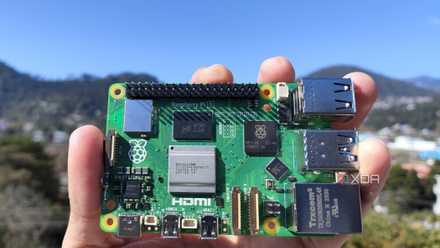
Raspberry Pi 5 review: The holy grail of DIY projects got even better (and rarer)
The Raspberry Pi 5 is one of the most powerful consumer-grade SBCs out there. Sadly, its limited stock means you'll have a hard time finding one.
5 Its launch was marred by stock issues
Consider yourself lucky if you were able to get one before 2024
One thing that remains unchanged from the older RPi boards is that the Raspberry Pi 5 was just as difficult to purchase at launch as its predecessors. If you’re someone who tried to grab the board last year in 2023, I feel your pain. I had to spend days constantly refreshing the Raspberry Pi 5 pages at every local retailer before I managed to snag one in November 2023.
Fortunately, the stock issues are somewhat fixed now, and it’s possible to purchase a Raspberry Pi 5 on CanaKit, SparkFun Electronics, Adafruit, and a few other retailers. Well, the keyword here is a few, because it’s still sold at scalped prices on Amazon.
4 The thermals are absolutely terrible
Making the Active Cooler a mandatory purchase
Even before the launch of the Raspberry Pi 5, the company behind the device had begun manufacturing accessories such as an “Active Cooler” and a power supply for the SBC. Having spent a lot of time with older Raspberry Pi models, I wasn’t sure about picking up a cooling solution for the RPi 5. After all, a miniature board couldn’t possibly generate a lot of heat, right?
Much to my dismay, the thermal issues on the device were so bad that I had to order the Active Cooler in the middle of reviewing the device. Since then, the cooler has become a part of the device. In fact, the only time I took it off was in late January to check the thermal performance of my Raspberry Pi emulation box. Despite my ambient room temperature being 48°F (9°C), the Raspberry Pi 5 managed to hit 189°F (87°C) on Persona 3: Portable. If those were the thermals when running a PSP game, then I shudder to think what would happen if I tried to run a PS2 or Switch title without a cooling solution.

How to emulate games on your Raspberry Pi
Here's everything you need to know to emulate older gaming systems on the Raspberry Pi.
3 It should have supported hardware encoding
Mini PCs are still the better choice for media servers
When rumors of the Raspberry Pi 5 started making rounds, I was pretty excited to turn it into a media server. After all, the Raspberry Pi 4 had acceptable hardware encoding, so I assumed its successor would be comparable to the cheapest mini PCs in encoding workloads. I was wrong.
Although the Raspberry Pi 5 is better at software encoding than its predecessor, hardware encoding is different altogether. For some reason, the Raspberry Pi Foundation decided to ditch the H.264 hardware decoder on the RPi 5. What’s truly infuriating is that the older mainline boards, including the very first version of the SBC, came with a H.264 decoder! So, not only were my dreams of AV-1 hardware support shattered, but I also had to make do without an H.264 decoder.
2 The RPi 5's processor was five years old at the time its release
The Raspberry Pi 5 is powered by outdated hardware
Before writing my Raspberry Pi 5 review, I used it as my daily driver for a week. Aside from gaming, my daily computing tasks involve writing articles, editing images, and a little bit of coding. The ARM Cortex-A76 inside the SBC worked well for the most part, and I didn’t encounter any issues working on the device -- even at 4K resolution.
That said, the processor is still five years old, and it is starting to show its age. For instance, things started to fall apart the moment I switched to anything even remotely demanding. Video playback on YouTube was rife with dropped frames, forcing me to drop the resolution to 1080p. Playing Steam games after installing the app didn’t fare any better. I wouldn’t complain about the processor if the SBC weren't so expensive. While we’re on the subject of price...
1 It’s way too expensive
Weren't affordable boards the selling point of Raspberry Pi?
With a starting price of $60, the Raspberry Pi 5 can no longer be considered a cheap SBC. Sure, you can argue that the 4GB variant of the Raspberry Pi 4 had the same launch price. But by getting rid of an affordable 2GB version, the Raspberry Pi boards have gone from cheap SBCs you can pick up on a whim and tinker with, to small boards that are only slightly cheaper than entry-level NUCs.
That’s before you include the accessories you’ll need for the SBC. If I were starting out with a 4GB Raspberry Pi 5 board, I’d buy at least two 64GB microSD cards, an Active Cooler, and a Micro HDMI to HDMI cable to set it up. This would set me back around $112, and we still haven’t considered the official 5V/5A power supply or a case for the SBC!
Raspberry Pi 5: Plenty of improvements, but some drawbacks as well
Aside from these complaints, I also have a few other pet peeves with the SBC. The lack of an AUX port is rather annoying; I’d rather have full-sized HDMI ports or USB Type-C connections instead of micro-HDMI sockets. The lack of 2.5G Ethernet is also apparent if you try to use the Raspberry Pi 5 as a NAS.

Best Raspberry Pi alternatives
The Raspberry Pi is just one of many great single-board computer options available for a variety of projects.
All that said, I have to give the Raspberry Pi Foundation credit where it’s due. The power button and the RTC module are great additions to the RPi 5, and the same holds true for the PCIe interface. Capable of supporting NVMe SSDs and running dual monitor setups at 4K resolution and 60Hz refresh rate, it’s also the most powerful Raspberry Pi board to date. Once you include the talented community that comes with intriguing projects on a daily basis, the Raspberry Pi 5 is an easy recommendation for newcomers and veterans alike.
Raspberry Pi 5
- CPU
- Arm Cortex-A76 (quad-core, 2.4GHz)
- Memory
- Up to 8GB LPDDR4X SDRAM
- Operating System
- Raspberry Pi OS (official)
- Ports
- 2× USB 3.0, 2× USB 2.0, Ethernet, 2x micro HDMI, 2× 4-lane MIPI transceivers, PCIe Gen 2.0 interface, USB-C, 40-pin GPIO header
- GPU
- VideoCore VII
- Starting Price
- $60