
Summary
- The Raspberry Pi 5 is more expensive than it appears, and it can cost over $100 with needed accessories and memory upgrades.
- Mini PCs under $150 offer better performance than the Pi 5, with Windows 11 support and a plug-and-play experience.
- Raspberry Pi 5 SBCs are a tailored to project-based deployments and are supported by a passionate commuity of users.
It's easy to get caught up in all the bleeding-edge technologies available in 2024, but it's often more fascinating to look at how good even the worst computers are today compared to older systems. The Raspberry Pi 5 and other single-board computers are great examples of this, and the Raspberry Pi community is doing awesome things with the most powerful Pi yet. As a consequence of the extra performance and better hardware, the Pi 5 costs nearly double the starting price of the Pi 4. The Raspberry Pi 5 costs $60, and it is still just an SBC lacking niceties like an active cooling system or a great case. To get a Raspberry Pi 5 ready to be a budget desktop replacement, you'll end up spending around $100.
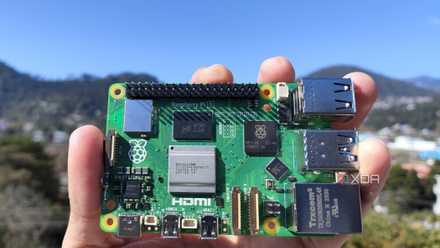
Raspberry Pi 5 review: The holy grail of DIY projects got even better (and rarer)
The Raspberry Pi 5 is one of the most powerful consumer-grade SBCs out there. Sadly, its limited stock means you'll have a hard time finding one.
Surprisingly, that puts the Raspberry Pi 5 in competition with low-end mini PCs for the title of best budget desktop replacement. You can get a very old, refurbished mini PC from a reputable company on Amazon for around $80, which is pretty impressive. However, jumping up to the $100 to $150 price point will get you a Windows 11 system with a lot better specs. For a while, SBCs like the Raspberry Pi were the default ultra-budget desktop PCs without much competition in terms of value. With the price hike of the Raspberry Pi 5 and the price cuts for new mini PCs, choosing between the two is more complicated than you might think.
The Raspberry Pi 5 is more expensive than it seems
Mini PCs are much more of a complete package than the $60 SBC
If you're looking at a Raspberry Pi 5 or a cheap mini PC, price is probably a massive consideration in your purchase decision. That could be due to your budget constraints, or it could be because this new system will be for a side project that doesn't need a lot of performance. So, let's talk about price first. The Raspberry Pi 5 starts at $60 for the SBC itself, but you'll probably want these great accessories to make it more complete: a case ($10), an active cooler ($5), a PCIe to M.2 NVMe SSD HAT ($10), and a USB Audio HAT ($10). If you add all that up, you're looking at a total cost closer to $100 than $50 for a Raspberry Pi 5 desktop replacement. Bumping the RAM to 8GB adds $20, too.
As mentioned previously, the price of a comparable mini PC depends on what you're looking for and how much you're willing to spend. For the purposes of this article, we went with the GMKtec Mini PC N100 as an example. It features an Intel Processor N100 CPU, 8GB of RAM, and 256GB of SSD storage, and is priced at $140 on Amazon at the time of writing. Unlike the Raspberry Pi 5, this GMKtec system has everything you need to get started, including a case, active cooling system, and Windows 11 Pro installed.

How to make a NAS with Raspberry Pi
Here's how you can build an affordable NAS server using a Raspberry Pi
Mini PCs are more powerful than the Raspberry Pi 5
Even the lowly Intel Processor chips can outperform the Pi's Arm Cortex-A76
With price out of the way, let's talk about the performance difference between a Raspberry Pi 5 and a budget mini PC. The GMKtec mini PC we're using for reference has an Intel Processor N100 chip inside, and this is likely the processor you'll find powering most new mini PCs in this price range. The "Intel Processor" branding is what Intel is calling its lowest-end chips, which you might have known as Pentium or Celeron. Though the N100 is a very low-end chip, it's still a quad-core CPU with clock speeds that can reach 3.40 GHz. As far as performance is concerned, it's worth calling out the 8GB of RAM and 256GB of storage that comes with most of these N100-based mini PCs.
By comparison, the Raspberry Pi 5 has an Arm Cortex-A76 quad-core CPU supporting 2.4GHz clock speeds. The big thing to note here is that the Pi 5 uses an Arm-based processor, whereas a mini PC will use an x86 processor that offers better compatibility with more apps. You can configure the Pi 5 with 8GB of RAM, but that model will cost $80, putting the price even closer to that of an N100 mini PC. Otherwise, the Pi 5 will include just 4GB of memory and no internal storage. In most ways that matter, the GMKtec Mini PC and similar computers will beat out the Raspberry Pi 5 in daily use.
Choose your fighter: Linux or Windows
Do you want a Linux distro or Windows 11 to power your budget PC?
We're not here to debate whether Windows 11 or a Linux distribution is the better operating system for an ultra-budget desktop, but the OS is one of the differentiating factors between the Raspberry Pi 5 and a mini PC. Somehow, the GMKtec Mini PC comes with Windows 11 Pro pre-installed, which costs around $200 on its own. It's cheaper to buy the GMKtec Mini PC with Windows 11 Pro than to buy a software license for Windows 11 Pro from Best Buy.
If having a system that runs Windows is valuable to you — and there are a lot of people that consider Windows essential — a mini PC will be a superior option to the Raspberry Pi 5. For what it's worth, you can install Windows 11 on a Raspberry Pi 5, but it's an involved process that casual users won't want to put up with.

How to install Windows 11 on your Raspberry Pi
If you've grown tired of running Linux distros on your Raspberry Pi, you can switch things up by installing Windows 11 on the device.
Mini PCs have a wider selection of ports
Multiple full-size display out ports will always crush micro HDMI
There's a lot of flexibility that comes with the Raspberry Pi 5, since you can use HAT boards to extend the SBC's default offerings. However, a mini PC will offer better port selection right out of the box. For example, the Pi 5 supports dual external 4K displays, but has micro HDMI ports. That means most users will need to get an adapter or specialized cable, once again raising the total Pi 5 price. Since mini PCs often feature full-size HDMI ports (the GMKtec option has two full-size HDMI ports and a full-size DisplayPort), they are easier plug-and-play computers than a Raspberry Pi 5.
Raspberry Pi 5 is for the tinkerer in all of us
Limitless projects and a passionate community of users come with Pi 5
The main thing the Raspberry Pi 5 has going for it is the SBC's unparalleled flexibility and the large community of users that continue pushing Pi systems forward. There's also the Raspberry Pi Foundation, which is committed to supporting Pi devices and an education-based mission. Put simply, the Raspberry Pi 5 can be used in much cooler and more unique applications than a regular PC. We've seen a Raspberry Pi used to build and track a high-altitude balloon, work as a watch, and a never-ending TV player, and these are just a few examples.
That's not just a positive for the Raspberry Pi, either. It also highlights a downside for mini PCs. Most of them come from random brands you've never heard of, and who knows if they'll be around if you need after-sale support. For example, GMKtec advertises a seven-day return policy on its site, which isn't great. I'd bet that the Raspberry Pi community will be able to help you out with any issues you run into, but I can't say the same about no-name mini PCs.

You can run LLMs locally on your Raspberry Pi using Ollama - here's how to do it
Who says only AI PCs can run LLMs?
So, which one should you buy?
There are benefits and drawbacks to choosing both a mini PC and a Raspberry Pi 5, and the best one depends on your use case. For everyday computing, the mini PC has an edge thanks to Windows 11 support, better performance, and plug-and-play operations. On the other hand, the Raspberry Pi 5 is unmatched in project-based tasks that might require custom hardware or software to achieve a specific goal. Surprisingly, a Raspberry Pi 5 with some essential accessories and a RAM upgrade costs about as much as an Intel N100 mini PC. That's great news for buyers, because you have more quality options available at the ultra-budget price point.
-
Versatile pick
Raspberry Pi 5
- CPU
- Arm Cortex-A76 (quad-core, 2.4GHz)
- Memory
- Up to 8GB LPDDR4X SDRAM
- Operating System
- Raspberry Pi OS (official)
- Ports
- 2× USB 3.0, 2× USB 2.0, Ethernet, 2x micro HDMI, 2× 4-lane MIPI transceivers, PCIe Gen 2.0 interface, USB-C, 40-pin GPIO header
- GPU
- VideoCore VII
- Starting Price
- $60
The Raspberry Pi 5 is a classic single-board computer, and it can be turned into just about anything you like. Still, it requires the spirit of a tinkerer. If that sounds like you, the Pi 5 can easily become your tiny budget computer.
-
Windows alternative
GMKtec Mini PC
GMKtec might not be a well-known brand, but you get a lot of mini PC for under $150 with this option. It features the Intel Processor N150, 16GB RAM, and a 512GB SSD. Plus, it includes Windows 11 Pro pre-installed. If the Raspberry Pi 5 is the fun choice, the GMKtec mini PC is the safe one.