
When your NAS slows down, the first thing that comes to mind is drive speed — you assume that the drives aren’t able to keep up anymore. Similarly, when buying new NAS hard drives, it’s tempting to go for the highest RPM or fastest read-write spec. News flash: the rated drive speed specification isn’t even among the top five factors that determine NAS performance.
Here’s what actually affects your NAS speed — and what you should focus on instead.
7 The real bottleneck: Network speed
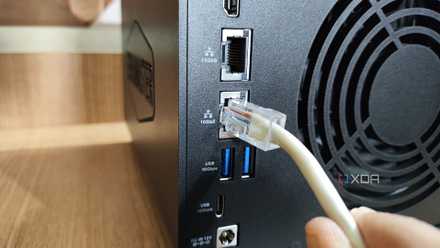
Check your LAN ports first
If your NAS is running slow, the first thing you might blame is the hard drive. But in most cases, network speed is the real culprit. Home networks typically run on Gigabit Ethernet (or even Wi-Fi), capping out transfer speeds at around 125MB/s in real-world usage. Even a basic NAS hard drive can handle that without breaking a sweat. Unless you’re running a 10GbE setup, faster hard drives won’t make much of a difference, anyway.
If multiple users are accessing the NAS at the same time, network congestion can cause slowdowns. Link aggregation can help in such cases by doubling the available bandwidth while upgrading to a 2.5GbE or higher LAN port on your NAS, which can significantly improve performance if your NAS supports such hardware upgrades.
5 reasons you should use link aggregation on your NAS
Both home users and businesses can benefit from it
6 RAID configurations balance performance
Yes, RAID affects speed too
RAID configurations can impact performance, but not in the way you might think. Since data is spread across multiple drives, the overall speed is influenced by the combined throughput, rather than the individual drive speed. A well-optimized RAID 5 or RAID 6 setup with standard HDDs is more than capable of handling media streaming, backups, and file sharing.
If speed is a concern, RAID 10 can improve read-write speeds, but it comes at the cost of usable storage. Instead of prioritizing raw speed, choose a RAID level that balances redundancy, performance, and storage efficiency based on your needs.
5 NAS workloads aren’t usually speed-intensive
Do you really need faster drives?
Most home and small business NAS users rely on their setup for backups, file storage, and media streaming — tasks that don’t demand high-speed drives. Even for Plex streaming, a standard HDD can easily support multiple 4K streams, provided your network and NAS processor aren't causing any troubles.
Drive speed won't be a limiting factor unless you’re editing 8K video directly from the NAS or running high-performance applications. Mainstream NAS drives already offer more than enough performance for everyday workloads, so only specialized cases would warrant a higher drive speed.
4 SSDs in a NAS can be overkill
High-speed drives aren’t always worth it
SSDs bring evident speed benefits over regular spinning drives but are often unnecessary for a regular NAS. For general storage, backups, and media streaming, HDDs remain the better choice due to their lower cost per terabyte and higher longevity — and previously discussed, their own speeds are more than enough for the majority of us.
SSDs also have a limited write lifespan, making them less ideal for continuous write workloads like 24/7 backups. Unless your NAS handles high IOPS applications like databases or virtual machines, SSDs won’t provide enough of a performance benefit to justify the marked price jump.
3 Cache and RAM do the heavy lifting
The smart way to boost performance
Many NAS devices support SSD caching and RAM upgrades, both of which offer significant performance improvements without requiring you to replace all HDDs with high-speed SSDs for storage. SSD caching stores frequently accessed files, making everyday tasks feel more responsive by sharing the HDD’s burden.
Similarly, adding more RAM reduces the load on the drives, allowing the NAS to handle simultaneous requests more efficiently. Instead of spending extra on high-speed drives, investing in caching or additional RAM is often a smarter way to improve overall NAS performance.

5 reasons to use SSD cache inside your NAS
Give your NAS a boost with the power of flash storage
2 Media streaming doesn’t need ultra-fast drives
Even 4K playback isn’t a challenge
If your NAS serves as a media server, drive speed is one of the least important factors. A 4K Blu-ray rip typically has a bitrate of 100–150Mbps, which is well below the speed of even the slowest NAS hard drive.
Network speed and CPU performance are far more important for smooth media playback. If you’re experiencing buffering or lag, upgrading your router, network cables, or NAS CPU will likely have a greater impact than switching to faster drives.
1 Reliability matters more than speed
Look for more critical drive metrics than just speed
When buying hard drives for a NAS, speed should be low on your list of priorities. Instead, focus on reliability, workload ratings, and durability. Metrics like workload capacity (TB/year) and mean time between failures (MTBF) give a better indication of how well a drive will perform under continuous use.
Enterprise-grade HDDs often come with better warranties and durability, making them a worthwhile investment for long-term storage. Brands like Western Digital offer NAS-specific drives designed for 24/7 operation, which is far more critical than marginal speed improvements. Seagate even bundles an excellent data recovery option, which will prove to be more beneficial in the long run.
Seagate IronWolf 8TB
- Storage Capacity
- 8GB
- MTBF
- 2.5M hours
In order to store data on a NAS, it's important to choose the right drives for the job. Seagate's IronWolf series of hard drives are excellent for running inside an enclosure.
When drive speed does matter
There are plenty of ways for you to use your NAS and while some don’t require high-speed drives, other use cases could definitely use that performance boost. If you’re using your NAS for high-speed data processing, virtual machines, or video editing directly from the NAS, then SSDs or faster HDDs might be worth considering. But standard NAS-grade hard drives will perform just fine for 99% of home and small business users.
Before splurging on high-speed drives, consider where the real bottlenecks are. More often than not, optimizing your network, CPU, and drive reliability will offer far greater performance improvements than simply buying faster disks.