
Choosing between air and water cooling can be tough when it comes to cooling your PC. While both options have advantages, they also have drawbacks, making the decision hard sometimes. You will also need to consider the other components that make up the PC, as things like the case and memory can play a big part in which type of cooler you choose.
Air coolers typically require less maintenance. Many prefer them because they have no liquid inside them, which, if leaked, could cause serious issues. However, they can be big and chunky and not only take up a lot of room in your case, but they can also block certain components. So, if you need to change something, you may have to take the air cooler out first, causing more headaches.
There are generally two types of liquid cooling. There are all-in-one (AIO) liquid coolers, which are self-contained and rarely require maintenance. There is also full-on custom loop cooling, which requires a lot more time and patience and requires regular maintenance to keep it running properly. For the points below, we will assume an AIO cooler is being used as the liquid cooling solution.
5 Aesthetics
Keeping things looking clean
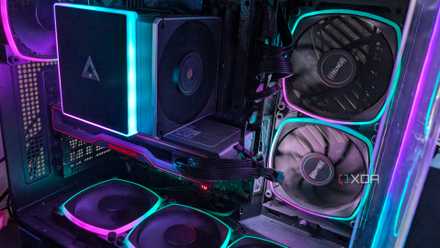
In many cases, an AIO cooler will leave you with a cleaner overall build. This is because the heat pump and cold plate attached to the CPU are much smaller than an air cooler. This allows you to better show off the components in your PC, such as your motherboard, RAM, and graphics cards. From the pump, a couple of tubes will connect to the radiator, but over the years, these have become much less of an eyesore.
The radiator for the AIO will most often go on top of the case or in the front. AIO radiators come in numerous sizes, but the most common are 240mm and 360mm, so you will need to make sure your case can accommodate the AIO Cooler you are considering. The radiator will also be where the fans are. The fans should sit flush on the radiator, adding a clean look to the overall build.
4 simple upgrades to drastically improve your PC’s cooling
Preventative maintenance can go a long way toward making sure your PC is running optimally while staying nice and cool
.
4 Reduced temps in warmer climates
We like to keep things cool
While this may not apply to everyone, an AIO liquid cooler can help reduce your PC's temperature in a warmer climate. AIO coolers normally offer better cooling than air coolers, especially in warmer climates. The cooler your PC is running, the better its longevity will be, so every degree cooler we can keep the CPU, the better.
Thanks to the liquid that runs through the tubes and radiator in an AIO, they can dissipate heat quicker. AIO Coolers, when used on top of the PC case, will dissipate the heat out of the case as well, helping to reduce the system temperature as a whole. This means the rest of the components in your PC could see reduced temperatures as well.
3 Quieter
The less noise, the better
Thanks to their design and how they dissipate heat, AIO coolers don't require fans to run as fast as they do on air coolers. With reduced fan speeds, you should also have reduced noise. The higher the RPM the fan spins, the more noise is created. This is important to consider, as no one really wants to hear their PC take off like a jet engine when they do more CPU-intensive tasks.
As AIO coolers are better at dissipating the heat out of the case, you should also be able to run the rest of your case fans at a lower RPM. This will further help reduce the noise as fans create most of the noise from a PC. If you don't mind tweaking your settings, you could likely end up with an almost silent PC by playing with the fan curves. Fan curves will allow you to adjust your fan speed based on temperature, giving you even more control of the noise output.

Air coolers or liquid-cooling solutions: Which one do you prefer?
Heat is easily the biggest nemesis of most computing devices, and you'll need some decent cooling provisions to keep your processor from catching fire during long gaming sessions. As a hardcore gamer, I'm a part of the liquid-cooler cult. To be more specific, I prefer AIO coolers to water-cooling blocks, mostly because self-built loops are an absolute pain to set up. That said, I'm not averse to air coolers and have even armed my secondary PC and dual-Xeon home lab rig with budget air-cooling solutions. But what about you? Are you a liquid-cooling enthusiast, or do you belong to the air cooler faction?
2 Better performance for workloads
Maintaining the best performance possible
If you are doing intensive workloads such as CAD work or rendering videos, you will want to keep your PC performing as best it can. By using an AIO to keep the temps down, you also help ensure the PC doesn't lose any performance. Every CPU has a Tjunction Max (TJMax), the maximum temperature the CPU transistors can reach before they become faulty or damaged.
When your CPU hits its TJMax, it dials down the performance so it cools down. Essentially, if you hit the TJMax, your CPU stops working as hard so that it cools down to a more acceptable temperature. This means you will see a loss of performance in anything you are trying to do. CPU tasks could take a ridiculously long time to complete.
1 Easier access to change other components
Accessing your other components can be crucial for some
Yes, an AIO allows easier access to other components, such as your RAM and GPU. This may not seem like such a big deal to some, but others who may test or review these components will want easy access. If you have one of the current best CPUs on the market, you will also need quite a larger air cooler to keep it under control. These larger air coolers can make it harder to access the other components and even some motherboard headers as well.
In most cases, an AIO pump isn't much bigger than the CPU itself, so it takes little to no room. This means that changing the RAM or accessing the clip to release your GPU can be achieved easily and without any extra hassle. I know this won't be an issue for most, but for those who change these components regularly, it makes all the difference.

5 signs your CPU cooler is not enough and needs an upgrade
Sometimes, it's the CPU, case, or fans - or perhaps it's your CPU cooler that needs an upgrade
Do you really need an AIO Liquid cooler?
In all honesty, very few people need an AIO. However, they are also worth the investment. Thanks to air coolers such as any variant of the Noctua NH-D15 and the be quiet! Dark Rock 5, they aren't exactly a necessity. As long as your cooler's maximum TDP for cooling matches your CPU's, you will be fine most of the time.
Air coolers may need less maintenance and the peace of mind that they won't leak into your PC, but AIO coolers have more to offer. A good AIO is aesthetically pleasing to the eye, can provide better cooling, allows for more room in your case so you can more easily access other components, and is generally quieter, even if they have more fans. There is also very little reason to worry about an AIO liquid cooler leaking these days; this is quite a rare occurrence.