
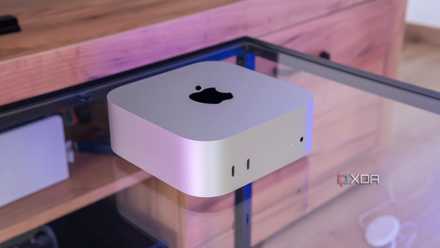
The M4 Mac Mini is currently my favorite computer out there, and it shouldn't be too hard to understand. At its base level, it offers excellent performance and efficiency that can handle just about anything I throw at it.
There are plenty of good computers out there, but in my opinion, unless you're a gamer, there's a good chance the Mac Mini is the best one for you. Here are a few reasons why you should keep it in mind for your next purchase.
7 reasons I'm not going back to Windows after using the Mac Mini
It didn't take long to convert me
5 macOS can do almost anything Windows can
No need to fret
One concern that I feel may be common among Windows users (as it was very prevalent for me as well) is that transitioning to a Mac has too much of a learning curve, or that some things may just not work. While in some cases that may certainly be true, the reality for most people is that the vast majority of the things you do on your Windows PC can also be done on the Mac Mini.
For one thing, most people these days live in a web browser when it comes to their computer, and every major web browser these days is cross-platform. If it's on Windows, chances are it runs on Mac too. Chrome, Firefox, Microsoft Edge, Vivaldi, Opera, Brave — all of these run on Mac, and even more niche picks do too.
But even if you go beyond the browser, you might be surprised at how many apps still work or have solid alternatives on Mac. I occasionally stream on YouTube using OBS Studio, and that program works just as well on Mac as it does on Windows.
Running Windows on a Mac made me realize there isn't much I miss
I'm good where I am now
4 It's tiny, but mighty
Surprisingly powerful
The M4 Mac Mini is also excellent because, unlike prior iterations of this hardware, it actually lives up to its name. This is a tiny computer that packs way more of a punch than you might expect.
Seriously, the Apple M4 is the king of mobile chips, offering some incredible performance and efficiency. When I tested it a few months back, it easily outclassed rivals like the Intel Core Ultra 7 258V and the Qualcomm Snapdragon X Elite (more so on the GPU side for the latter). And the Mac Mini does all that while running incredibly quiet the entire time, while a Windows machine can never be turned out without being audible.
And even with its tiny size, the Mac Mini has a pretty good selection of ports in the modern world. The base model has three Thunderbolt 4 ports and two standard USB-C ports, 1Gbps Ethernet, and HDMI, which should be more than enough to power a complete modern setup, especially if you use some Bluetooth peripherals. Sure, some cheaper accessories may need USB Type-A, but it's ahrd to blame Apple for the industry not moving forward, and USB adapters can be found for very cheap.

We tested it: Here's how Apple's M4 compares to Intel Lunar Lake and Snapdragon X Elite
Apple's latest processor is no joke
3 It's very affordable
Well, at least the base model
Another huge point in favor of the Mac Mini is just how cheap it is for the performance it offers. There are other mini PCs out there, yes, but to even be on a comparable level of performance with something like a Core i7 processor, you're looking to spend close to $1,000, whereas the Mac Mini starts at just $600. You simply can't get that kind of performance for that kind of price anywhere else, and that's not an exaggeration.
There's a big caveat here, yes, in that storage is only 256GB in this base model, and Apple charges an absolutely outrageous amount of money for storage upgrades. But 256GB is still a lot for most people, and, if you do need a lot more storage, I would frankly recommend getting the Satechi Stand & Hub accessory and buying an external SSD for it to expand your storage for much less.

2 macOS is far less naggy
Windows is so frustrating
One of the biggest advantages of using a Mac Mini is that you won't be using Windows, and as such, there's a very good chance you'll run into fewer frustrations. Sure, you may get some headaches when you're learning the ropes, but by and large, macOS is far less intrusive than Windows in pretty much every way.
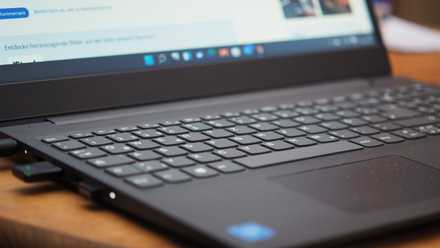
Windows is frustrating from the very beginning, with the setup process not only forcing you to use a Microsoft account, but then using that account to shove Microsoft services down your throat. Microsoft 365, Xbox Game Pass, OneDrive backups (this one you can't even reject), browsing data sync with Microsoft Edge — there's so much that Microsoft wants you to do on Windows 11, and it never really stops. In fact, if you turn OneDrive backups off, every now and then you'll be stopped during a reboot process to be reminded to turn it back on, though this time you can at least reject it.
macOS does almost none of this. Yes, you are prompted to use an Apple account, but after that, you're off to the races, and you're rarely ever stopped in your tracks for something Apple wants you to use. It's such a freeing experience.
Tired of Windows 11 being filled with junk? Here's how to remove it
Get rid of the bloatware
1 You can use Windows in a pinch
If you really must
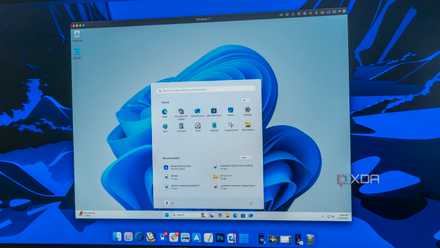
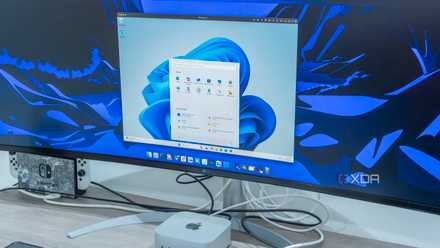
Finally, it's worth noting that, if you do need to run Windows for a specific app, virtualization solutions are available to make that possible without needing another PC. If you don't want to spend extra money, you can use WMWare Fusion for free, and if you can invest a bit more, then Parallels offers the best virtualization experience.
Alternatively, there are solutions like WINE for running Windows apps in macOS without needing virtualization. Neither of these will be a perfect experience, but if you only occasionally need Windows apps, these are excellent solutions that do the job just fine.
4 features in Parallels that make it the best VM software on Mac
There's not much room for debate, really
The Mac Mini is excellent
It may not be for everyone, but the Mac Mini is an absolutely fantastic PC for the price and in general. It's incredibly fast for its size and price, it's got a good selection of ports, and in many ways, macOS is preferable to Windows. You can buy a larger Windows PC that has some of its own benefits, but for the most part, you can't go wrong with the Mac Mini.