
Managing bookmarks can be challenging. Over the years, I’ve accumulated thousands of bookmarks scattered across Chrome, tools like Linkwarden, and oft-forgotten reads in Pocket. Combined with the issue of link rot, I had no reliable way of knowing whether this valuable information I might still want to access remained available.
Existing solutions like Pocket or Readwise are either too expensive or too limited to meaningfully tackle the problem. That’s why I switched to Hoarder, a self-hosted bookmarking solution that offers extended control, privacy, and a plethora of features. It effectively replaces all my disparate methods of organizing bookmarks. With its built-in archiving, tagging, and organizing abilities, it’s quickly become one of my most-used tools. Here’s why.

5 self-hosted apps you need to be using that will improve your life
Make your life easier by hosting these cool apps on your home lab
5 Maintain privacy and control with self-hosting
Take ownership of your data
One of my biggest concerns about cloud-based productivity tools is their longevity. If you spend enough time online, you’ll see startups come and go. That’s a no-go for a productivity suite I want to rely on long term.
Hoarder’s self-hosted nature and open-source algorithms alleviate that concern. For one, the app runs on my own server. The open-source code has been properly audited to ensure my bookmarks aren’t being data-mined or sold to advertisers.
This promise of complete privacy is essential and keeps my data safe from potential breaches, tracking, and other risks.
4 Advanced bookmarking features
A seamless way to organize and access content
Hoarder isn’t revolutionary in its feature set, but it successfully combines the best features of other tools. The app isn’t just about saving links; it excels at creating a comprehensive library of content that is fast and intuitive to access.
A standout feature is the persistent drop box, which lets you paste a link, image, note, or PDF from nearly anywhere in the interface. This makes it trivial to add additional, relevant data to a tag while researching.
Another highlight is the built-in auto-fetch functionality. Hoarder pulls in images, titles, and screenshots of websites to create thumbnails that are easily glanceable.
The organization is another strong suit. Hoarder offers two main methods: tags and lists. Tags are familiar hashtags you can assign to any piece of content. For example, if I’m saving an article about Brutalist architecture, I can assign multiple tags to help locate it quickly. To speed up the tagging process, Hoarder integrates with OpenAI or a locally run LLM to auto-generate tags based on content. While OpenAI’s API requires credits, the local option is free, though it can be resource-intensive.
Lists provide a second layer of organization. Hoarder’s nested smart lists are a significant differentiator. For instance, I maintain a shopping list with nested categories like clothes and electronics. Smart lists automatically move tagged items into the appropriate categories, streamlining the process.
3 Archival and resilience against link rot
Never lose access to important information👁 hoader app archived copy of website
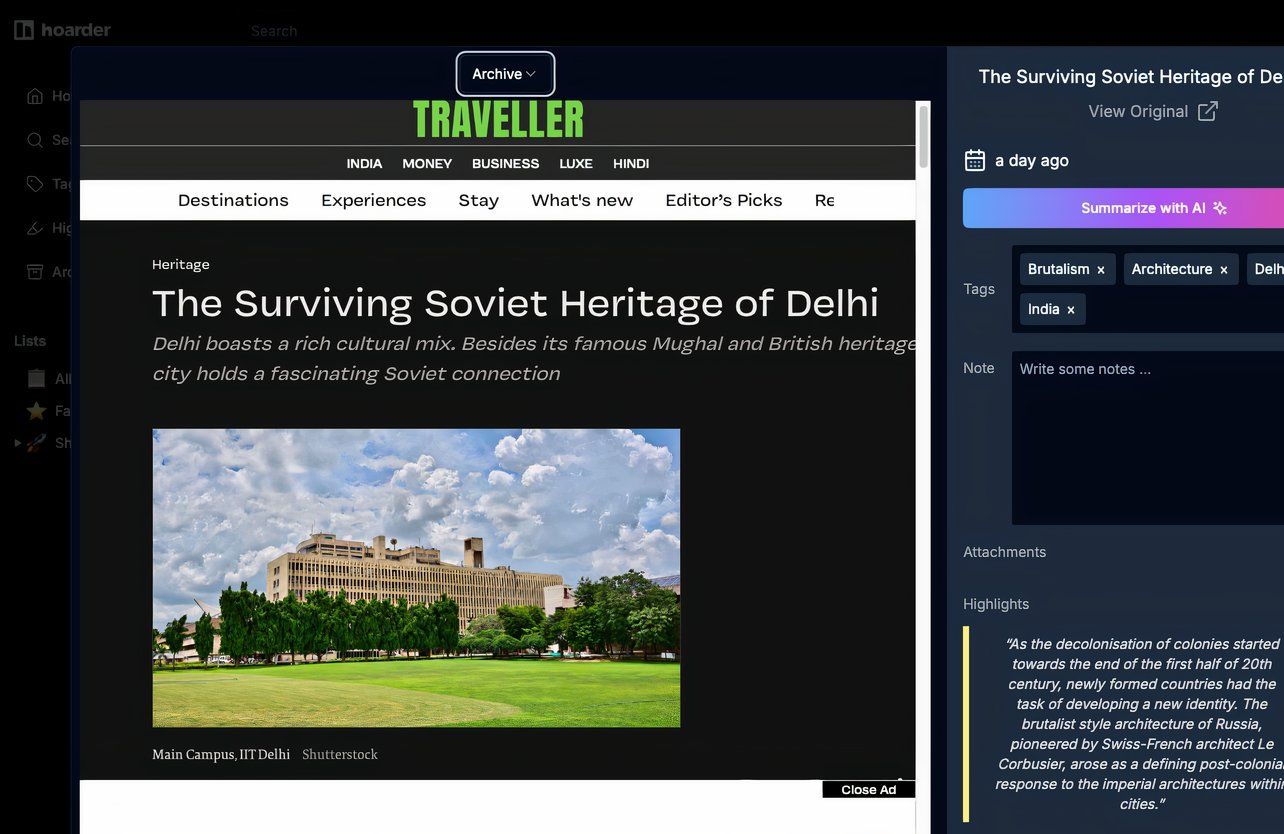
Hoarder’s ability to archive entire web pages ensures I always have access to saved content, even if the original site goes offline or changes.
Unlike other tools that archive piecemeal, Hoarder can be configured to archive every page saved to it, including full-screen screenshots. This guarantees access to any piece of content stored in the app.
The real magic lies in Hoarder’s ability to archive YouTube content. With a simple configuration, the app can save offline copies of YouTube videos, track channels for new uploads, and automatically back them up. This feature has been invaluable for building a personal knowledge base and preserving important resources.
2 Smart features that enhance usability
Automate, search, and save smarter
Hoarder offers built-in RSS support, making it a handy tool for automatically archiving intermittent blog updates, personal sites, or YouTube channels.
Other integrations enhance its usability. The LLM integration I mentioned earlier improves tagging, while the built-in OCR function enables full-text search, even within images. These features ensure I spend less time searching and more time engaging with the content I’ve saved.
1 Cross-platform accessibility
Access your bookmarks and knowledge base anytime, anywhere
A bookmarking manager is only as good as its ease of use. Hoarder, surprisingly polished for what is essentially a one-person project, supports Chrome and Firefox extensions, along with Android and iOS apps.
With Tailscale or a dedicated IP address, you can expose Hoarder to the internet, making it accessible on the go. This cross-platform flexibility is an invaluable addition.
Why Hoarder is the ideal bookmarking solution
Switching to Hoarder has been a game-changer for managing my bookmarks. With its emphasis on privacy, robust archival capabilities, smart retrieval features, and cross-platform accessibility, it tackles the most common bookmarking challenges. Whether you’re tired of link rot, concerned about privacy, or looking for a more efficient way to organize content, Hoarder is a solution worth considering.