
I consider myself a fairly competent home networking and tech enthusiast. I’ve crimped more Cat6 cables than I care to count; I run my own NAS for self-hosting, and I can explain the difference between a switch and a router to my relatives without their eyes glazing over. Yet, for the last three years, I’ve unwittingly been committing a cardinal sin of networking while swearing at my ISP under my breath for spotty coverage and connection latency. I hid my router in the corner of the house, in a bedroom right where the cable from the ISP came in, tucked into a media console because it looked cleaner. Now I've changed this, and my regret for the lost potential all these years is inconsolable.
We often convince ourselves that throwing money at the problem will fix it. We buy gaming routers that look like upside-down spiders or invest in expensive mesh systems, believing the marketing hype that these devices can punch through anything. But a $500 mesh system in a bad location will perform worse than a $100 router in the right one. I finally moved my router to the center of the house, and the changes are immense.
9 ways to bring networking dead zones in your home back to life
Networking dead zones are terrible but they're often easily fixed.
Wi-Fi is just a lightbulb you can't see
Physics sure cares where you place the box
To understand why placement matters more than the number of antennas on the box, it's essential to understand that Wi-Fi is effectively a radiated form of energy, much like radio waves or even light. However, they have a far lower frequency. By that analogy, a lightbulb stuffed in a corner of the room isn't of much use, and the same goes for your Wi-Fi router. If you put a light bulb on the floor behind a metal cabinet, you wouldn't be surprised when the kitchen is dark. Yet, we do this with routers constantly.
Radio waves behave like sound in a hallway or light in a room. They bounce off some surfaces, get absorbed by others, and generally lose energy the further they travel. That's why internet speed typically drops the farther you get away from the source. By tucking the router behind things, you are forcing the signal to scream through the most obstruction-heavy path possible just to reach the rest of your house.
If you err harder and sandwich the router between a wall and the back of a TV, you're compounding your networking issues with interference. RF signals reflect off metal instead of passing through it, making TVs like large Faraday cage walls. Other materials are just as guilty. Drywall dampens the signal, but concrete and brick murder it more. This ensured the signal from my router sat in one corner of the house wasn't even detectable at the diagonally opposite end of the property, just one storey above. Passing through three walls at oblique angles is harder since it could make the wall seem thicker from the radio wave's perspective if it wasn't reflected off and bounced around instead.
Antenna pointing straight up is a straight-up terrible idea
For a multitude of reasons
Additionally, most of us, including the uninformed me, tend to think of Wi-Fi signals expanding out from the router like a perfect sphere, an inflating balloon of internet connectivity. Instead, a donut or toroid (in strict geometric terms) is the best visual representation for the signal coming off a standard stick-shaped antenna. The antenna stick goes through the hole of the doughnut. This means the signal is strongest extending out perpendicular to the antenna, and weakest directly above and below it.
Every antenna has a "null" — a direction where it transmits virtually zero energy. For a standard vertical stick antenna, the null is directly off the tip. So, pointing the tip of an antenna towards a client could actually hamper function more than it helps. But it gets worse because, quite like sunglasses, signals have polarization. If a wave is transmitted vertically (antenna sticking up), the receiving antenna needs to be vertical to catch it efficiently. If the receiver is horizontal (90 degrees off), the client device loses most of the signal strength. Most devices like smartphones counteract this limitation using two integrated antennae mutually perpendicular to each other, called orthogonal diversity. As such, the router's antenna null aligning perfectly with a dead zone of the client device's antennae is a non-zero empirical possibility.
The magical fix
A new central location for the router
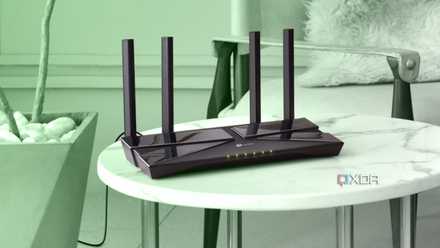
For three years, I had all my router’s antennas pointed sideways, sitting on a low shelf. That meant I was blasting a great signal into the baseboards and the ceiling, while the devices actually in the room were catching the edge of the doughnut. After fiddling with them and trying to switch to interference-free channels using diagnostic tools, I finally bit the bullet and moved the router because nothing fixed the issues. This time, I ran Ethernet from where the cable entered, all the way to the center of the house, along one edge of the floor.
As for the antennae, instead of the dead spider look or the all-vertical orientation, I angled them. One vertical, one horizontal, and the others at various degrees of tilt and rotation, like a windshield wiper in 3D space. This ensures that the "doughnuts" overlap to cover the room in all orientations. These two steps fixed years of tolerating dead spots, jitter in 4K streaming, and steady 5GHz within line of sight, at least. All this without ever touching the router firmware settings.
If your Wi-Fi comes through a sleek, white mesh node resembling a vase or puck, it has internal antennae you can't adjust. For these, placement is all the more mission-critical since you're reliant on the engineers' default design, which usually assumes the device is sitting on a table, right-side up. If you shove a mesh puck sideways into a bookshelf or behind a couch, you are tilting that internal radiation pattern into the floor or ceiling, worsening any networking issues you have.
Respect the physics
We tend to treat Wi-Fi like a utility that should just work like water from a faucet, outright sidelining the careful plumbing that forms the foundation for years of reliable service. Moving my router required an ugly cable running along the skirting board and a visible black box in my hallway. It doesn't look as nice, but it works better. If you are struggling with your network, I strongly urge you to try repositioning the router before fiddling with firmware or cussing out your ISP. At most, you'll need a long Cat6e cable to give the RF a fighting chance.

Can you have too many mesh network nodes?
Mesh networks are a great way to enhance connectivity, but how many nodes is too many?