
Summary
- I built a budget gaming PC with Ryzen 5 1600 and GTX 1050 Ti back in 2017; it's time to pull it out of storage.
- The 16GB of slower RAM and 120mm case fan could be re-used on my current PC, but I decided against them.
- The 250GB SATA SSD can house an alternate operating system or even my secondary Windows installation.
- I may have to sell most of the components to recover some of my investment, or just keep the PC with me for old times' sake.
Building PCs teaches you many things — optimizing budgets, making smart compromises, and troubleshooting unexpected problems. It also teaches you, often in hindsight, not to make some disastrous PC building blunders, like spending more on the CPU than the GPU, or buying a PSU incompatible with future upgrades.
This past weekend, I finally had some time to revisit my old gaming PC that I had built in 2017, to see if there was something from it that I could make use of in my current rig. I took it out of the dark corner of the house it was hibernating in, and opened it up to examine each component, deciding whether to put it into the re-use or resale bin. I'm not sure what I was hoping for, but this exercise unearthed some great memories.

From Intel dual core to AMD Ryzen 8 core CPU - My 15 years of PC building
I've built many gaming PCs but the ones I enjoyed the most are all in the past
What I built for $800 in 2017
Brace yourself, this isn't pretty
It was the year of the 7th Gen Intel Core CPUs, with the 8th Gen slated for release later in the year. However, when I decided to build a new PC, AMD's iconic first-gen Ryzen CPUs had been out for 5 months, and I knew I had to have a Ryzen 5 1600 for my gaming PC. For the graphics card, I wished to have a mid-range Pascal card, but I had a tight budget of around $800, so I ended up buying a GTX 1050 Ti from Zotac.
When I got a new RTX 3080 and Ryzen 7 5700X PC in 2022, I packed up this PC in its original box and placed it in storage, only to pull it out after 2 years.
Saying this wasn't the most balanced build would be an understatement, but I was too excited to care — after all, I was putting together a gaming PC after 3 years. For the rest of the components, I picked up budget components that would be enough to last me a few years (with a few upgrades down the line):
- Motherboard: Asus Prime B350-Plus
- RAM: G.Skill Ripjaws V DDR4-3000 8GB
- HDD: Seagate Barracuda 1TB
- PSU: Seasonic S12II 520W
- Case: Corsair Carbide SPEC-04
- Fan: Cooler Master SickleFlow 120mm
- Cooler: Stock
Over the next two years, I would go on to add another 8GB stick of RAM, a 250GB Samsung 860 EVO SSD, and the biggest upgrade of all, a GTX 1660 Ti. I sold the 1050 Ti in 2019, but everything else in the build has remained the same since the initial days. When I got a new RTX 3080 and Ryzen 7 5700X PC in 2022, I packed up this PC into its original box and placed it in storage, only to pull it out just now after 2 years.
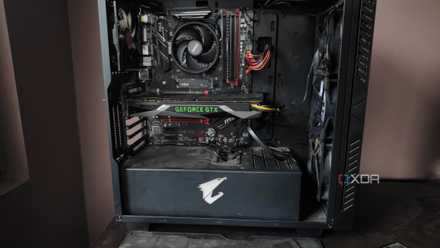
The PC had accumulated a lot of dust after 2 years in storage, so it wasn't looking its sharpest, but it was in great condition.
I was hit with a heavy wave of nostalgia, as I remembered how I sourced components from both online marketplaces and offline stores, and built the PC over a few days with my partner helping me every step of the way. The PC had accumulated a lot of dust after 2 years in storage, so it wasn't looking its sharpest, but it was in great condition, and everything was working fine. It was time to begin the scavenging.

Let's settle this — what is the right budget for a modern gaming PC?
You can spend whatever you want, but how much "should" you spend for a powerful gaming PC in 2024?
Can I salvage something for my current build?
Yes, and no
The whole thing that started this exercise was to find out whether I could re-use some of the parts from my old PC on my current PC. The Ryzen 5 1600 and the motherboard were never in contention (for obvious reasons), but I was hoping I could make use of some of the other components such as the storage drives and the memory. Before that, though, I had to decide what to do with the GPU, PSU, case, and fan.
The 120mm fan could fill in for the empty exhaust slot in my current build, but it didn't match the theme of my build.
The 1660 Ti, despite being a great budget GPU for the time, had no place in my current build, as I wasn't planning on any niche workstation use case that could use both the GPUs installed together. As for the PSU and case, the conclusion was the same as that for the CPU and motherboard — I simply have no use for them. The 120mm fan could fill in for the empty exhaust slot in my current build, but it didn't match the white theme of my current build.
I could use the 250GB SATA SSD to install a secondary operating system — maybe even transfer my secondary Windows installation to it.
Finally coming to the SSD, HDD, and RAM — I was glad that at least the SSD could be useful. I could use the 250GB SATA SSD to install a secondary operating system — maybe even transfer my secondary Windows installation to it, and keep only my primary Windows 10 copy on my main SSD. The HDD was another candidate for expanding my secondary storage, but it turned out the drive had developed quite a few errors over the years and wasn't functioning properly.
The choice was between running 32GB of higher-speed memory and combining the 4 DIMMs for a total of 48GB memory running at 3000MT/s.
I had even hoped to re-use the two 8GB DIMMs of RAM, but I had forgotten that they were rated at only 3000MT/s compared to my current 32GB (2 x 16GB) memory rated at 3600MT/s. So, the choice was between running 32GB of higher-speed memory and combining the 4 DIMMs for a total of 48GB memory running at 3000MT/s. I chose the former, and let the older sticks remain on the older PC.
7 coolest things to do with your old PC instead of throwing it away
Thinking of parting with your old PC? Here are some cool ideas to explore before you sell it or throw it away.
How much can I sell it for?
Recovering some of my investment
Considering I don't need another NAS device or some other DIY project, the only other course remaining for most of my old components is to sell them. Based on the listings for similarly-specced PCs in my area, I could maybe get $350 at best (if I was lucky). It goes without saying that the value of this $350 is far from what it was in 2017, but if I don't find any other use for this PC, I might actually end up selling it.
I have half a mind to keep this PC with me forever, as a reminder of the very first rig I built entirely with my own money.
The money I get from the sale could be invested in the market or my business. If nothing else, I could save up for a GPU upgrade when the Nvidia RTX 5000 series comes out in a few months. I'm even thinking of a full platform upgrade from AM4 to AM5, so the money could go into that kitty as well. I have half a mind to keep this PC with me forever, as a reminder of the very first rig I built entirely with my own money (I had help from my family in the builds prior).

How much is my PC worth? Know your PC's resale value
Finding out your PC's resale value doesn't have to be tough. Here are four ways to do it.
Financial vs. sentimental value of old tech
When it comes to our older PCs, smartphones, or any other gadget, it's hard to argue against selling them if you're not one for re-using them for a secondary purpose. However, sometimes it's hard to part with things that you've used for years, day in and day out, especially if it's a deeply personal device like a PC or smartphone. If you desperately need the money, go ahead and sell it to help you stay afloat, but in other cases, there's merit in retaining the device — just for old times' sake.
On the other hand, if you're planning to build another PC with old and used parts anyway, take stock of what parts you can use from your old PC, and what you need to source from used component listings and older-gen components. Make sure you're buying only those parts that are safe to buy used, and don't forget to protect yourself before buying any used component by doing your due diligence.