
The more complex my home network became over the years, the more time I spent tweaking it to achieve the best performance for every device connected to it. Wherever possible, I've tried to hardwire devices, the faster Wi-Fi bands are used by mobile devices, and the 2.4GHz band is only used for IoT devices.
But as the number of networked devices grew, I ran into one issue that I hadn't expected. Troubleshooting and management were made more difficult by the fact that every device was on the same subnet, with no particular order or grouping. Deciphering which device was causing issues takes time, so I decided to group devices on VLANs, mainly because I wanted to learn more networking skills in the process.
After planning how the VLANs would be used and implementing them on my hardware, I noticed my network felt more responsive, and I wondered how much was down to the sunk cost fallacy orother psychological effects. But it turns out that effort didn't go to waste, and it fixed a few problems I didn't even realize I had.

6 things you need to know before setting up VLANs on your home network
VLANs are super handy for organizing your network, but you need to do some prep work first
The hidden causes of home network slowdowns
Sometimes you don't know you have a problem until it's gone
Even after upgrading my wired network segments, I was still experiencing random slowdowns. Whether wireless or wired, it didn't seem to matter, and I knew it wasn't devices doing backups or other bandwidth-intensive tasks, since those are set to specific times of day.
It turns out most of the problem was of my own making, because I'd added more smart home devices to the network as we were in a larger property. The amount of IP multicast traffic generated by smart TVs, streaming boxes, IoT devices, and other Wi-Fi devices was making my wireless network noisy and slowing other network traffic. That, coupled with the increased number of devices on the network, was having such an effect that it was noticeable and highly irritating after the time and energy I'd spent setting up the new network equipment.

Here's how I make sure mDNS works across my VLANs
It takes is a dedicated multicast relfector and few firewall rules to let you discover your media devices and stream content.
VLANs solved several of my home network issues
Not everything, but enough that I was able to troubleshoot the rest without added noise
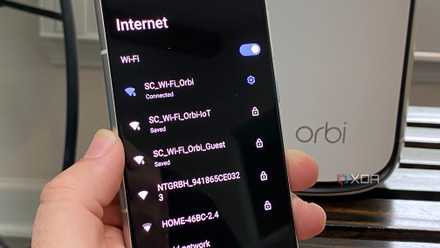
The biggest thing I've noticed after this process is that there are fewer unexpected slowdowns when I'm browsing the web or downloading files. The primary driver was removing IoT devices from the rest of the network, but I'm not sure if it's entirely down to reduced multicast traffic. I did give the IoT VLAN a dedicated dual-band SSID, so they're only fighting for airtime among themselves, and I think that's the main reason the rest of my wireless devices are performing better.
As a secondary effect, Wi-Fi handoff between my access points has improved, and the fewer devices on each AP, the better they can access the network. And yes, I now know my network is slightly more secure because it limits lateral movement. It's not quite the zero trust environment I'd like, but that's on the roadmap.
Additional organization is key to my success
To make troubleshooting easier, each VLAN has the same set of rules for how the devices on it are arranged. The third octet tells me which VLAN the device is on, so I know which subset of devices I'm dealing with if there's an issue. It also makes firewall rule creation easier, as I can set them per network segment.
The last octet indicates whether the device has a reserved IP address or is using DHCP. Anything under x.x.x.99 is reserved, anything over x.x.x.200 is DHCP. Most of my network has reserved IPs, except for devices I'm testing for work and smartphones, because it's challenging to reserve IPs for devices with rotating MAC addresses for privacy reasons.
4 signs your IoT devices are quietly ruining your home network
Don't let your IoT devices hold your LAN back.
VLANs didn't fix all my issues, but the remaining ones were more manageable
While I set out to make my home network easier to handle if things went wrong, part of the process fixed some lingering issues I hadn't managed to nail down. Perhaps the most significant improvement was shifting multicast packets away from devices that didn't need to see them, thereby unburdening my servers and NAS from traffic they didn't need. The chatty IoT devices (mostly) had to keep chatting to each other, and now they can do it on their own network segment, which they can't reach out of. But above all other issues, I feel I'm more organized and in control of my network, and that's worth the effort on its own.