
Whether you're upgrading an existing rig or building a new one from scratch, there's nothing better than slotting in a shiny new GPU to your system. It's one of the most exciting times for any PC builder, but it's important not to get ahead of yourself. Before you speed through the checkout with a new card, there are some factors to consider that are of the utmost importance.

7 reasons Intel’s Battlemage GPUs are what the GPU market needs
The GPU market has been terrible for consumers lately but Battlemage might turn the tide.
7 Your current card’s performance level
Getting a baseline measurement is important
Benchmarking is an important part of the PC building process. It allows us builders to gauge the level of performance of our systems, as well as weed out any potential reliability issues. With GPUs, benchmarking is especially important. Before buying your new card, you should put your computer through its paces and record the results, either with the help of a benchmarking program, or just by noting down performance metrics as you use your computer. This allows you to see exactly how much of a difference your new card is making once it’s in your system.

5 reasons Intel PresentMon is the best tool for checking exactly what your gaming PC's bottleneck is
Looking at CPU and GPU usage alone won't tell you the whole story.
6 Which games and applications do you use
Take stock of what you'll be using your PC for
Whether you’re building a whole new system or upgrading an existing one, your choice of GPU should depend heavily on which games you intend to play. If you play very GPU-bound titles, it’s worth spending a bit more on your GPU, even if it might bottleneck your CPU. Most games are either CPU or GPU-bound and will rarely put a full load on both components. Creating a bottleneck isn’t a bad thing, so long as you know your PC’s current limits as-is. If you’re running into CPU limitations in your favorite titles already, it’s worth considering an upgrade to both components.

10 best games for benchmarking a gaming PC
If you want to break in a new gaming PC, Crysis isn’t going to cut it anymore.
5 Skimping on VRAM is not advised
Even if it means going up a card-class
Games today are very VRAM hungry, and will use as much as you give them depending on the texture settings. The consequences of running out of VRAM during gameplay are punishing; average framerates will slow to a crawl, and you’ll likely have massive hitching due to your PC dipping into its much slower system memory. You can get around this by lowering the texture quality settings in-game, but you don’t buy a new GPU just so you can lower the quality settings. GPU manufacturers (looking at you NVIDIA) have been skimping on their VRAM capacity on their mid-range cards, and it’s clear from benchmarks that anything under 10GB is just difficult to recommend, especially at the price the cards are being offered at. When buying a new GPU for your system, ensure that it has at least that much, if not more, otherwise you might run into significant performance issues.

How to check GPU VRAM: Two simple ways to find out your graphics card's video memory
It's important to know how much VRAM you're working with
4 New GPUs are just around the corner
Both AMD and NVIDIA have new GPUs coming soon
All signs point to both NVIDIA’s 5000 series and AMD's RDNA 4 cards being right around the corner, and their official announcement will come with a significant shake-up of the GPU-value hierarchy. It’s really never a good idea to buy new if a product range is due to get a serious update, but that's especially true with graphics cards. Why pay $500 for a card that is significantly worse than the new $500 option that was just launched? Using the "wait and see" approach is best when there's new hardware due in a couple of months.
Nvidia GeForce RTX 5000 series
Interested in the new Blackwell GPUs? Here's everything you need to know about them
3 You might need to upgrade your PSU
Your new card might need some more juice, especially when stepping up a class
There’s nothing worse than getting your shiny new GPU, slotting it into your motherboard, and powering it on, only to find that your PSU can’t handle the TDP of your new card. Even if your PSU matches the posted recommended wattage, you’ll definitely want a little headroom on top of that. When I purchased my RTX 3080, I had a 750W PSU, which is technically enough to drive the card, but upon booting and running an intensive game, my PC would shut off almost as soon as there was any load put on the GPU. Dropping the power limit on the card kept my system from shutting down until my new PSU arrived, but I definitely could've avoided the headache had I not cut it so close with the total power draw of my system.

5 signs it might finally be time to upgrade your PSU
It's time to bid goodbye, once your old PSU is no longer enough to meet the demands of modern hardware
2 Buying pre-owned is a worthy consideration
Don't let the word "used" scare you away
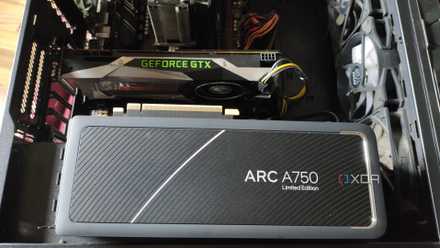
Once the new cards from AMD and NVIDIA are announced, it’s worth checking in on the used market to see if there are any deals. This is especially true if the newly announced cards are significantly better than their predecessors. There should be an increasing number of cards floating on the market as people upgrade, allowing you a better chance to snipe a potential bargain. The thought of a pre-owned GPU may put off some, but so long as you do your homework and find an honest seller, there’s nothing wrong with grabbing a piece of used hardware, especially if it has been well taken care of.
5 reasons why your next GPU should be pre-owned
Buying used is an excellent way to breathe life into your build without breaking the bank
1 Your case dimensions
Size matters
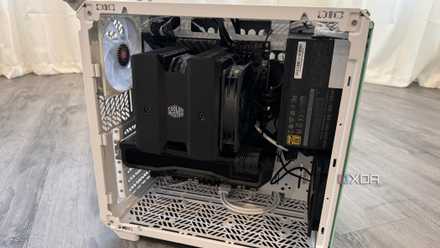
It’s incredibly easy to overlook the length and height of a GPU while you’re deciding which one to buy. Cards have ballooned in size and while most PC cases can accommodate large GPUs, it is best to check to make sure. This is especially important if you have a mid-tower or mATX case. The easiest way to check if your GPU will fit is by checking the manual for your case. In most modern case manuals, there should be a specified max-length for GPUs.
Don't forget these 5 things before building a small form factor PC
An SFF PC can be an exciting project, but keep these things in mind before you start building one
Don't jump the gun and buy a card you'll be dissatisfied with
The graphics card is often the most expensive part of any PC build, so taking the proper considerations before buying can save you a lot of strife in the future. If you're building a new PC for the first time, you can save yourself even more headaches by building with full-size parts, even if you're tempted to build a sleek, compact PC.