
I've been an ultrawide monitor convert ever since the Nixeus EDG 34 landed on my desk for review around the end of 2019. I love the additional space for productivity and the immersiveness of games, but I'd be lying if I said it was all smooth sailing. The 21:9 aspect ratio has been around since LG launched the EA93 Series in 2012, but even the best ultrawide monitors still suffer from a common core of annoyances. To be fair, none of them are dealbreakers, and I'll happily live with them for the extra real estate to put two browser windows side-by-side, but it's worth knowing what you're getting into when you decide to go for an ultrawide monitor.

I used the $219 Intel Arc B570 on my 49-inch gaming super ultrawide — here's how it went
You can game on a budget without many compromises.
5 They take up tons of space
Think your flat gaming monitor takes up lots of space? Think again
One thing you need to prepare for is just how much physical space your new monitor is going to take up. Monitors and TVs advertise their size using the diagonal screen measurement, and everyone is pretty used to how much space a 16:9 aspect ratio screen takes up. Most gaming monitors are 16:9, which, at under 27" in size, keeps every part of the screen in your field of vision without having to move your neck or eyes much.
But with an ultrawide, the diagonal measurement is much closer to the actual width of the monitor, because the common ultrawide ratios are skinnier. I've got two 34" inch ultrawides on my 72" desk, and the ends are almost equal to the edges of the desk. The stands take up a considerable amount of space as well because the usual tripod arrangement needs longer legs to be stable, partly from the extra width but also because most ultrawide are curved, so the center of mass is just in front of the screen instead of inside it.
But today's relatively sleek ultrawides have nothing on the first monitor to carry the name. The Ostendo CRVD 43" ultrawide that Linus is holding in the video above uses multiple rear projectors to create a 32:10 aspect ratio display that will definitely take over your desk if you have one. With a 42.5 x 20.8 x 15.2 inch footprint, only the heftiest desktop would be able to hold this 52.5lbs monster. It's a good thing that LED panels came out and took over from this screen type, as ultrawides still take up a fair bit of space.
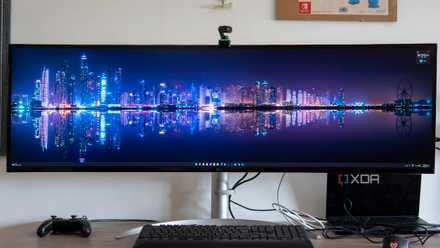
LG UltraWide 49WQ95C review: The only monitor you'll need
The LG UltraWide 49WQ95C is like having two monitors in one. It's expensive, but it's phenomenal for boosting your productivity.
4 And are heavy to mount
You're going to want to break out the big boy monitor arms
With how much space the stands on ultrawide monitors take up, you'll be tempted to put them on VESA monitor arms. That's a smart move to reclaim desk space, but you'll also need to make smart decisions on which monitor arm you pick. Not every arm can handle an ultrawide, even if the specifications for supported weight and screen size match up. And even if they do, with a couple of exceptions for the heavy-duty arms designed for ultrawides, you should expect some wobble when typing or if you bump your desk.
For example, both of my ultrawides are 34" across, and weigh just under 14 pounds (6.35kg). That would work on many arms on the face of things, but sometimes the ultrawide can overpower the tilt adjustment on the VESA mount end, or the arm will hold it up, but only if the adjustment screws are all the way up. I'm using Ergotron LX arms in a dual configuration and I still get some wobble, but they're solid otherwise. Just know that many of the cheaper arms might not pass the test once you try to mount your new expensive monitor.

Best monitor arms and mounts in 2024
Give your desk some room to breathe with these amazing monitor arms and mounts.
3 Unsupported games look bad
And even supported games have some undesirable effects from the wider perspective
Games are getting better at supporting ultrawide resolutions, but even those that come with native support often have issues with the UI or other on-screen elements. For example, X4: Foundations looks gorgeous while you're flying around in the universe, but the UI elements are all huddled in the middle of the screen, as if it's being played on a 16:9 monitor with the extended sides added on as an afterthought. The Witcher 3 also has a similar issue, and the warping at the edges of the screen is even more pronounced on an ultrawide. You can forget about ultrawide support on older games, too, with most running in 16:9 with black bars on the sides.
Competitive games like Overwatch 2 often shift all the on-screen elements to the outer corners, which is where you'd expect them to appear in a single-player experience, but in a twitchy competitive title, those milliseconds it takes to look at the corners might be the difference between winning and losing. It's not all bad though. Games like Microsoft Flight Simulator are incredible on an ultrawide, and some PC ports like Horizon Zero Dawn let you move, rescale, or remove the HUD elements to put them where you want them, or have them disappear for full immersion.

10 most immersive games that deserve an ultrawide monitor
An ultrawide monitor can take your gaming immersion to the next level, and these games are the best examples
2 Video playback can have issues
Black bars or weird crops can make movie-watching difficult
The bulk of the content that you'll want to watch on your monitor is filmed in 16:9 aspect ratio. That gives media players and streaming sites a quandry about how to display on differing aspect ratio displays, and for ultrawides that means you usually get black bars on the sides, and sometimes on the top and bottom of the video as well. On the other hand, movies filmed in 2.35:1 will fit almost perfectly, with only small letterboxing on the top and bottom, when viewers on a 16:9 monitor will get wide letterboxing. It's not a huge issue, because any monitor will have issues with content in some aspect ratios. Still, it's good to know what the limitations you'll have to work around are.

9 hidden features in VLC you might not know about
VLC is one of the better media players around but how many of these features do you already use?
1 They tend to be curved
It's hard enough to see the edges without them being flat
While a few ultrawide monitors have flat screens, those are in the minority. Most use curved panels, with varying curves depending on the size of the monitor. The whole idea is to keep every part of the monitor at the same distance from your eyes, adding to immersiveness and reducing eye strain. That said, they do take some adjustment before your eyes get used to the curve, and looking at a flat monitor once you're used to a curved one is a surreal experience where it seems like it's curving away from you.
I'm not here to debate curved vs flat monitor screens. I've used both, regularly switch between them, and both my current daily monitors are curved. But it's important to know that the majority of ultrawide monitors will be curved, because if you don't like the curve, you won't like the monitor.

7 reasons you should not buy a curved monitor
Curved monitors might be the next step in your display journey, but know its drawbacks before you commit
Ultrawides might have their flaws, but I won't use anything else on my desk
I love the productivity that ultrawides give me for work, and the immersiveness that they give when gaming. One other thing I didn't mention is that most are limited to 1440p resolution, which can have some issues with clarity. It's not really a problem, as you'd need more powerful hardware to run an ultrawide with 4K vertical resolution, but if you need 4K for whatever reason, you'll be better served elsewhere. But even with those annoyances, I won't go back to using anything else.

3 ways an ultrawide monitor is better than two screens
Some reasons why you should consider an ultrawide as your next monitor