
Setting up your first NAS (Network Attached Storage) at home is the dream — all your family photos, videos, and files in one place, accessible from every device. And yes, it does get there — eventually. But before that point, you’ll likely go down a rabbit hole of YouTube tutorials, Reddit support groups, and blog posts to figure a lot of things out.
It can get overwhelming fast because you end up learning crucial things after you’ve already set the system up. I was there too when I set up my first NAS a few years ago — so here are a few things I wish someone had told me upfront. Hopefully, these will help you better navigate those surprises.
6 NAS isn’t plug-and-play
That “quick, 5-minute setup” is deceptive
Pre-built consumer NAS models from brands like Synology and QNAP come with a guided setup wizard. But they still leave a surprising amount up to you, which is all important. You’ll have to choose a RAID level (there’s more than one!), set up user permissions and shared folders, and deal with mysterious acronyms like SMB and NFS. It’s a whole new world of network jargon.
I spent my first week Googling error messages and troubleshooting every tiny hiccup with help from Reddit veterans. The good news is that it’s not that intimidating once it clicks. But it takes time, and it’s ideal to do the setup on a chill weekend rather than while juggling a deadline on a weekday.
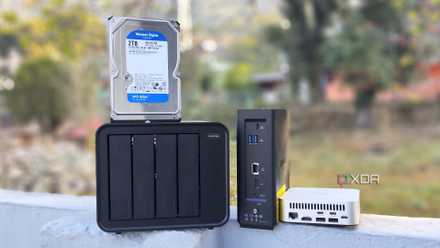
5 issues I faced when setting up a NAS for the first time and how I fixed them
Setting up your storage server comes with its challenges
5 A UPS isn’t optional, it’s essential
Power cuts causing data corruption are quite common
At first, I thought a UPS (Uninterruptible Power Supply) with a battery backup was overkill. Then, a sudden power cut corrupted my data mid-transfer, and that was that. Unlike your laptop, a NAS doesn’t have a built-in battery. If the power goes out while it's writing to the disk, you risk file corruption or, worse, drive damage.
You can either plug your NAS into your home’s inverter (if you have one) or get a dedicated UPS. Either way, it gives the NAS enough time to shut down safely and gives you peace of mind that your data is safe. Think of it as insurance for your projects, your media library, and your kid’s schoolwork. It’s not a nice-to-have; it’s a must.
4 RAID is not a backup
It may sound like backup, but it’s not
RAID (Redundant Array of Independent Disks) protects against hardware failure. If one drive on your NAS fails, RAID lets you rebuild the lost data from the others after you replace the broken drive. But here’s the catch — if you accidentally delete a file, overwrite something, or fall victim to ransomware that encrypts everything, RAID can’t help you. That’s why it can’t be a substitute for actual data backup.
Even with RAID, you still need a proper backup strategy. That could mean syncing critical folders to the cloud or plugging in an external drive weekly to save important data. I figured this out in time before I lost anything. You can be smarter and start with backups from day one.

4 backup strategies for your personal NAS
If you want to back up your NAS, these are the backup strategies you should consider.
3 Storage fills up faster than you think
Whatever you think is enough, double that
When I bought my NAS, 8TB felt like overkill. I thought I wouldn’t be able to fill it in for years. Fast-forward a few months, and I was out of space. Storage vanished rather quickly between full-resolution media backups, synced work files, Docker experiments, and entire shows I’d downloaded.
And if you're using RAID 1, which mirrors data across drives, you're only getting half that space in reality. The golden rule here is to get at least double the storage you think you’ll need, especially if you plan to use the NAS for years to come. Moreover, if your NAS starts to fill up, performance can tank quickly and impact your day-to-day work.
2 The app ecosystem is hit or miss
First-party app stores can feel limiting
Most NAS platforms have built-in app stores offering mainstream apps like Plex, WordPress, or download managers. In theory, installing these from your NAS dashboard feels safe and easy.
But in practice, it’s a mixed bag. Some apps are well-maintained, while others are clunky or missing from the app store. That’s why I turned to Docker in the first place. It unlocks a whole new world of powerful self-hosted tools. However, it comes with a learning curve and requires some basic container knowledge.
If you’re not ready to dive into the world of Docker just yet, that’s okay too. Just know the built-in ecosystem may only take you so far.
1 Your network is probably the weakest link
Network bottlenecks are usually the real reason for slowdowns
Your NAS could be blazing fast, and your drives could be top-notch. But if your router is old or your Wi-Fi is unreliable, everything will feel slow anyway.
Large file transfers and 4K video streaming require consistent speed. When your router struggles to keep up, your NAS can’t save you. I eventually upgraded to a gigabit router and ran Ethernet cables to key devices. Even link aggregation helps in this situation if your NAS supports it.
So, if speed and reliability matter, especially for streaming or backups, go wired wherever you can, as Wi-Fi might not cut it.

4 mistakes I almost made when building my first NAS
Don't make the same mistakes I did with my first DIY NAS.
Getting the right NAS for yourself
Setting up a NAS is easier today than it used to be. But choosing the right one is a whole different story. With so many models, features, and price points, it’s easy to get overwhelmed and end up more confused than when you started. But if you stick to a few basics — like thinking ahead about storage needs, network setup, and app flexibility — you’ll have a NAS that actually grows with you. And once it’s up and running, it’s one of the most satisfying tech investments you’ll make.
QNAP TS-464
- Brand
- QNAP
- CPU
- Intel Celeron N5095
- Memory
- 8GB DDR4 (max. 8GB)
- Drive Bays
- 4
- Expansion
- 2x M.2 PCIe 3.0, 1x PCIe Gen 3 x2
- Ports
- 2x 2.5 GbE, 2x USB-A 3.2 Gen 2, 2x USB-A 2.0, 1x HDMI
QNAP's TS-464 is an impressive four-bay NAS with a striking design, powerful internal specs, and IR support for a remote control. If you're looking for the best-equipped NAS for running Plex (or other media solutions) without spending a small fortune, this is the NAS for you.