
The Raspberry Pi family has spawned numerous cool accessories, and the RPi 5 is no different. Aside from microSD cards, cases are easily the most common companion devices you’ll find for Raspberry Pi single-board computers, with third-party manufacturers designing everything from sleek retro console enclosures to aesthetically pleasing chassis.
Elecrow’s Pitower Gen 1 falls in the latter category, as it’s a replica of a conventional RGB-heavy gaming tower that has been scaled down to fit a Raspberry Pi. But under its flashy exterior, the Pitower hides a couple of neat features for hardcore tinkerers. I’ve been using it for a few weeks now, and although I have some gripes about its design, the Pitower gets my seal of approval.

I tried using my Raspberry Pi as a laptop
With the right hardware and OS, even a Raspberry Pi can serve as solid daily driver
The Elecrow case earns a lot of points on the aesthetics front
There’s even a tiny OLED display here
Starting with the design, the Elecrow Pitower looks absolutely gorgeous. The clear front and side panels make my Raspberry Pi seem like a motherboard inside a typical PC, while the acrylic side panel and the all-black chassis give the overall setup a premium appearance. The back panel I/O uses the Raspberry Pi 5’s ports, though the PCIe-to-SSD adapter board that ships with the case lets me connect full-sized HDMI cables instead of dealing with finicky micro-HDMI ports on the RPi 5.
Since the Raspberry Pi is seated deep inside the Pitower, Elecrow includes another adapter for the GPIO pins to make them accessible from the front glass panel. Likewise, the Pitower includes a power button on top of the case, as the one on the RPi 5 isn’t accessible externally. Right next to the power switch is a miniature OLED display, which can be configured within the Raspberry Pi OS to output the current date, system resources, and CPU temps. It’s pretty neat if you’re running your Raspberry Pi as a server and need to keep an eye on its temperature and resource consumption metrics without constantly checking the Beszel dashboard.
It has enough fans to keep the RPi 5 cool under heavy loads
As the most powerful Raspberry Pi board to date, the RPi 5 can get really toasty if you use it without proper cooling provisions. Thankfully, the Pitower ships with case fans as well as the Active Cooler heatsink to ensure the SBC remains nice and cool. To put that into perspective, my Raspberry Pi 5’s idle temps lie in the 40-45°C with just the Active Cooler, and the SBC goes past 60°C if I try to run too many containers or deploy a Windows 11 VM.
The case, however, provides better cooling support thanks to the two intake fans on the side panel and an exhaust at the top. With the case on, my Raspberry Pi’s idle temps average around 38°C, and I’ve yet to see it cross the 50°C threshold under load. But since there’s no PWM controller for the case fans, they run at full speed all the time. I’ve got two desktop PCs running in the same room as the Pitower, so the noise isn’t that big of a deal for me. But these 50 dB fans can get somewhat loud for a quiet office environment.
But I love the SSD support more than anything else
As much as I adore the Pitower’s design, the SSD adapter is my favorite aspect of this package. Despite being the same size as the Raspberry Pi, it slots well inside the PC tower, and you can check its storage allocation from the OLED display. I’ve already mentioned the full-sized HDMI ports on this expansion board, but it also includes an RTC battery slot for projects that require accurate timekeeping even when the Raspberry Pi is powered off and not connected to the Internet.
Building the case can take a while
It’s akin to assembling a PC with a pint-sized mobo
Unlike most Raspberry Pi cases, where you just slot the SBC into them and tighten some screws, the Pitower is a bit of a slog to set up. Credit where it's due, Elecrow includes a detailed manual with the case, and there's an official assembly video on the company's YouTube channel. But putting everything together requires some effort. It took me around fifty minutes to finish assembling it, including some extra minutes to capture the images for this article. I also had to run a couple of terminal commands to get the OLED display working with the Raspberry Pi, but most of them are documented on Elecrow’s wiki.
That said, I’m not a big fan of the lack of proper cable management options. Sure, I could shove the fan cables in the empty space behind the GPIO extender board, but I can’t do the same with the power button’s wire or the ribbon cable. It’s a minor gripe, but the hanging cables can make the Pitower look somewhat disorganized.
I wish I could swap out the microSD card without tearing it down
The closest thing I have to a dealbreaker with the Pitower is the fact that I can’t replace the microSD card on the SBC. Most of the Raspberry Pi cases I’ve used in the past tend to have an opening that lets me replace the microSD card, but the Pitower requires me to disassemble the entire thing just to access the back of the RPi 5. If anything, the SSD is a lot easier to replace than the microSD card, and I just need to avoid the mess of wires when screwing in a new NVMe drive.
Now, I’m aware that the Pitower is designed for hardcore users who want lower system temps and NVMe drive support. Heck, I rely on SSDs for demanding projects. But when it comes to running new distros or building quick projects, cheap microSDs are a better option. I would’ve called the Pitower flawless if it included a slot in the back for slipping out old microSD cards and slipping in new ones.
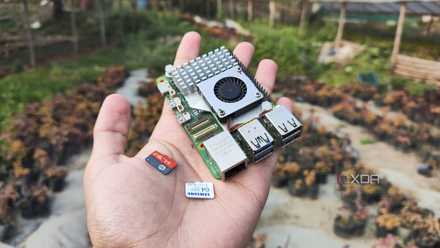
MicroSD cards aren’t great for Raspberry Pi projects, but I can’t stop using them
Despite their terrible durability and slow transfer speeds, microSD cards have some neat perks
Nevertheless, it’s a rock-solid Raspberry Pi case
My cable management and storage woes aside, I really appreciate the SSD board from a budget standpoint. You see, the official Active Cooler and PCIe-to-SSD adapter tend to cost around $30 if you buy them from Amazon, with a retro case requiring anywhere between $10-15. Meanwhile, the Pitower includes both the cooler and the SSD expansion board, alongside a PC-like case that not only looks gorgeous but also brings an RTC clock, an OLED display, and extra fans.
Elecrow Pitower Gen 1 Case
The Pitower is a miniature PC tower case that adds full-sized HDMI display ports and NVMe support to the Raspberry Pi. Plus, it even has a tiny OLED display and RGB case fans, though you'll have to assemble everything yourself.