
I gladly left the world of smart home apps and cloud service subscriptions behind. Instead, an ESP32-S3 running ESPHome quietly, locally, and reliably operates my smart home. So even when the internet connection is down, the dashboard doesn't break. It got me curious to know what my house actually does all day.
This ESPHome running device helps trigger and manage automations and interfaces with the lights, doors, temperature, smart electronics, and more. The responsiveness and actions are way faster than the HomePod and Amazon Echo I tried in the past.
Of course, a deep dive into ESP32 and the learning curve required to get ESPHome running on it takes significant effort. Time investment ensures that the ESP32-based device running ESPHome quietly operates my home behind the scenes.

7 ESPHome projects that made my smart home actually feel smart
Unlocking deeper control and reliability with ESPHome projects that turn everyday sensors into powerful smart home upgrades.
Why an ESPHome-based device is a crucial centerpiece
Taught me a lot to improve my smart home
After Home Assistant, I learned a lot from ESPHome about building custom smart home devices with ESP32 controllers and a bunch of cheap sensors. Besides helping me resurrect my old smart home devices, it continues to help me save money by avoiding blind splurges.
Removing the dependency on cloud services gave me a massive sense of relief. Besides, juggling between dedicated apps to control a smart device has become tedious. Using ESPHome and an ESP32 microcontroller, I have deployed several devices that work locally, even without an internet connection.
Additionally, the response time and data measured using ESPHome are logged instantly and locally.
I tried a number of ESP32 boards, and I chose the ESP32-S3 microcontroller because it had more RAM to handle more workloads and apps. More memory helps it handle several sensors and inputs without causing issues. Overall, it provides enough power and stability to support my smart home experiments. As the next upgrade, I’m looking to acquire S3 boards with a display.
Since ESPHome integrates directly with Home Assistant, it frees me from installing anything separately and has no dependency on cloud storage. Also, it allows the devices to trigger automations even during internet outages.
Why did I choose ESPHome to deploy on an ESP32
Convenience of native support
ESPHome runs inside Home Assistant and stores all its data on my home network. While it downloads libraries in the background for firmware building, those files can always be removed. Creating a YAML with declarative values for hardware and software makes it easier to build a custom firmware than to write code for it.
For that, I don’t need to install any IDE or download libraries specifically. For example, the ESP-IDF installation is over 3GB on my macOS, since it supports multiple ESP32 boards. Even after ESPHome downloads the libraries and compiles the build files, I can easily clean/remove them once flashing is complete.
For folks who don’t write code: configuring sensors, declaring GPIO pins, and defining functions in YAML-based files. Typically, installing ESP-IDF or Arduino IDE to build firmware on a computer requires skill and knowledge. With ESPHome, you don’t have to deal with C++ complexities and work around framework specifics.
ESPHome works as a configuration-driven framework that abstracts from the ESP-IDF APIs and Arduino libraries. While supporting connectivity functions, it allows creating custom firmware for microcontrollers without writing code.
What ESPHome devices run in my smart home
A couple of sensors and automation
My journey with ESPHome began with integrating a PIR motion sensor (HC-SR501), a temperature and weather sensor (DHT22), and a sound detector on an ESP32-S3 board. Thanks to the Home Assistant community, it was easy to replicate other’s codes and make adjustments in the YAML files to create custom firmware.
The ESP32-S3-based device provides weather data (temperature and humidity) for the Home Assistant’s dashboard. One of the automation triggers is when humidity or temperature spikes unusually inside the house.
Presence detection-based smart lighting control actions are enabled by a combination of a PIR motion sensor. However, I’ve also set an automation to gradually increase brightness at dusk. On the main door, a magnetic reed switch is paired with an ESP32 board running ESPHome to notify whenever it is opened after sunset.
After flashing the firmware for the first time, all subsequent updates occur over the air. So, I don't need to open the enclosures just to update the board.
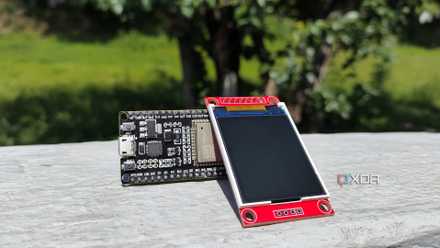
I added an open‑source ESP32 dashboard to my Home Assistant setup, and I'm glad I did
It's a customizable display that can fit practically anywhere in my smart home
ESPHome supports my smart home’s silent backbone
Proprietary hubs and off-the-shelf smart home devices lock me into their respective ecosystems. Also, the cloud storage dependency slows down simple, direct commands by several hundred milliseconds. That’s why I prefer devices running ESPHome, since they’re platform-agnostic and quite inexpensive to make.
Besides being extremely customizable, these ESPHome project based devices are easy to replicate and replace. All that aligns with my goal of managing a smart home where every device is highly customizable, works locally, and is highly responsive.
ESPHome
ESPHome is an open-source firmware framework that enables the easy creation of custom smart home devices using WiFi-enabled microcontrollers. It utilizes simple YAML configuration files, integrates seamlessly with Home Assistant, and supports multiple interfaces, including web, API, and MQTT. With built-in support for on-device automations and wireless over-the-air updates, managing your devices becomes straightforward and flexible.