
If you’ve been a part of the home lab community for a while, you’ve probably tried to mix and match different hardware and software combinations for your DIY projects. After all, the beauty of experimentation servers is that you can integrate practically any computing device with your nodes. And I don’t just mean mini-PCs, CPUs, or other hardcore PC components, either.
For folks relying on repurposed server-tier systems or old PCs for their tinkering tasks, you probably have some vacant PCIe slots on your motherboard. Fortunately, you can arm them with some handy PCIe cards to take your home lab’s computational abilities to the next level.

4 reasons PCI storage cards are the best upgrade for your home lab
A storage card may not seem all that impressive, but it's a great investment for your server
Bluetooth card
It’s way more reliable than a dongle
On the surface, you’d think wireless connectivity options are only useful for normal PCs, not servers. After all, you’ll probably hook your home lab nodes up to a network switch for Internet connectivity and call it a day. However, Bluetooth cards have their own advantages, even though they’re somewhat niche compared to the other options on this list.
Home Assistant, for example, meshes really well with Bluetooth-based smart devices, and since USB adapters are prone to random disconnections, relying on a proper PCIe card is better from a reliability standpoint. Heck, many obscure devices, including energy-efficient BLE paraphernalia, can’t connect to a Wi-Fi/LAN, making Bluetooth the sole method for integrating them into my smart home automations.
Host Bus Adapter cards
To add extra SATA, SAS, or FC ports to your server
When it comes to HBA cards, you’d imagine them to be extra SATA ports for your collection of hard drives. And you’d be right – for the most part, at least. You see, most of the popular HBA cards act as expansion slots for your SATA needs, though they support other protocols as well. If you’ve dealt with enterprise-tier HDDs, you may have noticed slightly different connectors on the storage drives. This would be a SAS interface that, when combined with the right HBA card, can provide better reliability, dual-pathing support, and superior throughput than SATA.
Then you’ve got HBA cards designed for network connectivity – specifically, fibre channels. Rather than relying on file-sharing protocols, FC hardware can offer block-level access to your storage. I’ll admit that it’s the most overkill form of HBA cards for the average home labber, but it’s definitely a lot of fun to tinker with, especially when you’ve got hardcore cluster nodes. Meanwhile, a SATA (or even SAS, if you know where to look) HBA card is useful when you’re looking to build a reliable NAS featuring multiple drives.
Graphics card
Even an old GPU can serve your home lab well
Although GPUs are typically associated with gaming PCs, they’re just as useful for servers. As unhinged as it may sound, you could even pass your graphics card to a VM and turn it into a remote gaming hub. Or, you can switch things up by turning your GPU-powered virtual machine into a video-editing station. Alternatively, you could try hosting LLMs on your GPU – and that’s precisely how I’ve repurposed my GTX 1080 after Nvidia pulled the plug on new Pascal drivers.
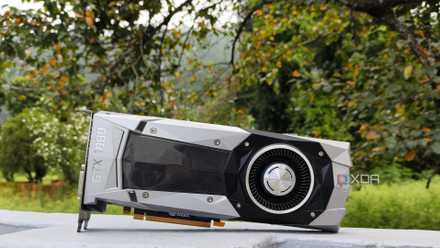
Nvidia stopped supporting my GPU, so I started self-hosting LLMs with it
I self-support my gpu now because Nvidia won't
Turns out, LLMs mesh incredibly well with self-hosted utilities. By connecting Home Assistant with the AI provider (Ollama, in my case), it’s possible to use the LLM as a reasoning model for the platform’s built-in assistant. Likewise, tools like LanguageTool, Paperless-GPT, and Karakeep can use your locally-hosted LLM for AI-centric tasks. Then you’ve got Frigate, which can utilize your graphics card for motion tracking, and media servers like Jellyfin that support GPU-powered hardware acceleration.
Network Interface Card
Grant your server the networking prowess it deserves
Depending on your system’s built-in Ethernet provisions and your networking needs, a dedicated NIC can range from a decent improvement to a much-needed upgrade for your home server. If your motherboard is rocking a 1G port, and you have a network switch that can handle 2.5 gigabit bandwidth, slotting a 2.5GbE network card into an empty PCIe slot can provide some oomph to your file transfers, especially if the node in question is a data archival and backup NAS.
The only caveat with NICs is that you’ll need to invest in additional network equipment, otherwise a fast card will get bogged down by a slower switch. Thankfully, 2.5G (and even 5 gigabit) paraphernalia is a lot cheaper than you’d think, though anything past that can cost you a few hundred dollars. But if you’re not looking to increase your server’s network speed, a dedicated NIC can provide better fault tolerance for your setup. Heck, you can even opt for a network card with a bunch of Ethernet ports if you want to experiment with self-hosted router distros, SMB multichannel, or link aggregation.
Try not to exceed your budget when grabbing PCIe devices
As much as I adore equipping my server nodes with extra components, there’s no denying that home labbing can get expensive. Graphics cards are kind of a no-brainer, with high-parameter LLMs requiring an impressive amount of GPU firepower to run. However, FC cards, SAS HBA boards, and 10GbE NICs can end up costing a fortune, and you’re better off looking into used server hardware for sensible deals.
Don’t get me wrong: these devices are perfectly optional, and you can still create a fully-functional home lab without investing in them. But the satisfaction of upgrading your nodes and being able to tinker with fun devices makes them worth picking up.