
It’s frustrating to discover your home server or key network service has been offline for hours, only noticing after a complaint or when you need it most. Since our home labs and networks are becoming increasingly complex, ‘hoping for the best’ isn’t a strategy.
We need a tool that shows cracks before the glass breaks. Here is where Uptime Kuma comes into play. It’s a tiny, lightweight self-hosted monitoring tool that lives in a Docker container. With its intuitive dashboard and instant notification triggers, it acts as your network’s early warning system.
5 of the best tools for monitoring your home lab
Keep a weather eye on your home server with these incredible services
What is Uptime Kuma, anyway?
Let’s go over the basics first
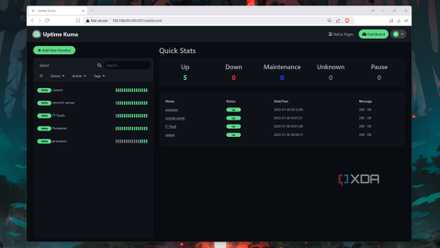
Uptime Kuma is an open-source, self-hosted monitoring tool. Every few seconds, it sends a digital poke to your router, media server, smart lights, or even the website you are hosting. If that device or service doesn’t answer back, it sends out an alert via whatever notification app you use.
I used to be the guy who only found out my Plex server was down when I sat down with popcorn and realized the app wouldn’t load. It’s frustrating, and that’s why I shifted to a setup with Kuma.
Networks don’t always break; sometimes they just degrade. Kuma tracks latency, so I can see if my ISP is starting to jitter before an important Google Meet call.
I have lost track of how many times I have forgotten to renew an SSL certificate. Kuma tracks those expiry dates for me. Most professional monitoring services charge you a monthly fee once you want to monitor more than a handful of things.
With Uptime Kuma, I can monitor 50+ devices for $0, while using the same RAM as a single Chrome tab. When the internet goes out, I don’t have to wonder if it’s the router, the modem, or the ISP.
I just checked my Kuma dashboard on my phone to see exactly where the internet stopped.
Setting up Uptime Kuma
Doesn’t take a while
Because Uptime Kuma is packaged as a Docker container, the installation process is a breeze. I don’t have to hunt for dependencies or configure web servers if I ever decide to move it. I just dropped a simple docker-compose.yaml file into a folder, ran docker-compose up -d, and that was it.
Within seconds, the container was up, the internal database was initialized, and I was looking at a login screen. You can even run it on a dusty Raspberry Pi in the corner of your closet.
The interface is snappy and beautiful. It defaults to a gorgeous dark mode that makes those green ‘Up’ status bars really pop. There are no cluttered menus or buried settings; everything is right where you expect it to be.
Adding a new monitor is just a few clicks. I enter a URL or an IP, choose how often I want to poke it, and I’m done. It’s one of the few tools in my stack that I actually want to keep open on a second monitor just because it looks so good.
Key features and pro-tips
The ‘wow’ factor
Once I got past the initial ‘wow’ of the installation speed, I started digging into what this little container could actually do. I quickly realized I could monitor almost anything with a digital pulse.
It’s not just about checking if a website is up; it’s about the depth of data I’m getting.
Kuma supports over 90 notification services. I hooked mine up to a dedicated Discord channel and Telegram.
Since Kuma lives in Docker, it can talk to the Docker socket. This means it can tell me if my other containers have crashed.
If you are new to Uptime Kuma, here is a pro-tip I learned the hard way: don’t host your monitoring tool on the same machine it’s supposed to be monitoring. If the server goes down, your monitor goes down with it.
I moved my Kuma instance to a tiny, low-power device. Now, if my main rig dies, I actually get the alert.
Also, you won’t want to be the person who gets 50 alerts while you are intentionally rebooting your router. Kuma lets you schedule maintenance windows so you can take things offline for upgrades without your phone blowing up.
5 Raspberry Pi software tools perfect for self-hosting beginners
We've all got to start somewhere, and these self-hosted services are some of the best for beginners
Dockerized watchman
For me, the goal of a great home lab or network setup isn’t just to have the most tools; it’s to have the most peace of mind. Thanks to Uptime Kuma, I no longer have to wonder if my services are healthy; I will know they are, and I will be the first to find out if they aren’t.
Whether you are a seasoned admin or just starting your Docker journey, Uptime Kuma proves that you don’t need a massive server rack or a huge budget to keep your digital world running smoothly.
So, what are you waiting for? Pull the image, set up your first monitor, and stop worrying about what’s happening behind the scenes.
Uptime Kuma
- Key highlights
- Open-source monitor
Uptime Kuma is a real-time monitoring tool for your self-hosted services.