
A Raspberry Pi 5 set up costs around $100 once you factor in a high-speed SD card, a proprietary power brick, and a case for the device. Your old phone, on the other hand, is essentially free because it's sat at the back of a junk drawer doing nothing anyway, and it already has better specs than any Raspberry Pi 5 setup while contributing highly to your smart home.
The biggest advantage is that a phone has a battery, meaning that when your power flickers and the Raspberry Pi crashes, corrupting your SD card, the phone stays online, leaving you with less hassle and trouble. Your old phone is a high-density ARM server with a built-in UPS, a touch-screen console, and a sophisticated sensor array that a Raspberry Pi could only dream of. The price-to-performance ratio of a Raspberry Pi 5 has made enthusiasts look elsewhere, and the e-waste in your drawer is often a Snapdragon-powered beast that destroys a Pi in single-core performance and power efficiency.
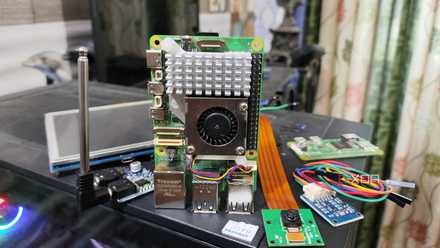
The best Raspberry Pi projects don’t require extra hardware anymore
You don't need to spend a fortune on premium Raspberry Pi HATs and gizmos for your DIY projects
Does a phone actually perform better?
And how can you use it?
Before getting into the nitty-gritty, let's actually look at the performance comparison.
When looking at your old phone's CPU and RAM, even a mid-range phone from 2022 has faster UFS storage than a Pi's MicroSD. There's also a stark contrast between a Pi's 2.4GHz Cortex-A76 and a Snapdragon's BigCores that you'll find in an old mobile phone.
Alongside this, there's a general power efficiency gap. An idle phone pulls sub-1W of power, while a Pi 5 idles at around 3–4W. While this doesn't sound like a major discrepancy, in a 2026 home lab, every watt counts toward your always-on footprint.
Pair this with the fact that you get a whole range of pretty sophisticated sensors as features, too, and it's clear why using an old phone is the true power move. A Pi needs $50 in HATs to get GPS, an accelerometer, and an ambient light sensor, but your phone already has all of these sensors baked into the kernel and ready to go.
There are a multitude of use cases for something like this. The first could be a home system voice satellite. In the Home Assistant 2026.3 update, it brought high-performance local-only wake word detection to the Android app, meaning that you can use your old phone in a similar way to an Amazon Alexa or Google Nest.

Turning an old Android phone into a home server
Trivia challenge
Think you know what it takes to run a home server from a dusty old Android phone? Put your knowledge to the test.
Which Android app is most commonly used to run a Linux environment on an Android phone without root access, making it a popular choice for home server setups?
One major advantage an old Android phone has over a Raspberry Pi as a home server is its built-in hardware feature. Which feature is that?
When hosting a home server on an Android phone, which method allows you to securely access it remotely without exposing ports directly to the internet?
Which lightweight web server is commonly installed via Termux on an Android home server due to its low memory footprint?
What Android setting must typically be disabled or managed to prevent the phone from killing background server processes during inactivity?
To prevent battery degradation when running an Android phone as a 24/7 home server plugged into power, what is a recommended practice?
What is the purpose of assigning a static local IP address to your Android home server on your router?
Compared to a Raspberry Pi 4, what is a notable hardware limitation of using an old Android phone as a home server?
Your Score
Thanks for playing!
But using your phone gives you a significant advantage. Instead of buying a voice assistant that spies on you, you can mount your old phone to the wall, and it's now a touch-screen dashboard and a privacy-focused microphone for your smart home. As a bonus, you can use the phone's front camera for presence detection or the light sensor to trigger sunset scenes, too.
Another use case is the tiny Docker node by combining Termux (which is not just an app but a Linux environment) with proot, you can run containers, including a full Debian or Ubuntu instance. After doing this, you can host a Pi-hole instance for ad blocking, a Navidrone music server, or a Vaultwarden password manager. These lightweight services run significantly smoother on 6 GB of LPDDR4x RAM than they do on a struggling SBC, as you'd get with a Raspberry Pi.
These are just a couple of simple use cases; there are tons more based on your specific setup and what you'd like to use and add to your home server.
Protect yourself from battery bloat
It will save your hardware in the long run
When you use an old phone as an accessory on your home server, there's obviously a major elephant in the room that needs to be addressed: battery bloat. If you leave an old Android phone plugged into a charger 24/7, you aren't just killing the battery; you're actually inviting battery bloat to ruin your hardware, too. For a device that's meant to stay top-heavy in a closet as a server, you need a strategy to mitigate heat and electrochemical stress.
The easiest way to keep a battery healthy is to stop it from sitting at 100% or 0% for extended periods. This means using the 20-80 rule. Using Tasker and a smart plug, you can create a simple automation that monitors the battery level. When it hits 80%, have it trigger an automation to cut power to a smart plug. When it then drops to 20%, have it toggle the power back on. This means you're cycling the battery and ensuring it stays on at all times without risking battery bloat. By doing this, you're also automating the process, so you don't have to monitor it or deal with it yourself.
You might also want to manage the thermals of your device. Phones are designed to dissipate heat through their screens and glass backs, which isn't ideal if they're sitting face down on a shelf or mounted to a wall. This means that you may need to take some steps to protect it from overheating. Passive cooling is a great first step; ensure the phone isn't in a case, as this can act like a thermal blanket.
If you want a more efficient method of heat dissipation, then you can DIY a heat sink by buying a small adhesive copper heat sink (the kind meant for Raspberry Pi's or laptop NVME drives) and then stick it directly on the back of the phone over the SoC area (usually near the cameras).
Don't invest in new tech that you don't need
Just give your current tech a new lease of life
The Raspberry Pi is for hobbyists who want GPIO pins, but the old phone is for people who want a robust, resilient server for the cost of a USB-C cable. If you've already got the device sitting at the back of a junk drawer, don't let it just become e-waste; give it a new lease of life. We're entering the era of second-life computing. Don't let a perfectly good quad-core CPU rot in a drawer when it could be running your digital life.