
There are millions of apps in the Play Store that work great on your Android phone or tablet, but only a few advertise compatibility with Chromebooks, and fewer still with Android Auto (AA).
It shouldn't be confused with Android Automotive OS (AAOS), which is the open-source OS that powers infotainment experiences in cars right off the factory floor. AAOS doesn't need a smartphone connection, unlike AA, since it runs the Play Store natively. However, AA is more widely available, easier for carmakers to throw into their products, and still offers a sizable selection of apps that benefit the user experience.
Most of these apps serve a dual duty: when they're installed on your phone, they readily offer access on your car's infotainment screen when your Android device is connected to it. However, not all of them have to be navigation-focused. I wasn't sure what was possible beyond navigation and music apps, but there's a lot available for Android Auto.
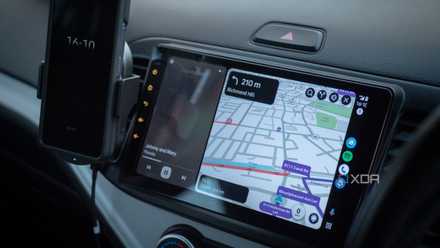
I replaced my car's head unit with Android Auto, and it changed way more than I expected
I made this change a few years ago, and I absolutely love it.
Apple Music
Tied for the top with Tidal
Music is a key ingredient to my sanity on the roads, and often, the constant chatter from radio stations does more harm than good. With music streaming apps, all I need to do is set up suitable playlists or trust the Shuffle selection.
Android Auto uses YouTube Music as the default music provider when you use Assistant voice commands to request a song or playlist, but I was a loyal Spotify Premium subscriber for a few years, and switched the default handler to Spotify. The option to change the default is available on your Android phone under Settings > Google > All Services > Settings for Google Apps > Search, Assistant and Voice > Google Assistant > Music.
Spotify kept me waiting for a high-res tier for way too long, so I jumped over to Apple Music for the same monthly price on an annual subscription, and I've been using it ever since. I get the full advantage of lossless streaming on the go, in the perfect acoustics of a quiet electric car. It's not that different from Spotify now that Spotify HIFI is out, so the choice boils down to personal preference. More serious audiophiles might even prefer Tidal for its free trial and 24-bit 192kHz playback. If you're invested in any ecosystem, switching services isn't easy, even with free, easy-to-use playlist transfer tools.
Google News
With NPR providing cover fire
While I get my music fix on the move, getting caught up with news without losing my cool to a ton of fluff or advertising seems impossible these days. Podcasts aren't my jam, and I prefer crisp news briefings; surprisingly, Google News fits the bill perfectly. It's one of the default apps for Android Auto if it's pre-installed on your phone, and it packs a treasure trove of crisp news briefings from the world's best providers. Moreover, I can use the app to adjust my preferences for these providers if the auto-selected defaults don't hit the mark. The specific settings.
My only gripe with Google News is that it doesn't read whole articles, so if something sticks with me, I need to make mental notes while driving and look it up later, or quiz Assistant about it. I'm not a fan of either because the former strains my memory, and the latter might offer biased or inaccurate results unless I ask pointed questions. So sometimes, I switch gears to NPR — yes, the same decades-old radio staple. It packs US-focused local news, public radio podcasts, and, most importantly, is totally free, just like Google News.
PlugShare
Keeping electric vehicles alive
As stated earlier, I drive an EV, and ensuring I always have juice can be a task sometimes. The thought never leaves my mind, and I need a reliable map of all the charging stations around me. Yes, Google Maps lists EV charging stations and even optimizes routes for them, but the community-curated list isn't as descriptive as I would like. PlugShare has my back, since it's solely an EV charger finder map, and nothing else. It has a singular purpose, and it does it well. There's no live traffic mapping to your destination.
The app has integrated filters for my car's plug type, my desired star rating for the charging station, and other important factors. Like Maps, all its data is crowdsourced from users, including the photos and details about the amenities at each charging station. So, when I'm low on charge and nowhere near home, PlugShare reliably and effortlessly takes over from Google Maps.
PlugShare
Zoom
Meetings on the move
All Android Auto apps come with the standard safety disclaimer that your attention should be on the road, and that you're better off letting the passenger operate the infotainment system. We don't condone hopping on a work call while you're driving, but Zoom made the whole ordeal a tad safer for those emergency huddles or scrum calls you just need to attend to. The Android Auto version allows joining meetings in audio-only mode, for obvious reasons, since there's no easy way to get a webcam to work with Google's in-car infotainment system. As with most other apps on this platform, the user experience is enhanced by oversized on-screen call controls.
I also appreciate how this solution works with your calendar to discourage non-essential use. A Join button only shows up if there's an upcoming meeting scheduled. The solution is certainly simpler to use than, say, having a laptop on your lap or dashboard while you drive, or taking the call on your phone. Personally, I'm still salty that Google Meet hasn't caught up in offering this functionality. The only parity it enjoys is the ability to join calls by dialing in.
You can do a lot more than navigate
Android Auto is built on the premise of making navigation and entertainment from your Android phone more accessible on your car's infotainment screen. However, the app ecosystem Google is fostering opens up possibilities well beyond what was originally intended. With these solid apps, I enjoy everything from high-res streaming to newscasts and worry-free EV rides, thanks to my Android phone.
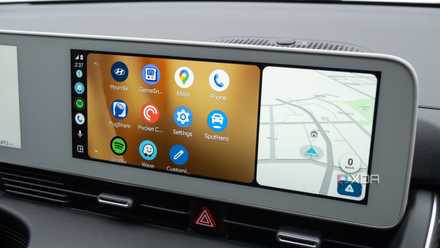
6 useful Android Auto apps that really improve my driving experience
I've never really enjoyed being behind the wheel, but these apps make the experience less painful and help pass the time.