
Deciding which graphics card will power your gaming or AI PC is a big decision. Whether you go for an AMD, Nvidia, or Intel GPU, you'll need to weigh the specifications, compatibility with your hardware, budget, and even software features. GPUs are complex pieces of hardware, and the drivers and the software package they come with can be just as important as the silicon specs. The software from all three makers does the job of controlling your graphics card's settings, but they're not equal, and there are a few important features that the AMD Adrenalin software has that the Nvidia app is missing.
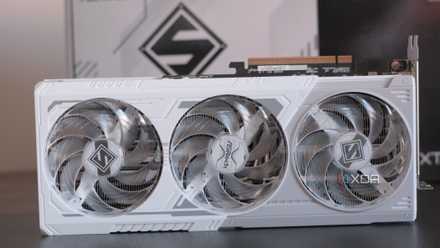
AMD's Radeon RX 9070 XT is the most exciting GPU to launch in years
It's here. It's brilliant. Go and buy one.
5 Works under more conditions
AMD Adrenalin doesn't need a permanent internet connection
One thing I noticed recently is that the Nvidia app has a habit of not showing content on its many tabs and pages if you don't have an internet connection. Some of this is cosmetic, like missing icons on the games and apps settings page, but some pages, like the one with Nvidia rewards, are just blank if you don't have internet. I've heard from other people that sometimes the games and apps settings page is also blank without internet, and that's a problem because those optimizations are one of the key selling points of the app.
I've not once seen the AMD Adrenalin app have the same issues. The only parts that don't show up without internet access are the occasional adverts, which you can turn off anyway. Every other feature (other than livestreaming, of course) is accessible at all times, with the correct icons and other UI elements.

10 ways to make your home network more resilient to outages
Nobody likes having their home network offline, especially if they work from home.
4 User-friendliness
Nvidia needs two apps, AMD only needs one
There are often comments about the Adrenalin interface being too cluttered or too hard to find settings, which I can understand to some degree, even if AMD has spent considerable time rearranging it for easier use. But you know what really breaks user-friendliness? Having to use multiple apps to control your GPU.
There's the Nvidia app, the Nvidia Control Panel, and, at one point, GeForce Experience, so you had three apps to contend with. Even with features being moved across to the Nvidia app, you have a situation like Windows 11 settings where some links open another program, or send you to Nvidia's website to download another program. It's frustrating when everything is right there in the AMD Adrenalin app, without having to download anything or think about what you might need or which app to open.

Complete guide to AMD Software Adrenaline Edition
AMD's Adrenaline driver software can look intimidating at first, but here's everything you need to know about it and what settings are important.
3 For overclockers
Adrenalin has deeper and more granular control for overclocking
While it's true enough that the best GPUs nowadays come tweaked from the factory so you can't manually overclock as much as you used to be able to, it's still a pastime that some enthusiasts enjoy. But the granular control that enthusiasts crave doesn't exist in the Nvidia app. If you have a Team Green GPU, you'll be using a third-party app like MSI Afterburner instead, and Nvidia seems content with letting that happen. Otherwise, you're stuck with an automatic toggle, and a few sliders that don't let you manually enter values at all. Not very satisfying, and not very useful either.
The story is different in AMD Adrenalin, where you get presets for several potential overclock, undervolts, and overvolts, but you also get manual tuning for more options of frequencies, voltages, and more. You also get automatic tuning options for a quick fix, which is handy to find a starting point for further tweaking. You'll also be able to play with VRAM options to tune that as well for the best total performance boost. It's as fully featured as MSI Afterburner or other OC software, but Adrenalin is laid out better and is easy to use.

I want the Nvidia app to borrow this one feature from AMD Adrenalin software
The new Nvidia app needs more time in the oven, and here's one feature that I hope it borrows from AMD's Adrenaline software.
2 For streamers
ShadowPlay can only record local videos these days
AMD and Nvidia both have software options for recording gameplay for content creation purposes. This is handy because it comes with your GPU drivers, so you don't need to download and set up a software package like OBS, even if that's going to be a more powerful option. Until recently, the recording package in Nvidia's app and AMD's app was fairly comparable, but no longer. The new Nvidia app does still have the ability to capture clips and local recordings, but it no longer lets you broadcast your gameplay to livestreaming sites like Twitch or YouTube.
For content creators, that's a big deal. AMD's Adrenalin has renamed the ReLive recording software to Record & Stream, but it's still the same fully-featured software package. You can live stream to Twitch, YouTube, and Facebook, plus a bunch of smaller or non-US audience streaming sites. Plus you can create scenes to switch between just like in OBS or XSplit, tweak audio levels, bitrates and more, all from your graphics card software package. There's also plenty of options for local recording, from automated capture to hotkeys for clips, making it almost as powerful as OBS, without having to install any more software.

How to use AMD Radeon ReLive to capture and stream your games
Radeon ReLive is the built-in solution AMD GPU users have for gameplay recording and streaming
1 Stability
Nvidia hasn't been doing a good job of this lately
As a longtime user of both AMD and Nvidia graphics cards (and several other companies that were purchased by the two, back when PC gaming was all beige), I know that many people have the impression that AMD's driver stability is bad. And, at one time, they might be partially right, but things have changed and I've seen AMD's drivers and software go from strength to strength, at a time when Nvidia's drivers are getting less stable.
The RTX 50 series introduced issues with black screens on boot, game crashes, reboots, and other issues that shouldn't have happened. My personal PC has an RTX 4080 Super in it, and I get the black screen on boot bug on every recent driver and hotfix driver. The only one that works is from December, and is missing several other bugfixes and optimizations for recent games. But it's not just recent issues, there was a black screen bug with the UEFI firmware on many generations of Nvidia cards that was only fixed in 2023, after years of user reports.
AMD's latest hardware launches, the Radeon RX 9070 and RX 9070 XT, have seemingly gone off without a hitch, without any of the repeated issues that have plagued other new PC hardware launches. The only thing missing is more in-game support for AMD's graphics technologies like FSR 4 upscaling.

Things look dire for Nvidia as the RTX 50 black screen fix only makes things worse
Back to the drawing board.
AMD Adrenalin gives you more control over your GPU
From wider options for sharing your gameplay, to finer control over your GPU's voltages and clocks, AMD's Adrenalin software has a better feature set than Nvidia's app. AMD's drivers are more stable than Nvidia's as well, and Team Red's hardware hasn't been subject to any of the recent issues Nvidia has been facing with melting connectors, cables, or missing hardware specifications. That said, the software packages are still fairly consistent between the two, with only a handful of features deciding between them.