
We've talked a good bit about Windows 11 and the PCs that were left behind with the upgrade. The system requirements for Windows 11 are quite a bit higher than those for Windows 10, especially when it comes to the CPU, since a lot of models were dropped for seemingly no reason at the time. As such, it's not uncommon to hear about older PCs that can still run Windows 11 fine by just bypassing the requirements.
But what if you have something really weak? That's what I wanted to find out, and as it happens, I remembered a friend of mine used to have a tiny Windows 8 laptop that seemed like the perfect fit for my test. I wanted to see if Windows 11 would run on it and how usable it would be, but in the end, I had to resort to Linux. Here's how it all went down.
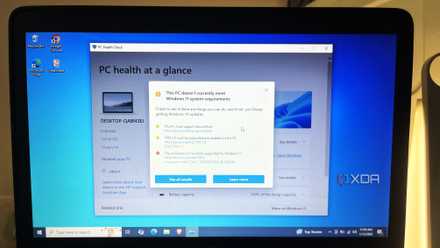
Microsoft says I can’t use my old CPU/laptop with Windows 11, but it’s actually fine
All those warnings turned out to be exaggerated
What's the hardware?
Old, but not ancient
For this experiment, I didn't want to go with something ridiculously old to the point where it really wouldn't make sense for it to be supported anymore. A Windows XP laptop would be a little too old in just about every sense, and the current version of Windows 11 now requires support for the PopCnt instruction, which is almost 20 years old, yes, but many Windows XP laptops probably wouldn't have it anyway. There's no way to bypass that requirement, so that was a dead end.
What I wanted to try was something more modern, but decidedly low-end, even for its time. I wanted to see how low we can go in terms of performance but still retaining enough modern features to be mostly functional.
In comes the Asus X102BA, a laptop from around 2013 or 2014 that shipped with Windows 8, and in the case of this specific model, included 2GB of RAM and an AMD A4-1200 dual-core CPU with a 4W TDP. Linux actually reports closer to 1.5GB available, but I'm not sure if that's completely correct.
Indeed, not particularly powerful hardware even for its time, and there hasn't been much in the way of maintenance done to it. I suspect the thermal paste of the CPU isn't doing so well after all this time, either. So how does it hold up today?

I forced Windows 11 to run on 2GB of RAM, and it was totally fine
A system requirement that's not truly necessary
Step one: Give up
I should have known
So, this obviously wasn't a great PC even when it came out, but for whatever reason, I really did hope I would be able to get a semi-usable experience out of it on Windows 11. My plan was to try it out and set up Atlas OS, a powerful tool that slims down Windows 11 to make it more responsive and less bloated. Unfortunately, this wasn't possible. After installing Windows 11, just loading the desktop would take minutes, and opening the Start menu was an absolute chore every time. Through a lot of patience, I was able to run AtlasOS's AME Wizard to set things up... except the process repeatedly got stuck and wouldn't move for hours. Unfortunately, I just had to give up on Windows 11 entirely.
Turning to Linux, I thought I'd try CachyOS first, not looking into the minimum specs. The installer alone was painful to use, and it eventually told me that CachyOS actually requires at least 2.5GB of RAM, which this laptop didn't have.
At this point, I turned to Linux Mint Xfce, featuring a lighter desktop than the traditional Cinnamon environment. This one I was able to set up, and frankly, it was almost usable. I managed to update the system, open a couple of apps, and even use the web browser. I got a little too ambitious, though, and opening three tabs, one of which was YouTube, was a bad idea. Plus, simply opening the application menu could still be slow at times, and the UI elements weren't always responsive.
My last resort was antiX, a Linux project completely focused on keeping old hardware alive. This is also available with the Xfce desktop, but there's another version that uses Fluxbox and Icewm, so I went with that to try and get the absolute lightest experience possible.

The old laptop in your closet is more powerful than most single-board computers
Uncover the hidden potential of your neglected laptop, as this unsung hero proves to be a formidable contender against the mighty SBC.
AntiX is actually usable
Not great, mind you
Settling on antiX was absolutely the right choice for this machine, as it actually made it usable. The Fluxbox desktop is much more rudimentary and limited than the modern alternatives, but everything you need is here and accounted for. The OS comes with a web browser in the form of Firefox, an office suite with LibreOffice, and everything someone would need for basic day-to-day use.
That simpler approach to the desktop, however, means the core of the experience is way more functional. Opening the system menu is actually instant, and browsing its dropdown menus also shows no delays. You can open the included apps and settings just fine, which is more than I can say for the other experiences I tried on this machine. And while it looks old, the Linux kernel version is 6.1, which is still officially supported and will keep getting necessary security updates for some time to come.
That's not to say the experience is fantastic with antiX, of course, there's only so much it can do about a computer that's this slow in the first place. Apps like LibreOffice still take a few seconds to load, and the web browser is notably still pretty slow to open. I certainly wouldn't recommend using multiple tabs, especially if you're planning to have one of them be something like YouTube. Most modern webpages are fairly resource-heavy so you're going to run into some issues. But once you load into a webpage, things are pretty usable. Scrolling the page is as smooth as you could expect, you can click links, and even watch videos. I noticed YouTube videos tend to stutter and freeze a bit during the first few seconds, but once things settle down, playback is generally pretty smooth.

I tried using Linux's AntiX OS on my super old laptop and it works like a charm
Abandoned laptop revived by a hidden Linux gem. See how antiX breathed new life into an old PC, making it useful again.
I was also able to write in LibreOffice totally fine once it loaded, and other things like file management seem totally fine as well. Even taking screenshots worked fine, and I went ahead and installed Telegram using the antiX Software app, which has a limited repository of apps. I was able to sign in and send messages here, too, so this is a mostly functional PC, even today. It's probably not for me or you, but for a very young child or an older, less tech-savvy person, it's usable. I'm not too unfamiliar with this kind of waiting for things to load, so I think it's still okay if you're somewhat patient.
The hardware could use some fix-ups, too
I'm genuinely curious
While I haven't tested this (yet), I'm frankly curious to see if this laptop could become usable at all with a little work done on the hardware itself. The RAM is soldered, so I suspect I can't do much about that, but I wonder if some new thermal paste for the CPU and cleaning up any dust buildup that may be found inside could push this laptop to an experience that's properly usable with antiX.
As it stands, this is already a surprisingly tolerable experience, but it goes without saying that it won't be great for someone trying to use it like a moderately modern computer. But if a hardware cleanup could improve things even slightly, I could see this being fine for someone like my mom, for example. Maybe I'll share some kind of update if I go forward with that.
