
Wireless technology is everywhere, and its ubiquitous nature is one of the most convenient things about modern life. It's also gotten a lot better in recent years, so it no longer has drawbacks for gaming, and you don't need a wired connection for the fastest download speeds. But even with how much it's improved, there are still times when a wired LAN can't be beaten, and security is one of those times. Even with modern encryption standards, there are still ways to snoop on wireless traffic, and as they're an inherent part of how Wi-Fi works, they aren't going away any time soon.

6 reasons your home LAN should be wired instead of wireless
Use the right networking equipment for your needs.
4 Wireless is easier to hijack
From spoofed APs to man-in-the-middle attacks, wireless can be an issue
Wireless connectivity is everywhere, which is both fantastic and also a drawback to security. Cybercriminals can set up man-in-the-middle attacks that use Wi-Fi hotspots with innocent-sounding names like "Free Wi-Fi," which our mobile devices will automatically connect to. The attacker can then snoop on your traffic, skim off credit card and banking details, and steallogin details if they're entered while connected to the fraudulent hotspot.
Another common Wi-Fi attack is a Fake AP, in which the criminal sets up their own wireless access point with the same SSID as a trusted network. Again, once you're connected to the AP, any traffic from your device can be intercepted and manipulated, whether that's siphoning off sensitive information, personal or corporate data, or injecting malware onto your device.
In either case, you can keep your data safer by using a VPN to encrypt it before it leaves your device, enabling two-factor authentication for any services that support it, and disabling auto-connect on your devices so they don't connect to potentially malicious open networks without your consent.

6 reasons you don't need to worry about public Wi-Fi anymore
If you've been worried about public Wi-Fi, it's not really an issue anymore, and here are the reasons why.
3 Less prone to interference
Wi-Fi is getting better, but nothing beats the uptime of Ethernet
Wired technology is also more secure from interference, as it usually runs through shielded cables. Wireless signals can be interfered with by other devices running in that frequency band, like baby monitors and radios, microwaves, or dense materials like stone and metal. Other wireless networks in the same local area are all competing for the same airspace, leading to congestion and interference.
As we add more wireless-capable devices to our homes, interference will only increase. The Wi-Fi standards group improves in this area every time a new standard comes out, with Wi-Fi 6, 6E, and 7 all including new features to reduce interference between devices. But it's always going to be an issue, when it's rarely a problem for wired networks.

10 common Wi-Fi issues and how to solve them
Wi-Fi issues on Windows are some of the worst, but here are some simple solutions to fix them
2 Hacking wired networks requires physical access
Security is easier to implement when you control the building
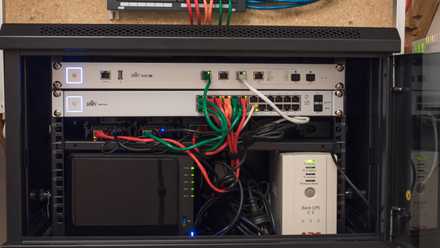
Wired infrastructure is inherently more secure, as it's enclosed in a physical building that you control access to. Once someone is in that building, they could connect to an Ethernet jack and try to connect, but other access control methods like whitelisting and MFA can prevent them from transmitting data. Wireless technology can be hacked into, hijacked, or sniffed from anywhere within the range of the wireless signal, or an attacker could piggyback on several networks to attack from blocks away.
Hacking a wired network requires physical access, which increases the chance of getting caught, as there are cameras, security staff, and other intrusion countermeasures in the buildings that an attacker would want to access. Any security system can be hacked with enough time, but there's a balance between security and usability, and convenience that has to be found.
5 best network monitoring tools for your small business
Your network monitoring needs change somewhat when you've got business related compliance to think of.
1 No password is being shared around
The best secret is one nobody knows
It takes additional configuration steps to make wireless technology properly secure. Even if you've set WPA2/3 encryption with a good passphrase, your security is only as good as the number of people who know that password and the number of devices connected to your network. If any of those is compromised, your security isn't very secure anymore. Other things you have to worry about when using wireless that you don't with a wired network include:
- Default credentials: Wi-Fi routers come with default password/login combos, and finding them unchanged is common. If that's the case, it's simple to find out the passcode, making it easy for attackers.
- Weak or outdated encryption: Older encryption standards such as WEP can be cracked in seconds, while WPA3 and other more modern protocols need to be properly implemented for them to work.
It's true enough that you don't need a password to plug in an Ethernet cable and get onto a wired network, but other security measures, like MAC address whitelisting, can ensure that only devices that are supposed to be connected are allowed to transmit data.

How to change a router password
Give your Wi-Fi password out to the wrong person? Change your router password in a few steps to take back control.
Wired technology is inherently more secure
The lack of wireless signals and the need for hands-on access to circumvent the security of wired networks make them more secure overall. Both are getting closer to parity in terms of security, but with slightly different attack surfaces that IT security teams need to be aware of when setting up the network. The need to broadcast an SSID and the range of wireless signals make them less secure, and that's an inherent part of how wireless operates. It's worth mentioning that wireless has convenience on its side, but it does need to be set up correctly to make it secure for all users.