
Xbox Mode is one of those things that Microsoft just randomly comes up with that's actually quite brilliant. Windows Phone, Metro UI, and the MSN Messenger come to mind as a few other fine examples of some brilliant engineering and timing. Xbox Mode is the result of Microsoft seeing SteamOS and Linux starting to shape up within the gaming handheld market. Proton from Valve is also helping Linux claw some more market share on desktop, but Windows is still king.
Microsoft doesn't plan on sitting around and doing nothing, which is why the company is trying to make Windows feel slightly less like an operating system and more like a console gaming environment with this specific mode. It's a great development for Windows-powered gaming handhelds, but it's also available for trying out on a desktop and laptop with Microsoft's OS installed.
Xbox Mode is Windows for gaming
It's like playing games on Windows, but better
Xbox Mode was originally rolled out as part of the partnership between Microsoft and Asus with the ROG Xbox Ally. It's what sets this gaming handheld apart from other Windows-powered devices in the same class. Microsoft has since rolled out Xbox Mode to more Windows 11 PCs, including many more than gaming handhelds. It's now possible to run the mode on desktops, laptops, and tablets. Developed as a controller-optimized full-screen experience, it should be easier to launch right into a game.
It's one of the issues traditional desktop operating systems have for gaming. When booting up a PC or other device, you're often greeted by that same taskbar, start menu, and other desktop-oriented design cues. It doesn't always translate so well to touch and gamepad inputs, which is what Xbox Mode is hoped to solve with Windows. The only drawback to this on a desktop is the very notion that it's designed and developed around those inputs. 99.9% of desktop gaming PCs have a mouse and keyboard.
Although Xbox Mode isn't a new version of Windows, nor is it some magical SteamOS replacement. What Microsoft is offering is a controller-friendly full-screen experience focused on gaming, utilizing the Xbox app and Game Bar. It's also not entirely new. Microsoft has tried this before with Games for Windows and, more recently, Full Screen Experience (FSE) before it was rebranded to Xbox Mode. All it does is run an experience on top of Windows, making it easier to navigate and launch games, much like you'd find on Xbox, PlayStation, Switch, and other consoles.
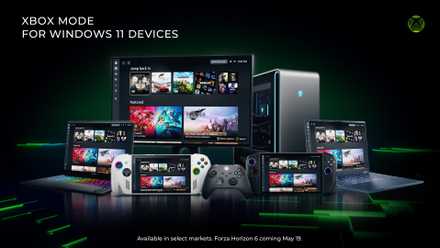
Microsoft rolls out Xbox Mode, bringing a console-like experience to any PC
After a lengthy preview period, Microsoft's Xbox Mode has landed on all Windows 11 PCs.
It's great for gaming handhelds
This is where Xbox Mode truly shines
The ROG Xbox Ally and other Windows gaming handhelds are fantastic for Xbox Mode. It's where this can really shine, thanks to their specific use cases and the need to boot straight into the action, or at least remove as many hurdles to pass to choose a title to enjoy. If starting up into Xbox Mode, Windows will even limit background processes to improve overall performance, which is great for devices with internal batteries. But it's just the right approach to take. Gaming handhelds command simple interfaces that stay out of the way. The only reason to boot up the handheld is to play games.
The same cannot be said for a desktop PC. Sure, the gaming handheld runs a full copy of Windows 11, the same OS as your desktop PC, and there are drivers, launchers, anti-cheat systems, storefronts, and more. But it's a simple gadget with a few buttons and a touchscreen. There's no mouse or keyboard, so good luck clicking close on an open window and not minimizing. Xbox Mode helps clear all this out so you actually use Windows less. There's method in the madness, which allows Windows to continue operating as a capable mobile gaming platform, but this is a prettier, more intuitive UI.
When configured to start up automatically, Xbox Mode can make the Windows gaming handheld feel like a complete experience. It's not like a bolted-on extension. This is how Windows on gaming handhelds is meant to feel. Limited background resources, huge UI elements, and a focus on one thing and one thing only — gaming.
Your desktop isn't a console
Neither is your laptop
Running Xbox Mode on a desktop and laptop PC provided me with the same thought, "We don't need this on PC." On consoles and even a mini PC running Batocera or Windows, I want to get to the game as soon as possible. That's simply not the case with a desktop or laptop PC. These devices are designed for different scenarios, and many of these don't include playing the latest titles. It's a completely different form factor and experience from gaming handhelds, where Xbox Mode is clearly targeted. It's almost acceptable to gaming handheld owners because the alternative is just short of awful. On PC, it's different.
It's a little like Windows 8 with live tiles. Great on tablet and phone, but a little rough with a mouse and keyboard. Desktop gamers like myself already have the ideal input for running the OS, consisting of a mouse and keyboard. We have larger displays and much more powerful hardware. My PC won't have any trouble running multiple apps as well as a demanding game. That's a testament to how capable hardware has become, but also how refined the OS landscape is. Linux and Windows are absolutely brilliant for gaming, and macOS isn't too far off either.
On PC, the game isn't the focus. Well, it is when you're actually playing, but all other times it's what's displayed on the monitor. This could be streaming, communications, running benchmarks, managing files, backing things up, browsing websites, or configuring network infrastructure. You name it, it's possible on PC ... as well as gaming. Game Mode is cool and a necessity for specific hardware, but PC gamers don't really need to bother. Windows can be optimized outside of running it, and if you're on Linux, you already have a great foundation.
3 things Microsoft's handheld needs to do in order to succeed
Microsoft is coming in late to the party.
Multi-display setups are a no-go
One clear problem with Xbox Mode is the fact that many of us have more than one panel connected to the PC. This makes it almost impossible to appreciate Xbox Mode as it was intended. Xbox Mode is a full-screen experience, which works best when there's one panel active, just like any other full-screen app. Streamers will require access to apps running alongside games. Those who are stuck at a specific point may require a browser window open with a wiki entry up. It just doesn't flow as well.
Score Gaming Gear Deals for Handhelds & Controllers
But if you do have a device that's targeted by Xbox Mode, such as a gaming handheld or tablet, it can become quite the companion for those long gaming sessions where you'd need frequent breaks and want to simply get back into it without Windows getting in the way. And for now, there's no way to boot into Xbox Mode on PC, so much of the benefits that come with using this feature on fully supported devices is almost removed from the equation altogether. But it really comes down to how you use your PC and what it's tasked to do.