
You might think you are a Docker pro, but chances are, you are only scratching the surface. After all, it's easy to get comfortable with the basics and known names, but trust me, there's a whole universe of useful containers waiting to be discovered. If you are ready to move beyond the standard image pull, you are in the right place.
I will go over the selection of underutilized yet incredibly powerful containers that are guaranteed to make your life easier and your workflow more efficient.

4 reasons why you should use Docker containers on your PC
There are many benefits of hosting your favorite apps inside Docker containers
7 Docmost
A robust Notion alternative
Docmost is an open-source collaborative wiki and documentation software. Docmost is available as a Docker container for now, and here’s why it’s a must-have for many. Docker offers a minimal interface where you can create a space and start adding pages. If you have used Notion before, you will find yourself right at home with Docmost.
As expected, Docmost supports the slash (/) command. You can use it to format your documents and even embed content from different services like Airtable, Loom, Figma, YouTube, Vimeo, and Typeform. The editor supports a wide array of content, including diagrams, tables, mathematical equations, and embedded media. Overall, Docmost, when combined with Docker, delivers a powerful and flexible solution for collaborative documentation.
6 Firefly III
Manage your finances like a pro
There is no shortage of finance apps out there. However, most of them run on a freemium model. If you are looking for a free and open-source tool to manage your expenses, go with Firefly III. It offers a robust dashboard where you can check your accounts, budgets and spending, expense breakdown by categories, revenue accounts, charts, and more.
Other features include subscriptions, piggy banks to plan your future purchases, detailed transactions with relevant details, detailed reports with charts, the ability to import and export data in various formats, and more. However, my favorite add-on is rules. It lets me set up rules to automatically categorize transactions and other aspects and make managing finances less time-consuming.
In essence, Firefly III is a private and flexible solution for personal finance management.
5 Immich
Google Photos, who?
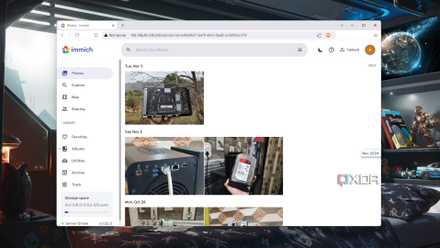
Immich is a relatively new tool, but it’s been quite effective for my media management. It’s a self-hosted photo and video backup solution (rivaling Google Photos) designed to give you complete control over your media. Immich offers dedicated mobile apps for uploading and browsing your media. Even the web interface is quite straightforward.
You can check your albums, tags, folders, utilities, and even archived memories from the sidebar, switch between light and dark themes, utilize the Map integration to check your memories on the globe and use the search bar to jump to relevant photos in no time. It delivers a privacy-focused solution for managing your personal media collection.
Here's how you can replace Google Photos with a self-hosted Immich server
Take full control of your privacy by storing your photos and videos in a self-hosted Immich server
4 Homarr
Manage all your services from a single place
While there are several self-hosted dashboards out there, Homarr gets my vote for several reasons. First of all, it’s highly customizable, and you can use drag-and-drop to arrange widgets on the dashboard. It seamlessly integrates with all the popular services to display their status or control them. It basically acts as a single point of entry for all your self-hosted services and eliminates the need to remember endless URLs or bookmarks.
Homarr received significant improvements with the v1.0 update. If you have skipped it before, I highly recommend giving it another chance. Homarr also supports custom icons and favicons and lets you personalize the look of your dashboard in no time.
3 Grafana
Monitor your smart home like a pro
Grafana is a flexible tool for visualizing and monitoring data. Grafana supports a wide range of data sources, including Prometheus, InfluxDB, Elasticsearch, and many others. It offers a rich set of visualization options. You can use graphs, tables, charts, and gauges as per your preferences.
You can create an interactive dashboard, set up alerts for critical events, and even use a wide range of data source plugins to connect to virtually any data source. You can always use Home Assistant for better visualization, but you can’t completely rule out Grafana’s capabilities.
2 n8n
Automate your workflow
n8n is another capable Docker container that often flies under the radar. It’s a powerful automation tool that connects various applications and services without writing a single line of code. It offers a visual editor to design and build workflows by dragging and dropping nodes.
n8n supports an extensive node library where you can connect to various applications and services, including APIs, databases, and cloud platforms. You can schedule workflows to run automatically, create triggers based on events, such as new emails, file uploads, or database changes, and even manipulate data within workflows using built-in functions and expressions.
A blogger could use it to promote new blog posts automatically. In another example, a small business could use this to keep their social media accounts active. The possibilities are endless.
1 Nextcloud
Ditch Microsoft 365 in no time
Speaking of the must-have Docker containers, how can I leave Nextcloud out of the list? Self-hosting Nextcloud via Docker gives you complete control over your data. Unlike Google Drive or OneDrive, you don’t need to rely on third-party providers to store your essential data.
Nextcloud offers file storage and sharing, calendar and contacts, photo management (although it needs to be improved), notes, task management, and even project management (via Deck). For more add-ons, you can always head to the App Store to extend Nextcloud’s functionality. There is also a customizable homepage where you can place relevant widgets for easy access.
Level up your Docker game
The Docker ecosystem is constantly evolving. If you are using the same set of containers on your desktop, it’s time to reevaluate them. What are you waiting for? Experiment with the above-mentioned containers, put them into practice, and see if they align with your current projects or pain points. You can also check our dedicated guide if you are looking for some useful Docker containers for your home lab.