
For the longest time, I didn't care if a motherboard had one Ethernet port or two. As long as I could plug in a cable and get a stable internet connection, I had nothing to worry about. A second Ethernet port on mid-range and higher-end boards always felt like a marketing checkbox, allowing manufacturers to charge higher prices. In fact, I didn't have any use for the second LAN port for the first three years after I built my PC. That changed when my main 2.5GbE port stopped working reliably.
From random disconnects that kicked me out of competitive games to momentary drops that stalled large file downloads or froze Twitch streams, it became obvious that the problem wasn't my internet connection itself. The issue was local, and once I realized that, the second Gigabit LAN port stopped feeling like a pointless extra. It made me rethink what that second port is actually useful for, even if it isn't as fast as the primary one in terms of raw throughput.

6 devices you can plug into your Ethernet port
It might not occur to you, but you can connect many devices to your PC using its Ethernet port
The second LAN port is useful as a backup
Think of it as a fallback when your primary LAN controller becomes unstable
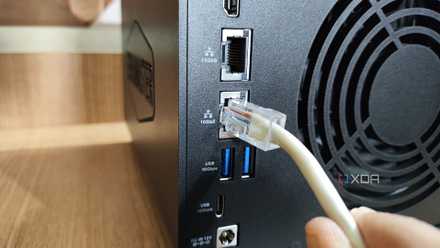
When my primary 2.5GbE port started acting up, I was quick to blame my ISP, the router, and even the Cat7 cable. That's how I usually diagnose network issues, and most of the time it's a reasonable place to start. But nothing made the problem go away until I switched to the slower Gigabit Ethernet port right next to it on my X570 board. That's when I realized the culprit was the LAN controller itself. Without a second port, I’d have had to rely on Wi-Fi, which isn’t great for low ping while gaming, or order a USB-to-Ethernet adapter from Amazon.
That’s the kind of situation where a second Ethernet port can come in clutch. You can immediately fall back without changing how you're connected to the internet or adding more hardware to the mix. I didn't need to rework my network, spend extra money, or wait for parts to arrive. I just moved the cable and kept going. Sure, it's a slower port, but when my ISP caps me at 1Gbps, that difference is irrelevant in practice. Likewise, if you have multiple ISPs or even just a secondary router, that extra port gives you an easy way to stay online when something upstream goes wrong.
UGREEN Cat 7 Ethernet Cable
- Length(s)
- 3, 6, 10, 15, 30, 50ft
The UGREEN Cat 7 Ethernet cable is a high-performance network cable that supports speeds up to 10 Gbps and bandwidth up to 600 MHz. It's compatible with various gaming devices, from PCs to consoles and even Smart TVs. The cable has a durable PVC jacket and gold-plated RJ-45 connectors to ensure reliable and stable data transmission.
Traffic separation and direct connections are where it really matters
Separating local and internet traffic can change how your network feels day to day
When everything in your setup shares the same network connection, it's easy for different kinds of traffic to step on each other. If you've ever copied large files from a NAS while gaming or streaming, you've probably noticed how background transfers introduce latency spikes or inconsistent performance. That's why it's worth routing your local traffic through a separate Ethernet port. This way, you can make sure your internet connection isn't sharing the same network path with local transfers that don't need it.
Another practical use case for a second Ethernet port is connecting two devices directly, which many people overlook. Instead of routing traffic through a switch or router, you can connect them directly and keep that traffic completely isolated. This is especially useful if you have a NAS, a secondary PC, or even a small home server. A direct connection means fewer troubleshooting headaches because when something goes wrong, you know exactly which link is responsible.
Most people won't ever need a second LAN port
But just because it's optional doesn't make it unnecessary
Of course, if you're just an average PC user browsing the web, playing games, or doing basic creative work, a second LAN port on your motherboard won't make any difference. After all, not everyone has a NAS drive or a multi-gig switch to actually take advantage of that port. One stable wired connection is enough, and as long as nothing goes wrong, you'll probably never think about what your network is doing behind the scenes. And if something goes wrong, you can always fall back to Wi-Fi or grab a USB-to-Ethernet adapter and move on.
But that's exactly why having the option built in still matters. Adapters are a workaround, and using Wi-Fi isn't a long-term solution. And let's not forget having to wait for your adapter to arrive. Manufacturers include features like this to cover more advanced use cases, even if most people won't touch them. When you're running a NAS, a home server, or a multi-gig switch, that second Ethernet port suddenly stops feeling optional. It's all about the flexibility to handle future upgrades or unexpected issues without having to rework your setup.
Flexibility matters more, and a second LAN port gives you exactly that
I totally get why most people don't even think about the second Ethernet port. When it's slower than your primary one, it's easy to dismiss it as pointless or redundant. I used to think that too, until I had no option but to use the second port to stay connected to the internet. A second LAN port won't give the fastest speeds, but it's still relevant as an option when something breaks, your setup changes, or you need more control over how your network behaves. Most people won't ever need it, but for those who do, it's invaluable.
4 reasons multi-gig Ethernet doesn't matter for most people
Multi-gig ethernet is a waste of time and money for most users, and shouldn't be a priority to implement in your home